

Orifice Flow
Kaup Shenoy Associates Utilities iPhoneiPadiPod touch
Orifice Flow is a paid Utilities app for iPhone and iPad by Kaup Shenoy Associates. Rated 4.0/5 from 1 ratings. Requires iOS 14.3. Updated April 29, 2025.
- Rating
- 4.0
- 1 ratings
- Price
- 3.99 USD
- on the App Store
- Size
- 1 MB
- Age 4+
- Updated
- Apr 29
- 2025 · v2.2
Screenshots
About Orifice Flow
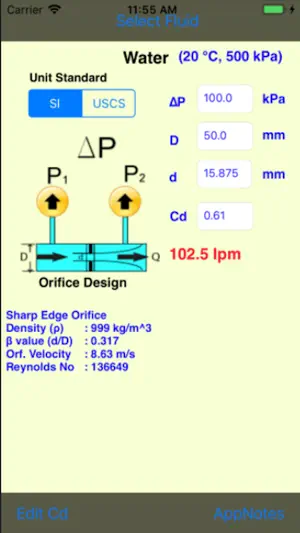
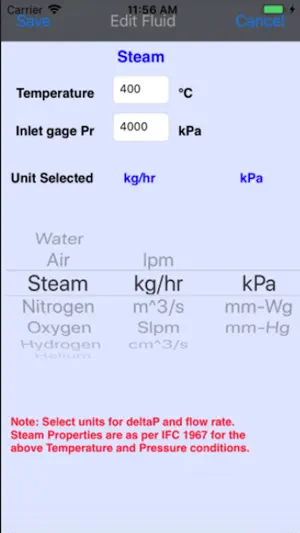
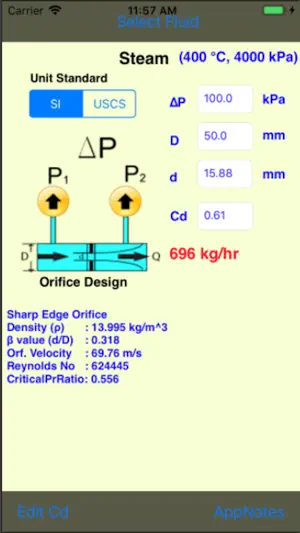
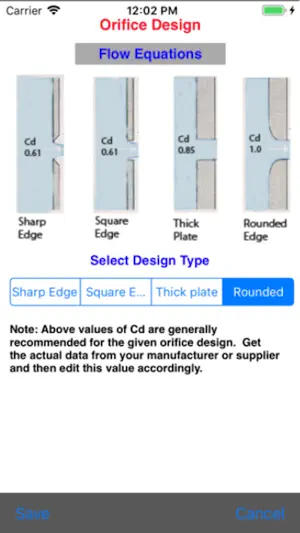
Measurement of fluid flow in pipes and conduits using orifice plates are very common in industrial applications. This app quickly computes the flow rates for liquid and gases based on standard parameters as per the model shown. Users can pick any fluid from a list of fifteen most common fluids used in industrial applications. Therefore, this app can be a very helpful tool for practicing engineers and designers in design and analysis of flows in different applications. A case study on CO2 flow rate is shown in the screen shot. The result is consistent with other methods used by the industry in computation and difference is less than 0.1%. Fluids that are not in the list, users can create a custom fluid with property data and compute the flow rate using the model provided in this app. Custom fluid data can be saved and reloaded every time when custom fluid is selected. Fluids: Air, Steam, Water, Nitrogen, Oxygen, Hydrogen, Helium, CO2, Methane, Ethane, Chlorine, Ammonia, Argon, Hydraulic oil, HFC(R410A), Custom (user's choice). Orifice Type: App gives four different standard orifice design with recommended discharge coefficients as shown in the following screen shot. It also provides the details of the model used in the computation of flow rates for liquid and gases. This model is valid even for nozzles, venturi-flow meters for which the discharge coefficient (Cd) is unity. Measuring Parameters: Fluid inlet temperature and pressure, orifice geometry, pressure differential using standard pressure taps (ISO 5167), are the standard parameters required in the computation. Based on the orifice geometry, recommended discharge coefficient Cd is used. However, users can edit this using manufacturer’s data for more accurate results. App notes provides brief description of different orifice parameters for quick reference. Unit of Measurement: Users can choose different unit of measurement for both flow as well as pressure drop under given unit standard (SI or USCS). This can be conveniently selected while choosing the fluid from the picker list. App notes provides additional guideline with a link for complete documentation on implementation and validation of math-models used with industry examples.
What’s new
Version 2.2 · Updated April 29, 2025
Updated for iOS 18 devices.
App privacy
The developer, Kaup Shenoy Associates, reported these privacy practices to Apple.
Data Not Collected
The developer does not collect any data from this app.
Alternatives to Orifice Flow
Looking for apps like Orifice Flow? Here are 6 similar apps on the App Store. The highest rated is HVAC Pipe Sizer Plus (3.0/5), and 1 of the 6 are free to download.
-
 HVAC Pipe Sizer - Steam
-
 Heat Exchanger Area
-
 HVAC Pipe Sizer Plus
3.0
HVAC Pipe Sizer Plus
3.0
-
 OrificeQ Pro
-
 Flow Rate Conversion
3.0
Flow Rate Conversion
3.0
-
 Pressure Vessel Thickness Pro
1.0
Pressure Vessel Thickness Pro
1.0
| App | Rating | Price | Last updated | Compare |
|---|---|---|---|---|
| Orifice Flow | 4.0 / 5 (1 rating) | 3.99 USD | April 29, 2025 | |
| HVAC Pipe Sizer - Steam | – | 6.99 USD | Jan 21, 2026 | Compare |
| Heat Exchanger Area | – | 1.99 USD | Jul 26, 2024 | Compare |
| HVAC Pipe Sizer Plus | 3.0 / 5 (1) | 13.99 USD | Jan 26, 2026 | Compare |
| OrificeQ Pro | – | Free | Jun 11, 2026 | Compare |
| Flow Rate Conversion | 3.0 / 5 (1) | 2.99 USD | Feb 4, 2026 | Compare |
| Pressure Vessel Thickness Pro | 1.0 / 5 (1) | 3.99 USD | Aug 20, 2026 | Compare |
Compare Orifice Flow with the top alternatives: ratings, updates, ASO score and keyword gaps →