

Make It Big
An Trinh Utilities iPhoneiPadiPod touch
Make It Big is a free Utilities app for iPhone and iPad by An Trinh. Rated 4.8/5 from 6,577 ratings. Requires iOS 17.0. Updated October 25, 2026.
- Rating
- 4.8
- 6.5K ratings
- Price
- Free
- on the App Store
- Size
- 4 MB
- Age 4+
- Updated
- Oct 25
- 2026 · v15
Screenshots


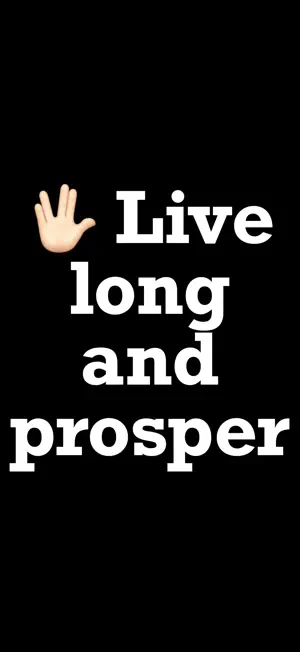
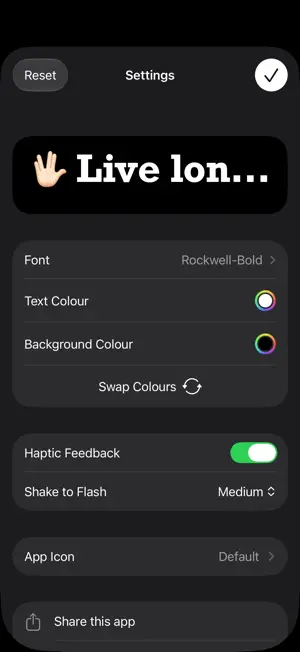
About Make It Big
Say it without speaking. Turn your iPhone or iPad into a full-screen message with Make It Big. Type what you want to say, then tap to display it in large text that automatically fits your screen. Show a message across a room, communicate in a noisy place, or hold up a name at an airport. Make It Big is also a simple way for Deaf, hard-of-hearing and nonverbal people, and anyone who cannot or prefers not to speak, to share a written message. No ads. No tracking. No account needed. Works offline. TYPE, TAP, SHOW Tap to edit your message, then tap again to hide the keyboard and show it full screen. Short messages make the biggest impression. FOR EVERYDAY MOMENTS Order in a busy café, share a note at a concert, show a pickup sign or communicate somewhere quiet without saying a word. WIDGETS, SIRI AND SHORTCUTS Keep your latest message handy with Home Screen and Lock Screen widgets. Use Siri or the Shortcuts app to display a message, or open Make It Big from Control Center. PORTRAIT OR LANDSCAPE Hold your device whichever way works best. Your message automatically resizes when you rotate the screen. YOUR MESSAGE, YOUR STYLE Choose a font and set your text and background colours. Swap the colours whenever you like, and turn haptic feedback on or off. SHOW IT AGAIN Find previous messages in Recents so you can display them again without retyping. Share individual messages as text, or share all your saved messages at once. OPTIONAL FLASH MODE Shake your device to flash between your text and background colours. Adjust the flash speed or turn off shake to flash in Settings. WARNING: Flashing screens may trigger seizures in people with photosensitive epilepsy. Use flash mode responsibly.
Ratings & reviews
4.8
6.5K ratings
What’s new
Version 15 · Updated October 25, 2026
Find your messages more easily: • Search your recent messages to quickly find something you want to show again. • See how many messages are in Recents, or match your search. We’ve also made a few improvements and fixes: • Added a glass background and an easier-to-see clear button to the message field on iOS 26 and later. The button now highlights when you tap it. • Refined Settings with clearer icons and an animation when swapping your text and background colours. • Fixed an issue where the button to close Settings could be hard to see with certain colour and light or dark mode combinations. • If your chosen font is no longer available, Make It Big now uses the default font instead of closing unexpectedly. • Fixed an issue with changing the app icon on iPhone and iPad. • The option to email the developer now only appears when Mail is set up on your device. Missed our last update? We added support for Duo devices, more widget sizes, and new ways to open Make It Big from Control Center or show a message using Siri and Shortcuts. You can also share all your recent messages at once.
App privacy
The developer, An Trinh, reported these privacy practices to Apple.
Data Not Collected
The developer does not collect any data from this app.
Alternatives to Make It Big
Looking for apps like Make It Big? Here are 6 similar apps on the App Store. The highest rated is LED Banner Pro: Marquee maker (4.8/5), and all 6 are free to download.
-
 LED Scroller and Text Banner
4.6
-
 LED Marquee - Scrolling Text
4.5
-
 GetPrivacy: VPN & Protection
4.7
-
 LED Banner Pro: Marquee maker
4.8
-
 Tab - The simple bill splitter
4.2
-
 Countdown
4.8
| App | Rating | Price | Last updated | Compare |
|---|---|---|---|---|
| Make It Big | 4.8 / 5 (6,577 ratings) | Free | October 25, 2026 | |
| LED Scroller and Text Banner | 4.6 / 5 (4,528) | Free | Jun 8, 2026 | Compare |
| LED Marquee - Scrolling Text | 4.5 / 5 (1,339) | Free | Nov 1, 2026 | Compare |
| GetPrivacy: VPN & Protection | 4.7 / 5 (963) | Free | Apr 9, 2025 | Compare |
| LED Banner Pro: Marquee maker | 4.8 / 5 (6,059) | Free | Sep 15, 2026 | Compare |
| Tab - The simple bill splitter | 4.2 / 5 (1,159) | Free | Jun 10, 2026 | Compare |
| Countdown | 4.8 / 5 (190,521) | Free | Oct 29, 2026 | Compare |
Compare Make It Big with the top alternatives: ratings, updates, ASO score and keyword gaps →