

Global Position
Nik Psaragathos Navigation iPhoneiPadiPod touch
Global Position is a free Navigation app for iPhone and iPad by Nik Psaragathos. Rated 4.7/5 from 3 ratings. Requires iOS 17.6. Updated October 28, 2026.
- Rating
- 4.7
- 3 ratings
- Price
- Free
- on the App Store
- Size
- 12 MB
- Age 4+
- Updated
- Oct 28
- 2026 · v4.6
Screenshots


About Global Position
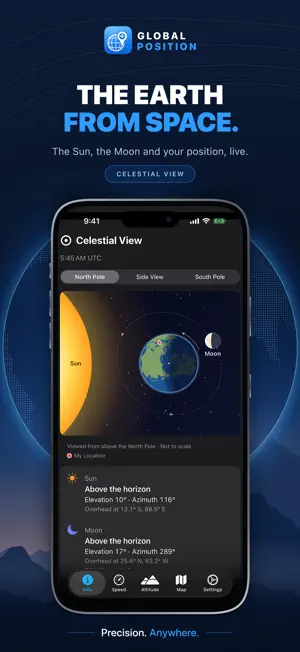
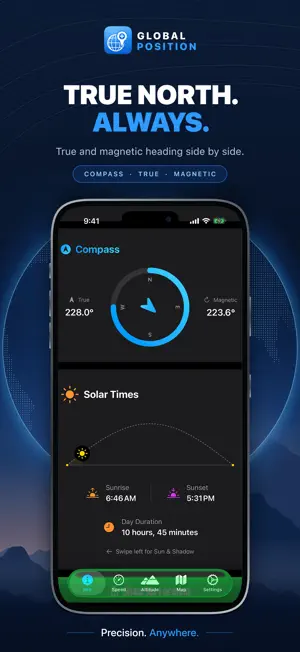
Turn your iPhone into a precision navigation instrument: every major coordinate and grid format, a compass, altimeter, speedometer, HUD mode, a live world daylight map and the new Celestial View. Coordinates, grid references and astronomy are calculated on your device, so they keep working without a mobile-data signal. COORDINATES IN EVERY FORMAT - Latitude and longitude in decimal degrees, DD-MM, DMS or radians - Universal Transverse Mercator (UTM) - Military Grid Reference System (MGRS) - Universal Polar Stereographic (UPS), shown automatically near the poles where UTM and MGRS are undefined Get a complete MGRS reference even on a ridge with no mobile signal. NAVIGATION TOOLS - Compass with true and magnetic headings side by side - Altimeter with a four-minute trend graph and session maximum - Speedometer in m/s, km/h, ft/s, mph or knots - HUD mode: rotate to landscape for a mirrored windscreen display that keeps the screen awake - G-force gauge with gravity excluded, plus maximum G-force and speed records - Flashlight for reading a map after dark SUN, MOON AND SKY Swipe across the astronomy card: - Solar Times: sunrise, sunset, day length and a daylight arc - World Time Zone Map: live daylight, civil, nautical and astronomical twilight and night, the points where the Sun and Moon are overhead, and the local time in 15 world cities - Celestial View (new): the Earth from space, lit by the Sun, with the Moon on its orbit and your position marked. Look down on either pole, or from the side to see the Earth's 23.4° tilt. Read the Sun's and Moon's elevation and bearing from where you stand. - Moon Status: phase, next full and new moon, distance and days into the lunar cycle WIDGETS (NEW) Position, Sun, Moon and Celestial View widgets for the Home Screen, with Position, Sun and Moon on the Lock Screen too: your coordinates and grid reference, the next sunrise or sunset with a countdown, today's moon phase, or the Earth, Sun and Moon from the viewpoint you choose. SIRI AND SHORTCUTS (NEW) Ask "Where am I in Global Position?" or "When is sunset in Global Position?". Hear your coordinates, altitude, the next sunrise or sunset, the moon phase or where the Sun and Moon are, copy your coordinates or share your location. Every action also works in the Shortcuts app. KNOW HOW GOOD YOUR FIX IS See the measured accuracy of your fix in metres, colour-coded Good, Fair or Poor, so you know whether to trust it. Choose how hard the GPS works: High, Medium or Low to save battery. SHARE YOUR POSITION One tap sends an Apple Maps link that opens on any phone or computer, with your address, coordinates, grid reference, altitude, accuracy and the local time of the fix. LOCATION AND MAP - Automatic address lookup when online - Standard, satellite and hybrid maps - Follow your location, or your location and heading MAKE IT YOURS Light, dark or system appearance; metres or feet; your choice of speed unit. AVAILABLE IN 24 LANGUAGES Arabic, Chinese (Simplified and Traditional), Czech, Dutch, English, French, German, Greek, Hebrew, Indonesian, Italian, Japanese, Korean, Norwegian, Polish, Portuguese, Russian, Spanish, Swedish, Thai, Turkish, Ukrainian and Vietnamese. Grid references stay in standard notation in every language, so your screen matches your paper map and everyone else's radio call. BUILT FOR THE FIELD Made for hikers, sailors, pilots, surveyors, field researchers, search-and-rescue teams, off-road drivers and travellers: anyone for whom knowing exactly where they are is not optional. On iPad, GPS positioning requires a Wi-Fi + Cellular model. Download Global Position and always know your position.
What’s new
Version 4.6 · Updated October 28, 2026
NEW: SUN & SHADOW A new page in the Info tab shows where the Sun is in the sky and how shadows move through the day. • See the real shadow of a person, a tree or a building on a satellite map • Set the height of the object, then tap the map to move it • Tap Play the day and watch the shadow move from sunrise to sunset • Choose any date and any place, or try one of the suggested places • Read the Sun’s elevation and azimuth, plus the shadow’s length and direction • Drag through the day on a time slider coloured for daylight, golden hour and twilight, with sunrise, solar noon and sunset marked YOUR HEADING ON THE MAP • Your location now shows a blue beam pointing the way you are facing, just like in Apple Maps Available in all 24 languages.
App privacy
The developer, Nik Psaragathos, reported these privacy practices to Apple.
Data Not Collected
The developer does not collect any data from this app.
Alternatives to Global Position
Looking for apps like Global Position? Here are 6 similar apps on the App Store. The highest rated is Save Locations with Photos (5.0/5), and 4 of the 6 are free to download.
-
 Save Locations with Photos
5.0
Save Locations with Photos
5.0
-
 Offline Maps & GPS Navigation
4.6
Offline Maps & GPS Navigation
4.6
-
 Far From Home
-
 GPSLocator: Run, Hike & Sail
2.9
GPSLocator: Run, Hike & Sail
2.9
-
 Currency++
5.0
Currency++
5.0
-
 Curio: Notice What's Nearby
5.0
Curio: Notice What's Nearby
5.0
| App | Rating | Price | Last updated | Compare |
|---|---|---|---|---|
| Global Position | 4.7 / 5 (3 ratings) | Free | October 28, 2026 | |
| Save Locations with Photos | 5.0 / 5 (1) | Free | Aug 21, 2026 | Compare |
| Offline Maps & GPS Navigation | 4.6 / 5 (7) | Free | Oct 28, 2026 | Compare |
| Far From Home | – | 0.99 USD | Sep 29, 2026 | Compare |
| GPSLocator: Run, Hike & Sail | 2.9 / 5 (9) | Free | Oct 12, 2026 | Compare |
| Currency++ | 5.0 / 5 (2) | 1.99 USD | Oct 26, 2026 | Compare |
| Curio: Notice What's Nearby | 5.0 / 5 (2) | Free | Jul 22, 2026 | Compare |
Compare Global Position with the top alternatives: ratings, updates, ASO score and keyword gaps →