

Cortona3D Viewer
ParallelGraphics Productivity iPhoneiPadiPod touch
Cortona3D Viewer is a paid Productivity app for iPhone and iPad by ParallelGraphics. Rated 3.0/5 from 4 ratings. Requires iOS 15.0. Updated August 31, 2026.
- Rating
- 3.0
- 4 ratings
- Price
- 2.99 USD
- on the App Store
- Size
- 96 MB
- Age 4+
- Updated
- Aug 31
- 2026 · v5.0
Screenshots

About Cortona3D Viewer
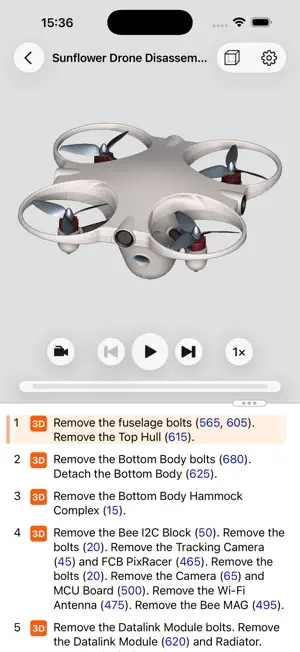
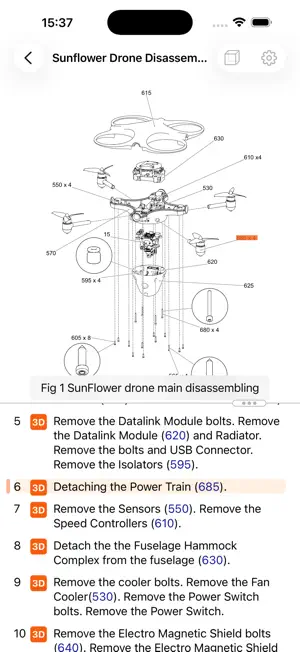
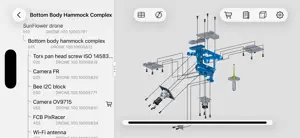
Cortona3D Viewer is your tool for interactive 3D and 2D product catalogs, work instructions, maintenance guides, and manuals created using Cortona3D RapidAuthor. With this tool, you can immerse yourself in 3D procedures and VRML scenes through augmented reality on your iPhone. Many equipment manufacturers are now enhancing their technical documentation. The Cortona3D Viewer supports AR, 3D interaction, full-text search, and interactive 2D elements, making it compatible with both legacy 2D and interactive 3D content derived from CAD. Interactive 3D streamlines complex maintenance and assembly communication, aids part identification, and facilitates mechanical skill training. It can also serve as a sales tool for product feature demos. Cortona3D Viewer on iOS complements RapidAuthor tools. RapidAuthor generates comprehensive technical documents with text, 2D, and 3D graphics from CAD and bill of materials data. Even if your company doesn't use Cortona3D RapidAuthor, you can still install Cortona3D Viewer to access sample content featuring 3D, legacy 2D graphics, and AR elements. Features: — AR support for procedures and VRML scenes — Multi-touch gestures for navigation — Exploded views and full bill of materials hierarchy — Part-specific additional information on touch — Various selection modes for parts — Part search, hide/show — Order parts using the shopping cart — Detailed Parts List with Part Number, Nomenclature, etc. — Links from IPC and procedures to other documents — Comprehensive viewing of 2D images in SGM and SVG formats — Inspect sheet transition animations in parts catalogs — Playback or scrub through animated install/remove sequences — Step-by-step instructions as text overlay — Dynamic cross-section and distance measuring — Navigation cube — Universal app for iPhone and iPad — Content upload and sharing via iCloud — Examples of ESA astronaut training content.
What’s new
Version 5.0 · Updated August 31, 2026
— Added support for Work Instructions made with DITA WI specification component. — Addresses an issue where inlined drawings may not appear in procedure text on iOS versions prior to 16.4. — Addresses an issue where a .cortona3d file goes missing when opening a publication from the Demo Content. — Fixed a screen overflow issue for the Caution/Warning view on iPhones in landscape orientation. — Fixed a possible crash when switching from an IPC to another publication within a book. — Fixed a missing sidebar button in the book navigation bar on iOS 15.
App privacy
The developer, ParallelGraphics, reported these privacy practices to Apple.
Data Not Collected
The developer does not collect any data from this app.
Alternatives to Cortona3D Viewer
Looking for apps like Cortona3D Viewer? Here are 6 similar apps on the App Store. The highest rated is Sphere - XR Solution (5.0/5), and 3 of the 6 are free to download.
-
 Earmarked: Audio Bookmarks
-
 Thermal Engineering Calc
4.7
Thermal Engineering Calc
4.7
-
 Circuit Laboratory
3.0
Circuit Laboratory
3.0
-
 Sphere - XR Solution
5.0
Sphere - XR Solution
5.0
-
 Manifest for iPad
5.0
Manifest for iPad
5.0
-
 Menlo AI
4.5
Menlo AI
4.5
| App | Rating | Price | Last updated | Compare |
|---|---|---|---|---|
| Cortona3D Viewer | 3.0 / 5 (4 ratings) | 2.99 USD | August 31, 2026 | |
| Earmarked: Audio Bookmarks | – | 6.99 USD | Sep 19, 2026 | Compare |
| Thermal Engineering Calc | 4.7 / 5 (6) | 2.99 USD | Mar 12, 2025 | Compare |
| Circuit Laboratory | 3.0 / 5 (2) | 5.99 USD | Jun 23, 2026 | Compare |
| Sphere - XR Solution | 5.0 / 5 (4) | Free | Nov 4, 2025 | Compare |
| Manifest for iPad | 5.0 / 5 (12) | Free | Aug 14, 2026 | Compare |
| Menlo AI | 4.5 / 5 (8) | Free | Feb 2, 2026 | Compare |
Compare Cortona3D Viewer with the top alternatives: ratings, updates, ASO score and keyword gaps →