

Smart Banking
UniCredit Bank Czech Republic and Slovakia, a.s. Finance iPhoneiPadiPod touch
Smart Banking is a free Finance app for iPhone and iPad by UniCredit Bank Czech Republic and Slovakia, a.s. Rated 4.6/5 from 421 ratings. Requires iOS 15.0.
- Rating
- 4.6
- 421 ratings
- Price
- Free
- on the App Store
- Size
- 708 MB
- Age 4+
- Updated
- Aug 6
- 2026 · v26.4.51
Screenshots

About Smart Banking
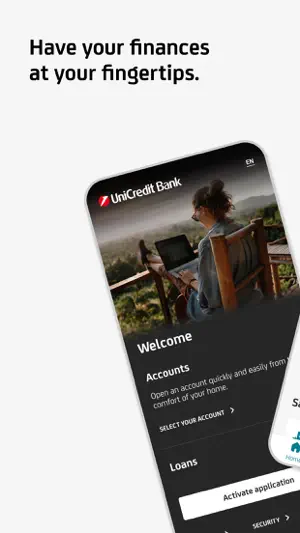
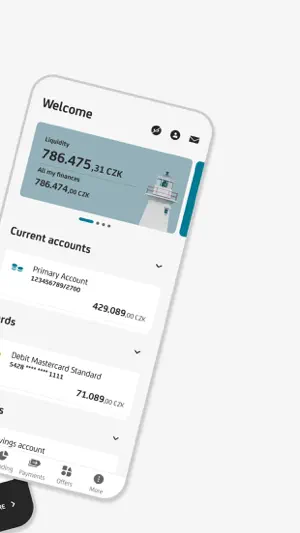
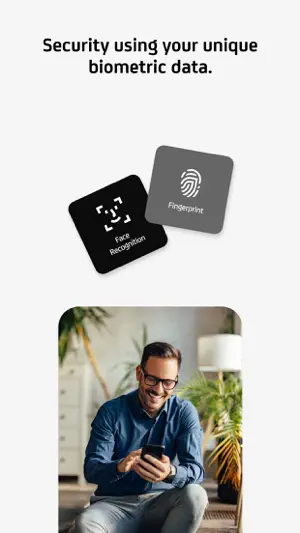
With Smart Banking you always have your bank at your fingertips. The application is user-friendly and most of all secure. It enables you to enter payments, create and edit standing orders, pay a credit card, or activate a debit card. Access to the application as well as payment signatures are protected by your PIN code or biometric data (Touch ID / Face ID). Smart Banking also includes Smart Key, which you can use to authorize payments and other orders entered in Online Banking, both online and offline. In online mode using push notifications and in offline mode by scanning QR codes. You can also easily change your credentials. In case you forget your credentials, you can reset them using a photo of your ID and a selfie video. The application itself will guide you through the reset. But the application can do many more things! • Learn about what’s going on in your account after you turn on Push Notifications. • Have you lost a credit or debit card? You can simply temporarily block and unblock the card for free in the app. • You can adjust the daily limit for credit and debit card according to your needs. • Add credit to your mobile phone with a few clicks. • Check your account balance even without signing into the app with the Widget • You can also make a payment by scanning a QR code (QR payment). • In Online Banking you can use the Payment templates and stored Beneficiaries in the Smart Banking application. • Account statements, statements for credit cards and other documents can be found in Documents. • Get an instant overview of currency rates. • Are you searching for an ATM or UniCredit Bank branch? You can quickly find them in the application. How to activate the app? We have prepared a simple and unified activation process for you. Simply download the application and activate the application by using your Username and PIN. If you do not have this data, but you are a Client of UniCredit Bank, you can obtain it directly in the application.
Ratings & reviews
4.6
421 ratings
What’s new
Version 26.4.51 · Updated August 6, 2026
What have we prepared for you in the new version? • Instant payments with future date • We have made a series of improvements
App privacy
The developer, UniCredit Bank Czech Republic and Slovakia, a.s., reported these privacy practices to Apple.
Data Linked to You
The following data, which may be collected and linked to your identity, may be used for the following purposes:
- Purchases: Purchase History
- Financial Info: Payment Info, Credit Info, Other Financial Info
- Contact Info: Physical Address, Email Address, Name, Phone Number
- Identifiers: User ID, Device ID
Used for: App Functionality
Data Not Linked to You
The following data, which may be collected but is not linked to your identity, may be used for the following purposes:
- Usage Data: Product Interaction
- Diagnostics: Crash Data, Performance Data, Other Diagnostic Data
- Location: Precise Location
Used for: Analytics, App Functionality
Alternatives to Smart Banking
Looking for apps like Smart Banking? Here are 6 similar apps on the App Store. The highest rated is MONETA Smart Banka (4.8/5), and all 6 are free to download.
-
 MONETA Smart Banka
4.8
MONETA Smart Banka
4.8
-
 KB Mobilní banka
4.0
KB Mobilní banka
4.0
-
 Fio Smartbanking CZ
4.1
Fio Smartbanking CZ
4.1
-
 ČSOB Smart
4.8
ČSOB Smart
4.8
-
 ČSOB Smart klíč
4.3
ČSOB Smart klíč
4.3
-
 mBank CZ
4.4
mBank CZ
4.4
| App | Rating | Price | Last updated | Compare |
|---|---|---|---|---|
| Smart Banking | 4.6 / 5 (421 ratings) | Free | August 6, 2026 | |
| MONETA Smart Banka | 4.8 / 5 (493) | Free | Oct 6, 2026 | Compare |
| KB Mobilní banka | 4.0 / 5 (42) | Free | Aug 17, 2026 | Compare |
| Fio Smartbanking CZ | 4.1 / 5 (42) | Free | Oct 8, 2026 | Compare |
| ČSOB Smart | 4.8 / 5 (751) | Free | Sep 29, 2026 | Compare |
| ČSOB Smart klíč | 4.3 / 5 (32) | Free | Aug 18, 2026 | Compare |
| mBank CZ | 4.4 / 5 (252) | Free | Sep 21, 2026 | Compare |
Compare Smart Banking with the top alternatives: ratings, updates, ASO score and keyword gaps →