

objManager
Gianluca Natalini Productivity iPhoneiPadiPod touch
objManager is a paid Productivity app for iPhone and iPad by Gianluca Natalini. Requires iOS 16.6. Updated May 5, 2026.
- Price
- 0.99 USD
- on the App Store
- Size
- 3 MB
- Age 4+
- Updated
- May 5
- 2026 · v3.3
Screenshots


About objManager
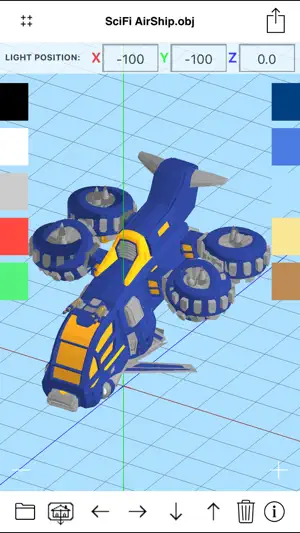
"objManager" is a Wavefront .OBJ file viewer (3D models with .obj + .mtl file extension). With "objManager" you will have the ability to: 1) save your 3D models on your mobile device 2) display the 3D models in any times and under any working condition (no Internet connection is required) 3) create images of your 3D model using the HD rendering procedure (with anti-aliasing and image enhancement filters) 4) choose the background color 5) move the light where You want in the 3D world The software does not need an internet connections: each 3D model is stored in your mobile device (using the technology "iTunes File Sharing" or "Open In") and can be read and visualized by objManager. objManager works like the integrated image viewer of the device, you can then: - ZOOM IN / ZOOM OUT the 3D model by dragging two fingers on the screen or using the ZOOM controls - Rotate the 3D model (ROTATE TOOL) by dragging a finger across the screen - Move the 3D model (PAN TOOL) using the PAN controls - Load the 3D model (from the obj files archive of objManager; 3D models are displayed in alphabetical order into the "obj Archive" of "objManager") - Save an infinite number of 3D models into the "obj Archive" of "objManager" (until the physical memory of the device is ended) - Share 3D models ( .obj files ) with File, Google Drive, DROPBOX, iFolders Safe, etc... or from iCloud Drive or other installed apps (cloud sharing: OUT) - Import 3D models from the web links, email attachments, File, Google Drive, DROPBOX, iFolders Safe, iCloud Drive or other installed apps (cloud sharing: IN) Compatibility with: 1) Maya 3D 2) Blender 3) 3D Studio 4) Finger3D 5) FingerCAD 6) Unity 7) 3D modeling software with export to .obj feature (or .obj + .mtl) If "objManager" is not enough for your aim, try the complete 3D modeler: Finger3D. "objManager" can also be used to view the .obj + .mtl models created with Finger3D in full screen (with orientation: Portrait).
What’s new
Version 3.3 · Updated May 5, 2026
* Minor bugs fixed
App privacy
The developer, Gianluca Natalini, reported these privacy practices to Apple.
Data Not Collected
The developer does not collect any data from this app.
Alternatives to objManager
Looking for apps like objManager? Here are 6 similar apps on the App Store. The highest rated is TransOnGo (5.0/5), and 3 of the 6 are free to download.
-
 Congressa
-
 3Dskope
3.3
3Dskope
3.3
-
 Personal Inventory - mythingss
-
 TransOnGo
5.0
TransOnGo
5.0
-
 RF Haversine Lite - Radio Link
5.0
RF Haversine Lite - Radio Link
5.0
-
 Mine Ops
5.0
Mine Ops
5.0
| App | Rating | Price | Last updated | Compare |
|---|---|---|---|---|
| objManager | – | 0.99 USD | May 5, 2026 | |
| Congressa | – | Free | Oct 11, 2026 | Compare |
| 3Dskope | 3.3 / 5 (3) | 3.99 USD | Oct 24, 2025 | Compare |
| Personal Inventory - mythingss | – | 4.99 USD | Aug 24, 2026 | Compare |
| TransOnGo | 5.0 / 5 (1) | Free | Mar 25, 2024 | Compare |
| RF Haversine Lite - Radio Link | 5.0 / 5 (8) | 1.99 USD | Jan 12, 2024 | Compare |
| Mine Ops | 5.0 / 5 (2) | Free | Oct 3, 2024 | Compare |
Compare objManager with the top alternatives: ratings, updates, ASO score and keyword gaps →