

RE.minder PRO+
postmechanical, LLC Productivity iPhoneiPadiPod touch
RE.minder PRO+ is a paid Productivity app for iPhone and iPad by postmechanical, LLC. Rated 4.6/5 from 74 ratings. Requires iOS 26.0.
- Rating
- 4.6
- 74 ratings
- Price
- 7.99 USD
- on the App Store
- Size
- 37 MB
- Age 4+
- Updated
- Nov 1
- 2026 · v2.9.4
Screenshots
Save to Pinterest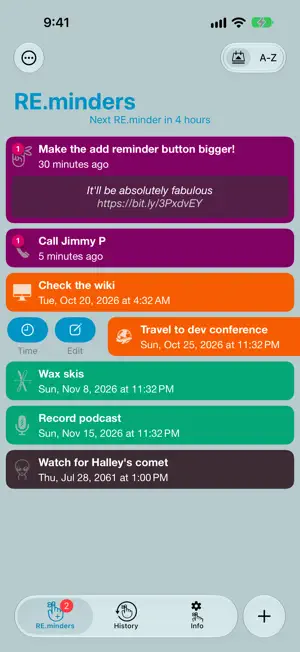


About RE.minder PRO+
What could be kinder than a friendly reminder? Is your to-do list full of to-didn'ts? You meant to get to them. You really did. But a list can't tap you on the shoulder at 3:47 PM. RE.minder PRO+ can. RE.minder PRO+ isn't about getting organized — it's about getting things done on time. Set a reminder in as few as three taps, and RE.minder PRO+ makes sure the nudge arrives right when you need it. Even offline. Everything is included: every feature, every sound, every icon, and no ads. REMINDERS THAT ACTUALLY GET THROUGH • Time-Sensitive notifications break through Do Not Disturb, so the important ones don't get silenced along with everything else. • CarPlay alerts sound while you're driving (or turn them off in Settings). • Bug Me nags you every minute or every hour until you deal with it. • Running late? Delay a reminder in one tap — or delay them all, or just the overdue ones. • Mute reminders for a while when you need some quiet. YOUR NEXT REMINDER, AT A GLANCE • A Home Screen widget shows your next reminder — or the next several on larger sizes — with its own colors, icon, and photo. • A countdown to your next reminder, right at the top of the list. • Every repeating reminder shows how often it repeats — like "2w" for every 2 weeks — in the list and on the widget. • Siri & Shortcuts: add reminders hands-free — try "Remind me with RE.minder" — or build them into your own Shortcuts. YOUR REMINDERS, YOUR WAY • Photos on reminders, so you remember exactly what it's about. • Advanced repeats: days of the week, a set number of repetitions, end dates, and schedules like "every 2 months on the second Tuesday" — right on the reminder screen, with a plain-language summary. • iCloud sync and backup, with a sync status that shows when your reminders last synced. Clear a reminder on one device and it's cleared on all of them. • Color schemes: pick a built-in one or design your own. • Search every reminder, current or past. • Customize the Quick Pickers — over 20 categories and times, and RE.minder PRO+ remembers what you use. FAST TO SET, EASY TO CHANGE • Pick dates on a calendar or the classic wheel. • Notes that work for you: tap a phone number to call, message, or FaceTime; long-press to copy. • History: reset a past reminder for the same time, the same interval, or a new time in two taps. • Every sound pack — Simple, Fun, Musical, and 17 extra-loud sounds for when you really can't miss it. • Every icon pack: Fun & Games, Home & Office, and Miscellaneous. • Rebuilt for Liquid Glass, with full VoiceOver support. Ready to turn those to-didn'ts into dones? Get RE.minder PRO+.
Ratings & reviews
4.6
74 ratings
What’s new
Version 2.9.4 · Updated November 1, 2026
RE.minder PRO+ 2.9.4 is a small update with a few tweaks and fixes: • New Always Expand Notes setting in Look & Feel: turn it off to show up to 12 lines of notes on overdue reminders until you tap them. • Tapping a reminder to show its notes is smoother. • On iPad, the RE.minders tab stays first in the tab bar. For more info, visit https://www.postmechanical.com
App privacy
The developer, postmechanical, LLC, reported these privacy practices to Apple.
Data Not Collected
The developer does not collect any data from this app.
Alternatives to RE.minder PRO+
Looking for apps like RE.minder PRO+? Here are 6 similar apps on the App Store. The highest rated is On Top To-Do (5.0/5), and 3 of the 6 are free to download.
-
 Workplace Stickers
-
 ANZAC Day Stickers
-
 StayTask Time Boxing: Timer
-
 On Top To-Do
5.0
-
 MyTasqs
-
 Superior 15: Time Tracker
5.0
| App | Rating | Price | Last updated | Compare |
|---|---|---|---|---|
| RE.minder PRO+ | 4.6 / 5 (74 ratings) | 7.99 USD | November 1, 2026 | |
| Workplace Stickers | – | 0.99 USD | Jan 28, 2026 | Compare |
| ANZAC Day Stickers | – | 0.99 USD | Apr 22, 2025 | Compare |
| StayTask Time Boxing: Timer | – | Free | Sep 10, 2026 | Compare |
| On Top To-Do | 5.0 / 5 (10) | 1.99 USD | Aug 3, 2025 | Compare |
| MyTasqs | – | Free | Aug 8, 2026 | Compare |
| Superior 15: Time Tracker | 5.0 / 5 (3) | Free | May 23, 2026 | Compare |
Compare RE.minder PRO+ with the top alternatives: ratings, updates, ASO score and keyword gaps →