

Finger Painting Animator HD
Gianluca Natalini Productivity iPad
Finger Painting Animator HD is a paid Productivity app for iPad by Gianluca Natalini. Requires iOS 16.6. Updated April 22, 2026.
- Price
- 2.99 USD
- on the App Store
- Size
- 5 MB
- Age 4+
- Updated
- Apr 22
- 2026 · v3.3
Screenshots
About Finger Painting Animator HD
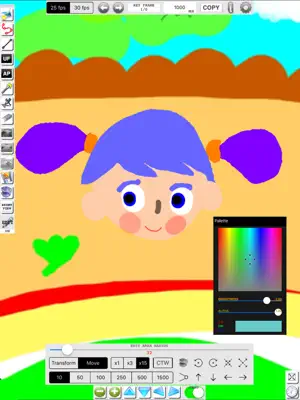
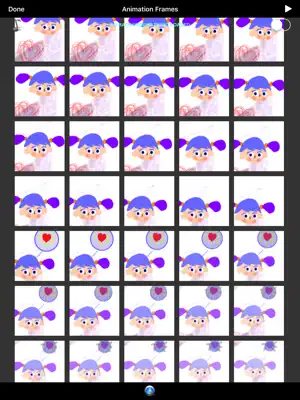
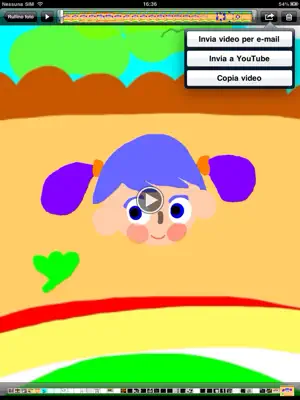
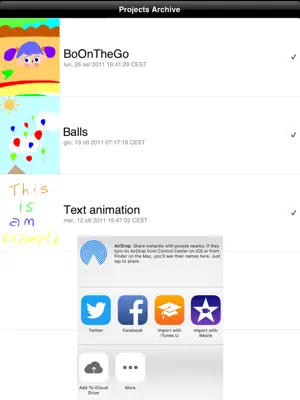
"Finger Painting Animator HD" is a software for creating 2D graphic animations and movies. The procedure for creating the movie is as follows: 1) Start a new project (giving it a name) 2) Load a background image (if desired) 3) Draw the scene to be animate with your fingers (using the tools provided: freehand drawing, color filling, airbrush, transparency, brushes with variable width, CAD tools such as line, grid, etc...) 4) Specify the scene duration (each scene can have a different duration) and save the scene 1 (keyframe 1) 5) Switch to the scene 2, edit the scene 1 using the editing tools provided (ZOOM, PAN, SCALE, ROTATE, COPY, TRANSFORM, JOIN CONTROL POINTS, MOVE, DELETE, MODIFY COLOR, WIDTH, TRANSPARENCY, etc…) or add new elements or characters to the scene and save the scene 2 (keyframe 2) 5) Create all necessary keyframes for your movie (2D animation: N 2D animation scenes, N keyframes) 6) Start the graphics engine to create the 2D animation movie: the software will automatically create the intermediate frames (inbetweens) interpolating and animating (tweening) the control vertices of the drawn keyframes (keyframing) and adding fades where needed. Also they are available the functions: - "MOVIE MAKER" that allows you to generate video .MP4 or .MOV exportable in the Photo Album of the device, usable with other installed applications (eg. “iMovie" ... for example "Finger Painting Animator HD" can be used to create new transitions for iMovie, also using handwritten animated text or drawings or small films superimposed on an image or a keyframe) - "PLAY" to visualize the created 2D animation movie (starting from any desired frame of the movie) - "FRAME BY FRAME" to display all the images of the movie (with the intermediate images, automatically generated from the graphics engine) - "LOAD AND ADD BACKGROUND MUSIC" to add a soundtrack to the movie - "SHARE PHOTOFRAMES" to copy all the JPG images (frames) of the 2D animation (movie) on your Mac or PC, using "iTunes File Sharing" - "SHARE MOVIE" to copy the generated movie file .MP4, and/or .MOV on your Mac or PC, using "iTunes File Sharing" - "REMOTE SHARING" to share all the created multimedia content with DROPBOX, iCloud Drive, Facebook, etc ... Create your movies with "Finger Painting Animator HD".
What’s new
Version 3.3 · Updated April 22, 2026
* Minor bugs fixed
App privacy
The developer, Gianluca Natalini, reported these privacy practices to Apple.
Data Not Collected
The developer does not collect any data from this app.
Alternatives to Finger Painting Animator HD
Looking for apps like Finger Painting Animator HD? Here are 6 similar apps on the App Store. The highest rated is WiseTalk AI Powered Voice Chat (5.0/5), and 5 of the 6 are free to download.
-
 WiseTalk AI Powered Voice Chat
5.0
WiseTalk AI Powered Voice Chat
5.0
-
 SwiftoDo for todo.txt
4.7
SwiftoDo for todo.txt
4.7
-
 RBrowser pro - Private Browser
4.6
RBrowser pro - Private Browser
4.6
-
 Web2Pics: Full Page Screenshot
4.4
Web2Pics: Full Page Screenshot
4.4
-
 Interval Timer for Tasks
4.2
Interval Timer for Tasks
4.2
-
 Convert Photo to PDF | Scan
4.7
Convert Photo to PDF | Scan
4.7
| App | Rating | Price | Last updated | Compare |
|---|---|---|---|---|
| Finger Painting Animator HD | – | 2.99 USD | April 22, 2026 | |
| WiseTalk AI Powered Voice Chat | 5.0 / 5 (1) | Free | Apr 4, 2024 | Compare |
| SwiftoDo for todo.txt | 4.7 / 5 (295) | Free | May 1, 2024 | Compare |
| RBrowser pro - Private Browser | 4.6 / 5 (11) | 14.99 USD | Dec 1, 2024 | Compare |
| Web2Pics: Full Page Screenshot | 4.4 / 5 (311) | Free | Jan 29, 2026 | Compare |
| Interval Timer for Tasks | 4.2 / 5 (95) | Free | Oct 10, 2026 | Compare |
| Convert Photo to PDF | Scan | 4.7 / 5 (23) | Free | Apr 1, 2025 | Compare |