

My Chord Book
Friis Data Music iPhoneiPadiPod touch
My Chord Book is a free Music app for iPhone and iPad by Friis Data. Rated 4.0/5 from 1 ratings. Requires iOS 18.6. Updated August 26, 2026.
- Rating
- 4.0
- 1 ratings
- Price
- Free
- on the App Store
- Size
- 7 MB
- Age 4+
- Updated
- Aug 26
- 2026 · v3.0
Screenshots


About My Chord Book
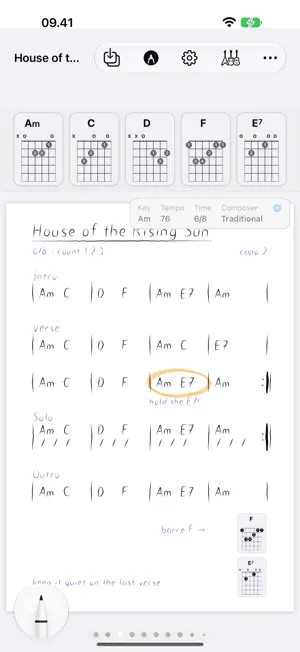
Your personal songbook — the songs you actually play, with the chords the way you play them. My Chord Book is made for working musicians: get a song down fast, and find it again in seconds when you haven't played it for two years. It is a song book, not a lesson platform and not a library of other people's tabs. HANDWRITE YOUR SONGS Open a book, swipe to the blank page and start writing with Apple Pencil. Lyrics, chords, arrows, the reminder you scribble in the margin — a new song is created with your first stroke. Pen, marker, highlighter, eraser, lasso and undo are one tap away, and a double-tap on your Apple Pencil switches to the eraser. Turn on ruler lines when you want your writing straight. BOOKS, CHAPTERS AND SONGS Organise your repertoire like a real songbook. Books for bands or projects, chapters for sets, and a table of contents you tap to jump anywhere. Swipe to turn pages. Move songs between chapters, reorder them, delete the ones you no longer play. A CHORD FINDER FOR GROWN-UP CHORDS Build any chord — root, quality, 6/7/9/11/13, flat5, sharp5, flat9, sharp9, sharp11, sus2, sus4 — and see every position on the fretboard in the fret range you choose. Tap the frets you actually use and save that voicing to the song. Keep as many voicings per chord as you need: the chord you play in the verse and the one you play in the bridge. Note and scale modes are there too, when you are working something out. CHORD DIAGRAMS WHERE YOU NEED THEM Saved chords appear as diagrams along the top of the song. Drag them into the order you play them, or drag one down onto the page, right next to the line where it happens. YOUR FILES. YOUR SONGS. NO ACCOUNT. Every book is a .chordbook file in the Files app. It syncs through iCloud Drive, works offline at the rehearsal room with no signal, and you can AirDrop a whole book to a bandmate. No account, no sign-up, no tracking, no ads. Your songs stay yours. Made for iPad and Apple Pencil. Runs on iPhone for looking things up. Coming next: notate complete lead sheets by hand — bars, repeats, odd time signatures, and chords recognised straight from your handwriting.
What’s new
Version 3.0 · Updated August 26, 2026
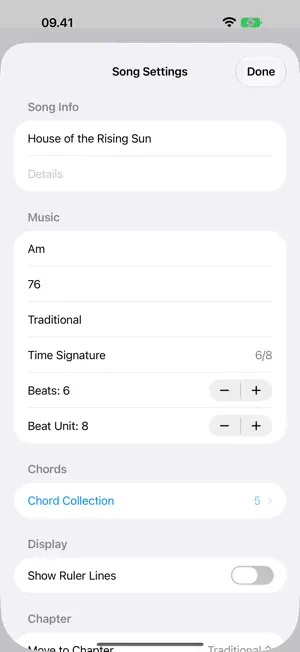
My Chord Book has been rebuilt from the ground up. WRITE BY HAND - Full-page Apple Pencil canvas for every song, saved as you write - Drawing tools: pen, marker, highlighter, eraser, lasso, ruler, undo and colours - Double-tap your Apple Pencil to switch to the eraser - Start drawing on a blank page and the song is created for you A REAL SONGBOOK - Books with chapters and songs, turned page by page like a paper book - Table of contents: tap any chapter or song to jump straight to it - Move songs between chapters, reorder them, delete them - Song details: key, tempo, composer and time signature CHORD FINDER - Build chords with extensions, alterations and suspensions, or pick notes or a scale - Every position on the fretboard, with selectable fret ranges - Save several voicings per chord to the song - Chord diagrams along the top of the page — reorder them, or drag one onto the page YOUR FILES - Every book is a .chordbook document in the Files app - iCloud Drive sync between iPad and iPhone, works offline - Share a book with a bandmate over AirDrop - No account, no tracking, no ads Books made in this version keep working in future versions — and a book written by a newer version opens read-only here instead of losing anything. COMING FROM VERSION 2? Your old songs come along. Open an .mcbsong file, or use Import 2.0 Song inside any book, and the song arrives as a handwritten page with its chords, bar lines, section labels and lyrics. Chords get a standard fingering to start from. Your original files are never changed or deleted.
App privacy
The developer, Friis Data, reported these privacy practices to Apple.
Data Linked to You
The following data, which may be collected and linked to your identity, may be used for the following purposes:
- Purchases: Purchase History
Used for: App Functionality
Data Not Linked to You
The following data, which may be collected but is not linked to your identity, may be used for the following purposes:
- User Content: Other User Content
- Usage Data: Product Interaction, Other Usage Data
- Diagnostics: Crash Data, Performance Data, Other Diagnostic Data
Used for: Analytics, App Functionality
Alternatives to My Chord Book
Looking for apps like My Chord Book? Here are 6 similar apps on the App Store. The highest rated is JustChords (4.9/5), and all 6 are free to download.
-
 Songs - The App For Musicians
4.5
Songs - The App For Musicians
4.5
-
 JAMMATES Lite
2.6
JAMMATES Lite
2.6
-
 JustChords
4.9
JustChords
4.9
-
 Chords: intervals and scales
4.6
Chords: intervals and scales
4.6
-
 Song Book Pro
3.6
Song Book Pro
3.6
-
 Band-in-a-Box
3.9
Band-in-a-Box
3.9
| App | Rating | Price | Last updated | Compare |
|---|---|---|---|---|
| My Chord Book | 4.0 / 5 (1 rating) | Free | August 26, 2026 | |
| Songs - The App For Musicians | 4.5 / 5 (111) | Free | Sep 7, 2026 | Compare |
| JAMMATES Lite | 2.6 / 5 (5) | Free | Jun 30, 2025 | Compare |
| JustChords | 4.9 / 5 (349) | Free | Oct 24, 2026 | Compare |
| Chords: intervals and scales | 4.6 / 5 (58) | Free | Sep 23, 2026 | Compare |
| Song Book Pro | 3.6 / 5 (523) | Free | May 22, 2026 | Compare |
| Band-in-a-Box | 3.9 / 5 (38) | Free | Sep 1, 2026 | Compare |
Compare My Chord Book with the top alternatives: ratings, updates, ASO score and keyword gaps →