

TalkingTime: Speaking Clock
Fortuisoft LLC Utilities iPhoneiPadiPod touch
TalkingTime: Speaking Clock is a free Utilities app for iPhone and iPad by Fortuisoft LLC. Rated 4.6/5 from 309 ratings. Requires iOS 17.6.
- Rating
- 4.6
- 309 ratings
- Price
- Free
- on the App Store
- Size
- 25 MB
- Age 4+
- Updated
- Oct 15
- 2026 · v27.0.3
Screenshots

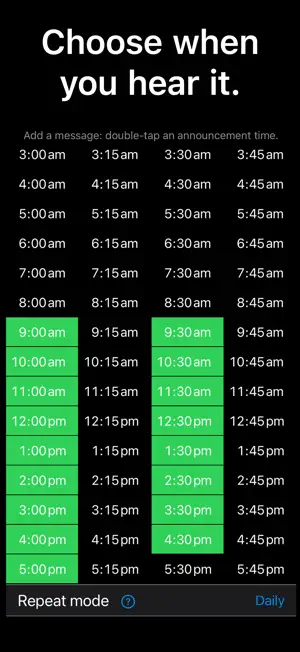

About TalkingTime: Speaking Clock
Hear the time without stopping to look at your screen. TalkingTime gives you spoken time announcements, chimes and personal voice reminders on iPhone and iPad. Use a regular time cue to notice the passing hours while you work, study or move through your day. START WITH EASY • Use the included Easy schedule. • Choose spoken time or chimes, a voice, and 12- or 24-hour speech. • Add your own text to an enabled Easy announcement time. PRO SUBSCRIPTION • Edit Easy announcement times. • Use the separate Custom schedule at any minute, on specific dates or on selected weekdays. LEGACY PRO Your original lifetime access continues to include Easy editing and messages. The separate Custom schedule requires a Pro subscription. SET UP ANNOUNCEMENTS Keep Master Enable on and allow Notifications and Sounds for TalkingTime. Then return to the Home Screen with a normal swipe up or Home button, giving the app time to prepare your schedule. Prepared announcements use iOS local notifications and can sound when the screen is locked. Keep the device powered on. Silent mode, ringer volume, Focus and audio routing can affect what you hear. GET HELP Open It’s not working and tap Get support. Diagnostic information is sent automatically. You can also contact [email protected]. The app and Apple purchase sheet show the current Pro price, billing period and any eligible trial. Pro is an automatically renewing subscription unless cancelled. Manage or cancel subscriptions through your Apple account. Privacy: https://www.fortuisoft.com/talkingtime/Privacy.html Terms: https://www.apple.com/legal/internet-services/itunes/dev/stdeula/
Ratings & reviews
4.6
309 ratings
What’s new
Version 27.0.3 · Updated October 15, 2026
• iPhone Duo ready • Bug fixes
App privacy
The developer, Fortuisoft LLC, reported these privacy practices to Apple.
Data Linked to You
The following data, which may be collected and linked to your identity, may be used for the following purposes:
- Purchases: Purchase History
- Location: Coarse Location
- User Content: Customer Support
- Identifiers: Device ID
- Usage Data: Product Interaction
- Diagnostics: Crash Data, Performance Data, Other Diagnostic Data
Used for: Analytics, App Functionality
Alternatives to TalkingTime: Speaking Clock
Looking for apps like TalkingTime: Speaking Clock? Here are 6 similar apps on the App Store. The highest rated is Hourly Chime in Background (4.8/5), and 5 of the 6 are free to download.
-
 Speaking Clock with Voice
4.5
Speaking Clock with Voice
4.5
-
 Chime : Speaking Clock
4.2
Chime : Speaking Clock
4.2
-
 Clock Chime - Time is passing
4.6
Clock Chime - Time is passing
4.6
-
 Westminster Chimes Full
4.2
Westminster Chimes Full
4.2
-
 Sink It for Google
4.5
Sink It for Google
4.5
-
 Hourly Chime in Background
4.8
Hourly Chime in Background
4.8
| App | Rating | Price | Last updated | Compare |
|---|---|---|---|---|
| TalkingTime: Speaking Clock | 4.6 / 5 (309 ratings) | Free | October 15, 2026 | |
| Speaking Clock with Voice | 4.5 / 5 (43) | Free | Aug 8, 2026 | Compare |
| Chime : Speaking Clock | 4.2 / 5 (819) | Free | Oct 10, 2026 | Compare |
| Clock Chime - Time is passing | 4.6 / 5 (472) | Free | Oct 10, 2025 | Compare |
| Westminster Chimes Full | 4.2 / 5 (277) | 1.99 USD | Nov 22, 2023 | Compare |
| Sink It for Google | 4.5 / 5 (18) | Free | Jun 13, 2026 | Compare |
| Hourly Chime in Background | 4.8 / 5 (5) | Free | Dec 4, 2025 | Compare |