

Superimpose
Pankaj Goswami Photo & Video iPhoneiPadiPod touch
Superimpose is a free Photo & Video app for iPhone and iPad by Pankaj Goswami. Rated 4.5/5 from 3,198 ratings. Requires iOS 15.0. Updated October 15, 2026.
- Rating
- 4.5
- 3.1K ratings
- Price
- Free
- on the App Store
- Size
- 381 MB
- Age 4+
- Updated
- Oct 15
- 2026 · v11.3.0
Screenshots


About Superimpose
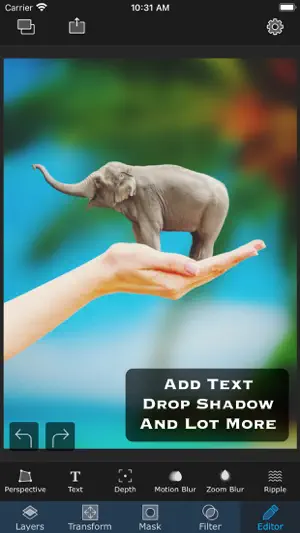
Superimpose is a complete creative studio for photo editing, image compositing, video editing, and AI-powered visual creation. Build complex edits by hand with layers, masks, blend modes, brushes, effects, adjustments, shadows, text, blur, warp and perspective tools. Cut out people and objects, combine several images, paint masks, adjust colours, add depth and shadows, and refine every detail. When you want faster results, use AI to generate images from text, edit and repair photos, replace backgrounds, expand a picture beyond its edges, enhance details, relight a scene, create headshots, swap faces, turn a sketch into finished art, or animate a still photo into a short video. And it is not only about photos any more. A true multi-track video editor is built in, so one project can carry you from a single image to a finished video without ever leaving the app. PHOTO EDITING AND COMPOSITING • Layer-based editing with up to 24 layers • Advanced masking, including Magic Wand, Magic Lasso, brush masks and shape masks • 18 blend modes and 16 adjustment layers • Non-destructive layer blur and adjustments • 63 photo effects, plus clarity, colour, tone and detail controls • Text and curved text tools • Motion Blur, Zoom Blur, Spin Blur, Lens Blur, Selective Blur and Gradient tools • Warp, perspective transform and distortion tools • Paint, smudge, clone stamp and effect brushes • Built-in shadow and Light Wrap tools • Camera fill with real-time masks and blend modes • Masking Library for reusable cutouts and stickers • Session Library that saves your projects automatically • PSD export with layers • More than a million royalty-free stock photos VIDEO EDITING • Multi-track timeline for video, images, audio and text • Split, trim, rotate and freeze clips with ease • Speed control, including speed ramps • Keyframe animation with adjustable curves • Transitions between clips • Stack effects and animations on any track for unique results • Use masks for precise editing, including green screen and more • Audio from your device, voiceovers and royalty-free music • Stickers and animated GIFs • Royalty-free stock video and photos • Export in the format and resolution you choose AI TOOLS • AI people masking • AI image generation from text • AI image editing and inpainting • AI background creation and replacement • AI outpainting and image expansion • AI image enhancement • AI relighting • AI sketch-to-image creation • AI headshot generation • AI face swap • AI image-to-image transformation • AI image-to-video generation Whether you are making social posts, thumbnails, designs, artwork, product images, profile photos, memes, edits or professional composites, Superimpose X gives you manual precision and AI speed in one app. Start with an idea, a photo, a sketch, a video or a blank canvas. Superimpose gives you the freedom to create by hand, the speed of AI when you need it, and the control to make every result your own. Terms of use: https://www.superimposeapp.com/terms-of-use--superimpose-classic-.html Privacy Policy: https://www.superimposeapp.com/privacy2.html
Ratings & reviews
4.5
3.1K ratings
What’s new
Version 11.3.0 · Updated October 15, 2026
New: Write On text animation! Watch your words write themselves, stroke by stroke, just like real handwriting. • How to use: in the Video Editor, select your text, tap Animation and pick Write On in the In tab (or Write Off in the Out tab to erase it). • It plays across the whole clip by default. Adjust Duration, Scope, Order and Overlap to set your own pace. Fixes: • Fixed a crash when adding stock photos. • Fixed several crashes in the photo and video editors, including the Magic Lasso, mask brush and saving layers.
App privacy
The developer, Pankaj Goswami, reported these privacy practices to Apple.
Data Not Linked to You
The following data, which may be collected but is not linked to your identity, may be used for the following purposes:
- Diagnostics: Crash Data, Performance Data, Other Diagnostic Data
Used for: Analytics, App Functionality
Alternatives to Superimpose
Looking for apps like Superimpose? Here are 6 similar apps on the App Store. The highest rated is Ultimate Photo Mixer Blender (4.9/5), and all 6 are free to download.
-
 Superimpose+:Background Eraser
4.8
Superimpose+:Background Eraser
4.8
-
 Blend: Combine Photo Layers
4.4
Blend: Combine Photo Layers
4.4
-
 PhotoLayers
4.8
PhotoLayers
4.8
-
 Overlay: AI Photo Design
4.7
Overlay: AI Photo Design
4.7
-
 Ultimate Photo Mixer Blender
4.9
Ultimate Photo Mixer Blender
4.9
-
 Phonto - Text on Photos
4.8
Phonto - Text on Photos
4.8
| App | Rating | Price | Last updated | Compare |
|---|---|---|---|---|
| Superimpose | 4.5 / 5 (3,198 ratings) | Free | October 15, 2026 | |
| Superimpose+:Background Eraser | 4.8 / 5 (11,879) | Free | Jun 22, 2026 | Compare |
| Blend: Combine Photo Layers | 4.4 / 5 (3,645) | Free | Aug 21, 2026 | Compare |
| PhotoLayers | 4.8 / 5 (19,915) | Free | Jan 15, 2026 | Compare |
| Overlay: AI Photo Design | 4.7 / 5 (1,242) | Free | Jul 30, 2026 | Compare |
| Ultimate Photo Mixer Blender | 4.9 / 5 (6,381) | Free | Mar 1, 2026 | Compare |
| Phonto - Text on Photos | 4.8 / 5 (122,319) | Free | Oct 19, 2026 | Compare |
Compare Superimpose with the top alternatives: ratings, updates, ASO score and keyword gaps →