

WaiterOne
WaiterOne SL Business iPad
WaiterOne is a free Business app for iPad by WaiterOne SL. Rated 3.5/5 from 13 ratings. Requires iOS 16.6. Updated September 23, 2026.
- Rating
- 3.5
- 13 ratings
- Price
- Free
- on the App Store
- Size
- 183 MB
- Age 4+
- Updated
- Sep 23
- 2026 · v1.8.24
Screenshots

About WaiterOne
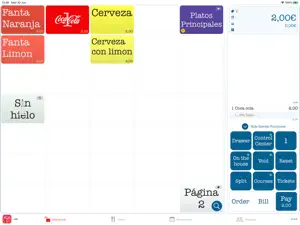
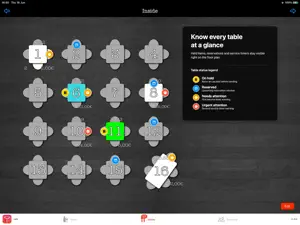
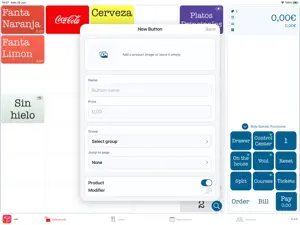
WaiterOne is a fast and complete POS system for cafes, bars, restaurants, food trucks, events, terraces, and hospitality businesses that want professional point-of-sale software on iPad. Built for real service, WaiterOne helps you take orders, manage tables, print tickets, process payments, follow reservations, organize staff, and keep your business running smoothly from one central iPad. WaiterOne for iPad is the heart of the system. It manages your products, tables, printers, payments, reports, remote devices, kitchen screens, customer displays, reservations, and cloud connections. It is designed for speed during busy service, with clear screens, fast ordering, and reliable offline-first workflows. Use WaiterOne Remote on iPhone or iPod touch to take orders directly at the table. Orders are sent to the main POS and can be printed in the kitchen or bar, helping your team work faster and reduce mistakes. WaiterOne KDS turns an iPad or iPhone into a kitchen display system. Chefs and bartenders can follow orders on screen, organize preparation, and reduce paper ticket handling. WaiterOne Kiosk adds self-service ordering for customers. It supports add-ons, tips, calories, localized payment messages, and a modern ordering flow for venues that want faster counter or self-service experiences. Customer Display and Digital Signage options let you show order information, totals, and customer-facing content on additional screens. Reservations and planning tools help you manage bookings, table reservations, upcoming reservations, staffing context, and forecast information, so your team can prepare better before service starts. Attendance management helps track clock-in and clock-out, breaks, manager corrections, audit history, and attendance reports. WaiterOne supports a wide range of receipt and kitchen printers, including Epson, Star Micronics, Citizen, AirPrint-compatible printers, and many printers using Epson-compatible ESC/POS modes. Print receipts, kitchen tickets, bar tickets, reports, and fiscal documents depending on your setup. At the end of the day, WaiterOne can generate useful reports for sales, payments, discounts, users, fiscal data, attendance, and operational totals. Reports can be printed, exported, or sent by email when an internet connection is available. WaiterOne also supports many professional workflows, including: - Table plans and table moves - Split bills and multiple payment types - Tips and configurable tip suggestions - Product import and export with CSV files - Price levels and automatic price rules - Barcode and Socket Mobile scanner support - Kitchen and bar ticket routing - AirPrint and POS printer reports - Remote ordering and communication recovery - Fiscal workflows for supported countries - Payment provider integrations such as SumUp, Zettle, Stripe, TWINT, FlatPay, CM, Pin Vandaag, and more depending on country and configuration Because WaiterOne runs on iPad, you do not need a traditional PC server for daily operation. The system is built to stay practical, fast, and reliable during service, even when the internet connection is limited. WaiterOne is made for hospitality teams that need a powerful POS without unnecessary complexity: quick to learn, flexible to configure, and strong enough for serious restaurant and bar operations. WaiterOne can scale from a single iPad at a small bar to a connected setup with remote ordering devices, kitchen screens, customer displays, kiosks, scanners, multiple printers, and cloud reporting. You choose only the tools you need, while the POS stays focused on fast service, clear information, and dependable operation. Whether you run a small cafe, a busy bar, a restaurant terrace, a food truck, an event setup, or a multi-device hospitality workflow, WaiterOne gives you the tools to serve faster, stay organized, and keep control of your business.
Ratings & reviews
3.5
13 ratings
What’s new
Version 1.8.24 · Updated September 23, 2026
Added • Overview heatmap shows sales and ticket counts by weekday and hour over the last 28 business days. • With an updated KDS, kitchen staff can record prepared quantities, with stock confirmed by the main iPad and shared with Remotes. Choose prep products and grant staff Receive deliveries permission. • Optional product defaults for container quantities and kitchen-approved shelf life support KDS prep labels. Staff review use-by dates before printing. Labels retain the original staff name; delivery failures and recovery appear in Control Center. • Optional automatic retries for ESC/POS, Epson ePOS and Star printers. ESC/POS jobs can resume after restarting when recovery is enabled. • Database damage warnings include guidance to contact support. • Start Bancontact payments directly from counter checkout and resume waiting checkouts after restarting. Customer displays can show the QR code and include tips selected on either device. • Sales archive in Settings > Data saves password-protected historical sales, verifies a separate copy before eligible removal, lets you browse archived tickets and reclaims unused database space. • Restore archived sales to their original database without overwriting records or repeating payments, stock movements or uploads. Fiscal and other safety restrictions apply. • Full PinVandaag Worldline card refunds and matching voids for eligible EUR receipts paid with one PinVandaag payment. Partial refunds, mixed payments, tips, invoices and fiscal receipts are excluded. Unconfirmed refunds appear in Control Center and are protected against duplicate attempts, even after restarting. • Remote staff can make sent items complimentary or restore their saved price after permission checks. • On the POS screen, select On the House or Retour/Void, then tap an ordered or billed item to make it complimentary or add a separate return line. • Delete results before a selected business day in Settings > Data, preserving newer results and respecting the configured start-of-day time. Improved • Faster POS page loading, title sizing and page switching, especially with large button layouts. • Refreshed Overview charts with selectable metrics, clearer values, Light/Dark Mode support and configured user, product group and payment colors. • Support logs include Control Center events and settings reset details. • Customer displays show clearer subtotal, tax, tip, total, paid and due amounts, with a 10-second delay before returning to the screensaver after payment or feedback. • On the House toggles between complimentary and saved prices, even after reopening a table. Price restoration applies to items made complimentary with this update. Fixed • Better Settings field sizing and menu selection. • Correct product prices on the first POS visit after login resets the price level. • Startup notices follow the selected app language. • More responsive KDS screen and Epson printer discovery on current iPadOS versions. • Fiskaly and BeFDM pro-forma bills no longer reset paid receipt numbering. • Updated Light/Dark Mode status bar on iPadOS 27. • Table orders are checked before payments; conflicts are flagged. With an updated Remote, checks also detect payments for cleared and reused tables. • Fixed occasional one-cent differences when splitting bills from Remote. • Reliable database imports from Files; failed imports preserve the working database. • Correct tip recording when Tip is the default payment method. • Sales archive respects the configured start of day, shows the exact cutoff and protects the current calendar month. • Invalid Remote table moves stop safely and appear in Control Center. • More reliable PinVandaag payment status checks during temporary unknown statuses or service interruptions, with clearer retry guidance.
App privacy
The developer, WaiterOne SL, reported these privacy practices to Apple.
Data Not Collected
The developer does not collect any data from this app.
Alternatives to WaiterOne
Looking for apps like WaiterOne? Here are 6 similar apps on the App Store. The highest rated is Mobi POS - Kitchen Display (5.0/5), and all 6 are free to download.
-
 SalesVu POS for iPad
4.2
SalesVu POS for iPad
4.2
-
 Datio Point Of Sale Retail
4.6
Datio Point Of Sale Retail
4.6
-
 Shopcaisse - Cash register
3.0
Shopcaisse - Cash register
3.0
-
 Rezku Restaurant POS System
3.9
Rezku Restaurant POS System
3.9
-
 OrdersTracker
4.0
OrdersTracker
4.0
-
 Mobi POS - Kitchen Display
5.0
Mobi POS - Kitchen Display
5.0
| App | Rating | Price | Last updated | Compare |
|---|---|---|---|---|
| WaiterOne | 3.5 / 5 (13 ratings) | Free | September 23, 2026 | |
| SalesVu POS for iPad | 4.2 / 5 (17) | Free | Sep 22, 2026 | Compare |
| Datio Point Of Sale Retail | 4.6 / 5 (194) | Free | Jul 17, 2026 | Compare |
| Shopcaisse - Cash register | 3.0 / 5 (4) | Free | Sep 24, 2026 | Compare |
| Rezku Restaurant POS System | 3.9 / 5 (14) | Free | Sep 2, 2026 | Compare |
| OrdersTracker | 4.0 / 5 (4) | Free | Sep 2, 2025 | Compare |
| Mobi POS - Kitchen Display | 5.0 / 5 (3) | Free | Sep 8, 2026 | Compare |
Compare WaiterOne with the top alternatives: ratings, updates, ASO score and keyword gaps →