

McDonald's Japan
日本マクドナルド株式会社 Food & Drink iPhoneiPadiPod touch
McDonald's Japan is a free Food & Drink app for iPhone and iPad by 日本マクドナルド株式会社. Rated 4.6/5 from 162 ratings. Requires iOS 15.0. Updated September 29, 2026.
- Rating
- 4.6
- 162 ratings
- Price
- Free
- on the App Store
- Size
- 104 MB
- Age 4+
- Updated
- Sep 29
- 2026 · v5.5.70
Screenshots

About McDonald's Japan
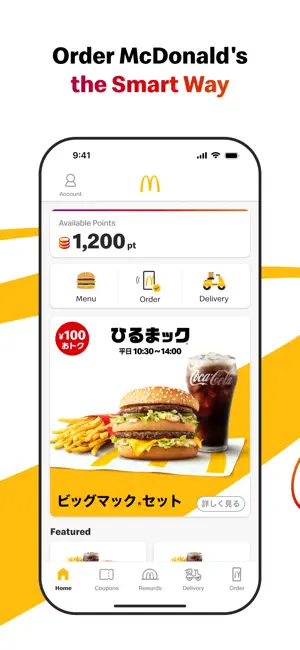
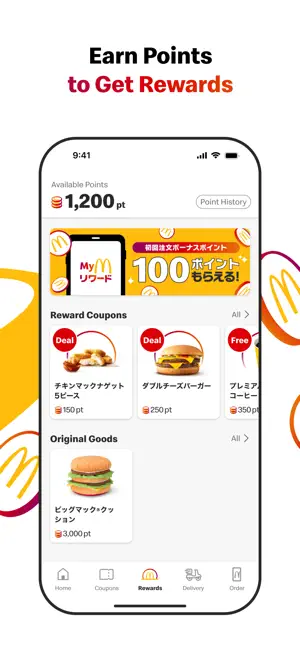
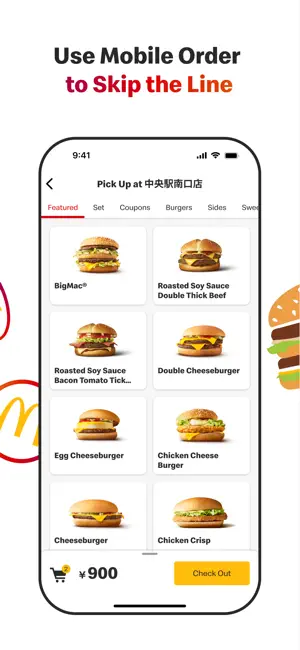
McDonald's Official App for Japan The McDonald's official app offers not only daily coupons and latest information but also allows you to complete your order and payment seamlessly. Features Available: • Access to the Latest Coupons Enjoy exclusive coupons that can be used in-store or through mobile orders. Show the coupon number to the staff by selecting "Use in Store" or choose a coupon from the mobile order menu category. • Check McDonald’s Menu Access detailed information about McDonald's products, including ingredients, allergy information, and nutritional content. • Discover the Latest News Find recommended news and products tailored to you right on the home screen. • Order and pay via the App with Mobile Order You can complete your order and payment entirely through the app. Skip the line and receive your food directly at your table (not available in certain restaurants or hours). • Order from home and have your meal delivered by McDelivery® Service via the App. How to Use Mobile Order: Step 1: Log In To use coupons or place an order, you need to register and log in. If you've forgotten your password, you can reset it via the "Forgot Password" option. Please ensure that you can receive emails from [email protected]. Step 2: Choose a Restaurant Select the restaurant where you would like to receive your order. Please check the available restaurants in the app. Step 3: Select Your Menu Choose your favorite menu items. Coupons can also be used. Please note that some coupons available for mobile orders may differ from those available at the Front Counter. Step 4: Choose Your Pickup Method Select from table delivery (table service), counter pickup, takeout, or Drive-Thru. Pickup options may vary by restaurant and time. Table service, park & go, and drive-thru are not available at all locations. Step 5: Choose Your Payment Method You can pay with a credit card (VISA, Master, JCB, Diners, American Express), d-Barai, PayPay, Rakuten Pay, au PAY, or Apple Pay . Please Complete the Following Step After Arriving at the Restaurant Step 6: Receive Your Order Once you arrive at the restaurant, confirm your payment to start the preparation of your order. Enjoy your freshly prepared food. How to Use McDelivery® Service: Step 1: Log In To place an order, you need to register and log in. If you've forgotten your password, you can reset it via the "Forgot Password" option. Please ensure that you can receive emails from [email protected]. Step 2: Select Delivery Address and Time Choose whether you want to order now or reserve a delivery time. Reservations can be made from one day to two hours prior to the desired delivery time. Step 3: Select Your Menu Choose your favorite menu items. Step 4: Choose Your Payment Method You can pay with cash, credit card (VISA, Master, JCB, Diners, American Express), d-barai, PayPay, Rakuten Pay, au PAY, or Apple Pay . Please note that cash payments are not available at some locations. Step 5: Receive Your Order Our delivery staff will bring your freshly prepared meal to your specified address. If you prefer a no-contact delivery, you can select the "Leave at the Door" option when ordering. • Please note: • Delivery times vary by location. • Orders for the breakfast menu must be placed by 10:20 AM. • Minimum order value is ¥1,500. • A delivery fee of ¥300 applies.
Ratings & reviews
4.6
162 ratings
What’s new
Version 5.5.70 · Updated September 29, 2026
• Improved app performance and stability. • Fixed minor bugs and fine-tuned the design.
App privacy
The developer, 日本マクドナルド株式会社, reported these privacy practices to Apple.
Data Used to Track You
The following data may be used to track you across apps and websites owned by other companies:
- Identifiers: Device ID
Data Linked to You
The following data, which may be collected and linked to your identity, may be used for the following purposes:
- Purchases: Purchase History
- Location: Coarse Location
- Identifiers: User ID
- Usage Data: Product Interaction
- Contact Info: Email Address
- User Content: Customer Support
- Diagnostics: Crash Data, Performance Data, Other Diagnostic Data
Used for: Developer’s Advertising or Marketing, Analytics, Product Personalization, App Functionality
Data Not Linked to You
The following data, which may be collected but is not linked to your identity, may be used for the following purposes:
- Identifiers: Device ID
Used for: Developer’s Advertising or Marketing, Analytics, Product Personalization, App Functionality
Alternatives to McDonald's Japan
Looking for apps like McDonald's Japan? Here are 6 similar apps on the App Store. The highest rated is Cookpad Recipes (4.8/5), and all 6 are free to download.
-
 バーガーキング Burger King
1.8
バーガーキング Burger King
1.8
-
 Cookpad Recipes
4.8
Cookpad Recipes
4.8
-
 Rocket Now: Food Delivery
4.4
Rocket Now: Food Delivery
4.4
-
 すき家 公式アプリ
-
 MyExchangeFood
1.8
MyExchangeFood
1.8
-
 楽天ぐるなび
4.2
楽天ぐるなび
4.2
| App | Rating | Price | Last updated | Compare |
|---|---|---|---|---|
| McDonald's Japan | 4.6 / 5 (162 ratings) | Free | September 29, 2026 | |
| バーガーキング Burger King | 1.8 / 5 (10) | Free | Aug 7, 2026 | Compare |
| Cookpad Recipes | 4.8 / 5 (4,330) | Free | Sep 28, 2026 | Compare |
| Rocket Now: Food Delivery | 4.4 / 5 (44) | Free | Oct 1, 2026 | Compare |
| すき家 公式アプリ | – | Free | Sep 14, 2026 | Compare |
| MyExchangeFood | 1.8 / 5 (190) | Free | Aug 8, 2026 | Compare |
| 楽天ぐるなび | 4.2 / 5 (148) | Free | Sep 30, 2026 | Compare |
Compare McDonald's Japan with the top alternatives: ratings, updates, ASO score and keyword gaps →