

RE.minder
postmechanical, LLC Productivity iPhoneiPadiPod touch
RE.minder is a free Productivity app for iPhone and iPad by postmechanical, LLC. Rated 4.7/5 from 806 ratings. Requires iOS 26.0. Updated October 27, 2026.
- Rating
- 4.7
- 806 ratings
- Price
- Free
- on the App Store
- Size
- 44 MB
- Age 4+
- Updated
- Oct 27
- 2026 · v2.9.3
Screenshots


About RE.minder
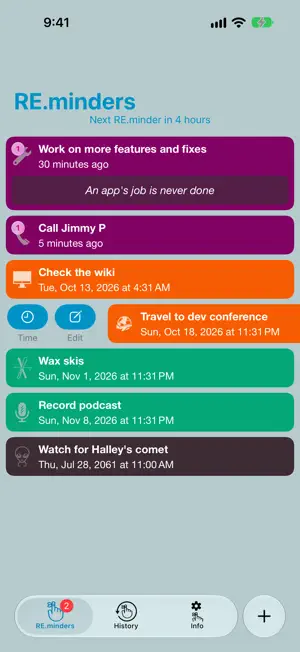
What could be kinder than a friendly reminder? Is your to-do list full of to-didn'ts? You meant to get to them. You really did. But a list can't tap you on the shoulder at 3:47 PM. RE.minder can. RE.minder isn't about getting organized — it's about getting things done on time. Set a reminder in as few as three taps, and RE.minder makes sure the nudge arrives right when you need it. Even offline. REMINDERS THAT ACTUALLY GET THROUGH • Time-Sensitive notifications break through Do Not Disturb, so the important ones don't get silenced along with everything else. • CarPlay alerts sound while you're driving (or turn them off in Settings). • Bug Me nags you every minute or every hour until you deal with it. • Running late? Delay a reminder in one tap without leaving the list. YOUR NEXT REMINDER, AT A GLANCE • A Home Screen widget shows your next reminder — or the next several on larger sizes — with its own colors, icon, and photo. • A countdown to your next reminder, right at the top of the list. • Every repeating reminder shows how often it repeats — like "2w" for every 2 weeks — in the list and on the widget. • Siri & Shortcuts: add reminders hands-free — try "Remind me with RE.minder" — or build them into your own Shortcuts. FAST TO SET, EASY TO CHANGE • Over 20 Quick Pickers for categories and times, and RE.minder remembers what you use. • Repeat options right on the reminder screen, with a plain-language summary of what you've set up. • Pick dates on a calendar or the classic wheel. • Notes that work for you: tap a phone number to call, message, or FaceTime; long-press to copy. • History: reset a past reminder for the same time, the same interval, or a new time in two taps. • Over 20 sounds in three flavors: Simple, Fun, and Musical. • Rebuilt for Liquid Glass, with full VoiceOver support. GO PRO (in-app purchase) • Photos on reminders, so you remember exactly what it's about. • Advanced repeats: days of the week, a set number of repetitions, end dates, and schedules like "every 2 months on the second Tuesday." • iCloud sync and backup, with a sync status that shows when your reminders last synced. Clear a reminder on one device and it's cleared on all of them. • Color schemes: pick a built-in one or design your own. • Search every reminder, current or past. • Mute reminders for a while, or delay them all at once. • Customize the Quick Pickers. • No ads. ADD-ON PACKS (in-app purchase) • 20 musical sounds • 22 fun sounds • 17 extra-loud sounds, for when you really can't miss it • Fun & Games, Home & Office, and Miscellaneous icon packs Want it all for one price? RE.minder PRO+ includes every PRO feature and every pack. Ready to turn those to-didn'ts into dones? Download RE.minder free.
Ratings & reviews
4.7
806 ratings
What’s new
Version 2.9.3 · Updated October 27, 2026
RE.minder 2.9.3 shows how often each reminder repeats, right in the list: • Repeating reminders show how often they repeat next to the repeat icon, like "2w" for every 2 weeks. Tap an overdue repeating reminder to see its full repeat schedule without opening it. • The widget shows how often reminders repeat, too. • Siri recognizes RE.minder more easily on iOS 27. Try "Remind me with RE.minder". • Notifications for reminders you've cleared, delayed, or deleted are removed from Notification Center. • Delaying only the next occurrence of a repeating reminder no longer sets it to "Never". • Canceling a delay or duplicating an overdue repeating reminder no longer stops its notifications. • Reminders that repeat weekly, monthly, or yearly no longer jump years ahead because of a hidden weekday setting. • Repeat descriptions are now fully translated. For PRO: • Clear a reminder on one device and it's cleared on your other devices once they sync with iCloud, including Bug Me. • Repeat and Bug Me indicators use your color scheme's Secondary Text color. • Custom color schemes can use gradient backgrounds, and schemes based on a gradient built-in scheme keep their gradients. • Fixed a black background after opening RE.minder with a custom color scheme. For more info, visit https://www.postmechanical.com
App privacy
The developer, postmechanical, LLC, reported these privacy practices to Apple.
Data Used to Track You
The following data may be used to track you across apps and websites owned by other companies:
- Identifiers: Device ID
- Usage Data: Advertising Data
Data Linked to You
The following data, which may be collected and linked to your identity, may be used for the following purposes:
- Usage Data: Advertising Data
Used for: Third-Party Advertising
Data Not Linked to You
The following data, which may be collected but is not linked to your identity, may be used for the following purposes:
- Identifiers: Device ID
Used for: Third-Party Advertising
Alternatives to RE.minder
Looking for apps like RE.minder? Here are 6 similar apps on the App Store. The highest rated is Reminder, simple & useful (4.8/5), and all 6 are free to download.
-
 Reminder - Beep Me
4.6
Reminder - Beep Me
4.6
-
 Angle Todo
-
 Remind Me: ToDo reminder
4.5
Remind Me: ToDo reminder
4.5
-
 Engramr - Reminders & Alarms
4.7
Engramr - Reminders & Alarms
4.7
-
 Reminder, simple & useful
4.8
Reminder, simple & useful
4.8
-
 Reminder Notes Widget - Alarm
4.4
Reminder Notes Widget - Alarm
4.4
| App | Rating | Price | Last updated | Compare |
|---|---|---|---|---|
| RE.minder | 4.7 / 5 (806 ratings) | Free | October 27, 2026 | |
| Reminder - Beep Me | 4.6 / 5 (342) | Free | Oct 19, 2026 | Compare |
| Angle Todo | – | Free | Dec 9, 2024 | Compare |
| Remind Me: ToDo reminder | 4.5 / 5 (2,452) | Free | May 25, 2024 | Compare |
| Engramr - Reminders & Alarms | 4.7 / 5 (23) | Free | Oct 28, 2026 | Compare |
| Reminder, simple & useful | 4.8 / 5 (16) | Free | Jun 25, 2026 | Compare |
| Reminder Notes Widget - Alarm | 4.4 / 5 (45) | Free | Oct 23, 2025 | Compare |
Compare RE.minder with the top alternatives: ratings, updates, ASO score and keyword gaps →