

Finger3D HD
Gianluca Natalini Productivity iPad
Finger3D HD is a paid Productivity app for iPad by Gianluca Natalini. Rated 1.0/5 from 1 ratings. Requires iOS 18.0. Updated June 24, 2025.
- Rating
- 1.0
- 1 ratings
- Price
- 3.99 USD
- on the App Store
- Size
- 4 MB
- Age 4+
- Updated
- Jun 24
- 2025 · v4.2.2
Screenshots


About Finger3D HD
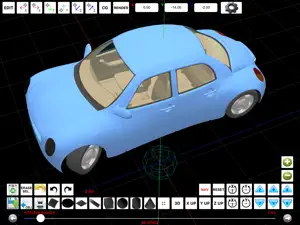
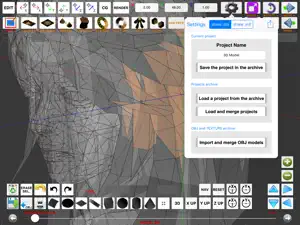
"Finger3D HD" turns your device into a three-dimensional modeler, the smallest and portable existing 3D modeler. With "Finger3D HD" you can create any shape/object/3D model, modeling the shapes with the fingers of your hands. To create Your 3D MODEL, You will have the 3D geometric primitives (spheres, cylinders, cones, cubes, planes, surfaces, discs, curves, etc...) typically used in the commercial 3D modelers for the PC or MAC. You can manage the parameters for lighting (eg. lamp position), material (eg. material’s color, textures), the object transparency, etc... You can navigate the 3D WORLD using the fingers of your hands; you can use the 3D view, the top view (Y UP), right view (X UP), frontal view (Z UP). You can explore the 3D WORLD using the first person view (NAVIGATION MODE). You can model the objects in the 3D WORLD, scale, rotate, move the vertices dragging Your fingers on the screen or use the blue 3D ball pointer to select/move objects/vertices/faces. You can quickly locate the pointer in the 3D space by writing the X, Y, Z coordinates, using the “pointer move” buttons (along the axes X, Y, Z). The size of the objects can be defined, during insertion, with the "POINTER RADIUS" control or using the scale feature (in editing mode). With "POINTER RADIUS" you can select one or more vertices/objects/faces; increasing the size of the "POINTER RADIUS" You can select multiple components. Instruments for the 3D modeling: 0) CHARACTER MODELING using BACKGROUND IMAGES 1) MODEL with fingers: move the touched vertices by dragging Your finger on the screen 2) SUBDIVIDE: divide one or more faces into 4 or more faces for each face 3) EXTRUDE: extrusion perpendicular or oblique for faces or vertices (extrusion direction: from the center of the selected face to the center of the 3D pointer or along the three axes X,Y,Z) 4) SMOOTH: useful for the creation of mountains 5) VLINK: move the vertices in the center of the 3D pointer (useful to create arrows, beaks of animals, aircraft, wings, etc...) 6) COPY/PASTE 7) COPY MIRROR (respect the chosen axis or along it) 8) ERASE VERTICES / FACES 9) FACES EDITING / VERTICES EDITING 10) REVOLVE 11) REVOLVE "SPIN" 12) REVOLVE "BASE FACE" (to create people with one click) 13) MOVE 14) 3D and 2D views 15) SMOOTH SHADING, FLAT SHADING, WIREFRAME 16) GROUP/UNGROUP 17) UNDO/REDO etc… The model may be manually or automatically saved for later use, exported to OBJ+MTL format and then be sent via e-mail or loaded in the common 3D modelers for the PC o MAC (ex. Maya 3D, Blender, etc...). RENDERING: the generated JPG/PNG image according to the policy "render what you see" will be saved in the device’s photo album (can be sent by e-mail if necessary). PERSPECTIVE and ORTHOGRAPHIC projections. The “Projects Archive” allows storing, management, loading and merging projects. You can see the model in all its parts, activating the animation. The ability to apply textures photographed (with the camera of the device) to the 3D model will give you the feeling of working with real 3D models. The 3D graphics has been fully implemented using OpenGL, with the graphic acceleration used for the PC games. Useful for all types of use: for Engineers (computer, mechanical, electrical, chemical), Architects (eg. design and rendering), Chemicals (ex. design of molecules), Astronauts, Astronomers, Designers, Filmmakers, Gamers, Biologists, Interior Designers, etc... Finger3D has been designed to work well together to FingerCAD: You can model in a 3D WORLD the design started with a 2D CAD, apply textures to the 3D model, explore the CAD design using the first person view (3D CAD VIRTUAL REALITY NAVIGATION feature), create realistic images using the rendering procedure. Finger3D extra screenshots: http://www.ngcybit.it/iTunesApp/finger3d/finger3d-hd-screen-shots.html Documentation: http://www.ngcybit.it/iTunesApp/finger3d/finger3d-quick-users-guide.html
What’s new
Version 4.2.2 · Updated June 24, 2025
* Minor bugs fixed TEXTURES: * Added the ability to assign a texture to the selected faces of the 3D objects * The 3D model is displayed using the texture also during the exploration / visualization of the 3D model (to enable or disable the TEXTURE visualization: double tap the screen with two fingers in 3D SPACE mode) * Added the ability to choose the quality for the texture's image (in pixels) and the ability to “repeat” or “scale to fill” the textures on the selected faces of the 3D objects * Added the ability to choose the vertical number of texture to apply to the walls exported by FingerCAD (useful for example to draw tiled bathrooms using .jpg and .png images for the textures - photo album's image textures): the horizontal repeat number of textures will be automatically calculated (so, You can scale the model and the system will automatically calculate for You the horizontal repeat number for the textures) * Added the ability to use semitransparent textures (alpha channel used for the textures) * Smooth shading for the texture * New ground texture (You can now set the repeat number for the ground texture and its image quality in pixels) * New visualization algorithms for the "sky" and "background images" textures (high quality and high visualization performances) SHOT A PHOTO AND USE IT AS A TEXTURE FOR YOUR 3D MODEL: * Added the “image picker for textures” to pick the image for the texture from the device’s photo albums ILLUMINATION: * New algorithms for the scene illumination, for the color 3D models and for the textures (fixed some bugs of visualization of the colors during zoom out) * Added a sun light and an adjustable spot light 3D MODELING AREA: * Full screen visualization mode FACE MODELING (MODELING ON): * New face modeling algorithms (fixed some bugs) MODELING (EDIT ON): * Added the ability to move only the selected part of an object at a certain distance (using the "MOVE+" and "MOVE-" buttons) EXTRUDE: * New extrude routines along X, Y, Z axis (with a selectable extrude distance) FLAT SHADED or WIRED FRAME visualizations: * Added the FLAT SHADED and WIRED FRAME visualizations for EDIT ON and MODEL ON modes (to choose FLAT SHADED or WIRED FRAME: double tap the screen with two fingers in EDIT ON or MODEL ON modes) NORMALS CALCULATION: * Fixed many bugs for the calculation of normals for: circle, sphere, cylinder, cone UNDO / REDO: * Added the undone and redone buttons OBJ+MTL and TEXTURE archive: * Added the “OBJ + MTL” and the “TEXTURE” filters UNGROUP: * New ungroup algorithm (optimized and fixed some bugs) PERFORMANCES: * The source code was optimized to reach high performances for the refresh rate, also when the texture is used for the materials of the 3D objects
App privacy
The developer, Gianluca Natalini, reported these privacy practices to Apple.
Data Not Collected
The developer does not collect any data from this app.
Alternatives to Finger3D HD
Looking for apps like Finger3D HD? Here are 6 similar apps on the App Store. The highest rated is ASR: When Machine Listens (5.0/5), and 3 of the 6 are free to download.
-
 Ultimate Database
-
 ASR: When Machine Listens
5.0
ASR: When Machine Listens
5.0
-
 Document Scanner Max
-
 Still: simple lists
5.0
Still: simple lists
5.0
-
 iWriter Pro
4.7
iWriter Pro
4.7
-
 Timeview - Calendar Statistics
4.8
Timeview - Calendar Statistics
4.8
| App | Rating | Price | Last updated | Compare |
|---|---|---|---|---|
| Finger3D HD | 1.0 / 5 (1 rating) | 3.99 USD | June 24, 2025 | |
| Ultimate Database | – | 0.99 USD | Jun 16, 2026 | Compare |
| ASR: When Machine Listens | 5.0 / 5 (1) | Free | Jul 11, 2024 | Compare |
| Document Scanner Max | – | Free | Oct 16, 2024 | Compare |
| Still: simple lists | 5.0 / 5 (4) | 1.99 USD | Jun 12, 2026 | Compare |
| iWriter Pro | 4.7 / 5 (132) | 5.99 USD | Oct 12, 2026 | Compare |
| Timeview - Calendar Statistics | 4.8 / 5 (32) | Free | Jun 9, 2026 | Compare |
Compare Finger3D HD with the top alternatives: ratings, updates, ASO score and keyword gaps →