

iWriteMusic
iWriteMusicProject Music iPhoneiPadiPod touch
iWriteMusic is a free Music app for iPhone and iPad by iWriteMusicProject. Rated 4.5/5 from 181 ratings. Requires iOS 16.0. Updated November 10, 2026.
- Rating
- 4.5
- 181 ratings
- Price
- Free
- on the App Store
- Size
- 19 MB
- Age 4+
- Updated
- Nov 10
- 2026 · v3.7.1
Screenshots


About iWriteMusic
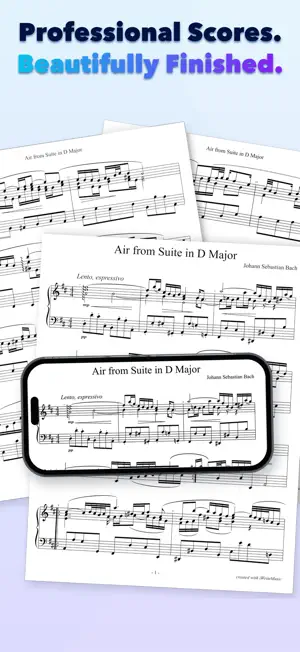
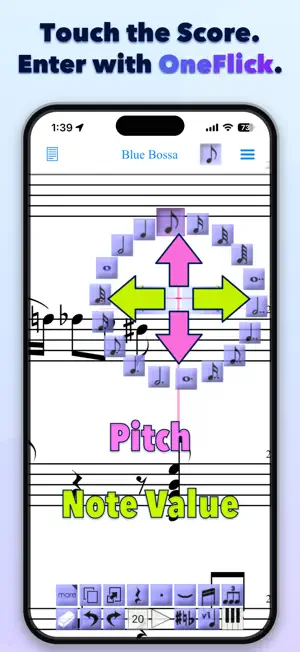
Less learning. More music. Professional notation without the lengthly learning process. Whether you are capturing a musical idea, preparing lesson material or a lead sheet, or completing a large score, iWriteMusic helps you turn inspiration into finished notation efficiently. 7 reasons to choose iWriteMusic. 1. Easy to master. Essential controls are organized clearly, so even if notation apps are new to you, you can get started without relying on a thick manual or a long series of tutorial videos. 2. Enter notes faster, your way. With OneFlick, you can combine choices such as pitch and note value into a single gesture. Traditional Entry lets you choose the notation item and its position separately. Use either method to match the task and the way you prefer to work. 3. Create polished, professional scores. Flexible page-layout tools help you prepare music for practice, lessons, rehearsals, performance, and distribution. Create individual parts from a score and print directly with AirPrint. 4. Use the notation your music requires. Create multi-track, multi-voice scores with lyrics, chord symbols, percussion, drum notation, and multi-bar rests. Add key, time, clef, and tempo changes within a piece, along with grace notes, articulations, dynamics, and full or partial transposition. 5. Keep scores and parts organized. Manage scores and their individual parts together, and use folders to organize a growing collection of compositions and teaching materials. 6. Listen, check, and practice. Play your score while you work. Use the mixer, solo, mute, instrument selection, loop playback, and swing playback to check your music or support daily practice. 7. Export and share for any purpose. Export PDF, image, Standard MIDI, MusicXML, and audio files (WAV). Share editable iWriteMusic files and continue working on another device. For composers, arrangers, songwriters, music teachers, students, singers, and instrumentalists. Use iWriteMusic for musical sketches, lead sheets, chord charts, lesson materials, choral and ensemble scores, chamber music, band music, orchestral scores, and individual parts. iWriteMusic is free to download. Some features require one-time in-app purchases.
Ratings & reviews
4.5
181 ratings
What’s new
Version 3.7.1 · Updated November 10, 2026
Fixed an issue that could display incorrect track names when scrolling in Playback Settings. Since version 3.7.0, this app has been free to download, with additional features available through in-app purchases. Features included in your previous app and in-app purchases remain available at no additional charge.
App privacy
The developer, iWriteMusicProject, reported these privacy practices to Apple.
Data Not Collected
The developer does not collect any data from this app.
Alternatives to iWriteMusic
Looking for apps like iWriteMusic? Here are 6 similar apps on the App Store. The highest rated is Melospin: Vinyl Record Player (5.0/5), and all 6 are free to download.
-
 Sight Reading Machine
3.7
-
 Hip Hop Drummer: Boom Bap
4.8
-
 MIDI Aid
-
 Sidecar MIDI Controller
4.9
-
 iMridangam Manjira Tambura
2.8
-
 Melospin: Vinyl Record Player
5.0
| App | Rating | Price | Last updated | Compare |
|---|---|---|---|---|
| iWriteMusic | 4.5 / 5 (181 ratings) | Free | November 10, 2026 | |
| Sight Reading Machine | 3.7 / 5 (26) | Free | Nov 11, 2026 | Compare |
| Hip Hop Drummer: Boom Bap | 4.8 / 5 (163) | Free | Nov 8, 2026 | Compare |
| MIDI Aid | – | Free | Nov 15, 2026 | Compare |
| Sidecar MIDI Controller | 4.9 / 5 (14) | Free | Feb 24, 2026 | Compare |
| iMridangam Manjira Tambura | 2.8 / 5 (12) | Free | Nov 13, 2026 | Compare |
| Melospin: Vinyl Record Player | 5.0 / 5 (5) | Free | Nov 19, 2026 | Compare |
Compare iWriteMusic with the top alternatives: ratings, updates, ASO score and keyword gaps →