
pdf-notes for iPad (ads)
AMuseTec Co., Ltd. Productivity iPad
pdf-notes for iPad (ads) is a free Productivity app for iPad by AMuseTec Co., Ltd. Rated 3.3/5 from 23 ratings. Requires iOS 16.0. Updated April 13, 2026.
- Rating
- 3.3
- 23 ratings
- Price
- Free
- on the App Store
- Size
- 141 MB
- Age 4+
- Updated
- Apr 13
- 2026 · v26.4.2
Screenshots

About pdf-notes for iPad (ads)
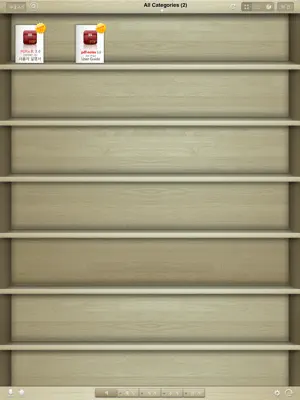
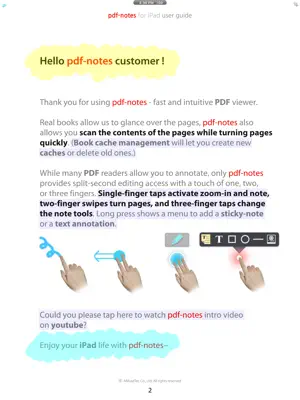
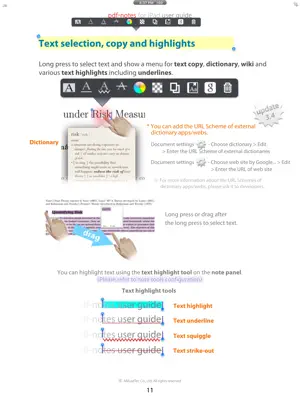
[notice] pdf-notes for iPad (ads) involves advertisements. Paid version is available at http://itunes.apple.com/app/id4172008446 Utilize pdf-notes to manage all the pdf files on your iPad. Fast display, quick page-turning even a thousand pages, useful finger-writing and email your notes to your friends. Differentiation-1. While turning pages of paperbooks fast, you can glance over the pages. While turning pages of pdf-notes fast, you can still run over the contents. Speedy page turning and scanning the contents with pdf-notes or paperbooks. Differentiation-2. There are many pdf readers allow you to annotate; but do you know which app allows you can write any notes in a second? If you are using pdf-notes, you may experience very fast and intuitive finger-writing like: zoom-in and note by double-tap or; writing with one finger, page-turning with two fingers, pen-changing with three fingers. - Easy importing PDF files through (DropBox, Email or Safari's) "Open In..." or iTunes - Categorized multiple bookshelves(booklists) with powerful search - Displaying pages as optimized size 1024x768 of iPad - Portrait and landscape view - Pinch zoom and crop page-margins - Fast loading and Speedy page-turning - Finger-writing with a variety of pens, highlighters and text notes - Easy "zoom-in and note" on a magnified screen by a double tap - One-step page-turning using 2 fingers on editing mode - One-step pen-changing or undo/redo using 3 fingers on editing mode - Exporting annotated PDF files to Email - External display and screen brightness controls - AirPrint and multi-tasking Misunderstandings about pdf-notes: - Not only pdf-notes but every app recently updated is removed from the open-in menu because iOS5 or formers currently show only 10 apps in open-in menu. - iPad/iphone Mail/iBooks can't display PDF annotations so that please open it in the other pdf apps. - please visit the support site for more information http://bit.ly/f6D31P Blog http://pdf-notes.com Email [email protected] Twitter http://twitter.com/musebook4u YouTube http://youtu.be/4AyRyFq9yxg NOTE: All content contained herein is subject to change without notice.
Ratings & reviews
3.3
23 ratings
What’s new
Version 26.4.2 · Updated April 13, 2026
- search bug fixed (Document Settings > "Text search failed? Reset search data")
App privacy
The developer, AMuseTec Co., Ltd., reported these privacy practices to Apple.
Data Used to Track You
The following data may be used to track you across apps and websites owned by other companies:
- Location: Coarse Location
- Identifiers: Device ID
- Usage Data: Product Interaction, Advertising Data
- Diagnostics: Crash Data, Performance Data
Data Not Linked to You
The following data, which may be collected but is not linked to your identity, may be used for the following purposes:
- Location: Coarse Location
- Identifiers: Device ID
- Usage Data: Product Interaction, Advertising Data
- Diagnostics: Crash Data, Performance Data
Used for: Third-Party Advertising
Alternatives to pdf-notes for iPad (ads)
Looking for apps like pdf-notes for iPad (ads)? Here are 6 similar apps on the App Store. The highest rated is Notepad: notes, checklist (5.0/5), and all 6 are free to download.
-
 PDF Max - Edit, Sign PDFs
4.5
PDF Max - Edit, Sign PDFs
4.5
-
 국민 메모장 솜노트 - SomNote
4.7
국민 메모장 솜노트 - SomNote
4.7
-
 PDF Cabinet
3.8
PDF Cabinet
3.8
-
 Notepad: notes, checklist
5.0
Notepad: notes, checklist
5.0
-
 WeNotes+
4.8
WeNotes+
4.8
-
 Note X - Notepad
4.6
Note X - Notepad
4.6
| App | Rating | Price | Last updated | Compare |
|---|---|---|---|---|
| pdf-notes for iPad (ads) | 3.3 / 5 (23 ratings) | Free | April 13, 2026 | |
| PDF Max - Edit, Sign PDFs | 4.5 / 5 (1,176) | Free | Sep 15, 2026 | Compare |
| 국민 메모장 솜노트 - SomNote | 4.7 / 5 (801) | Free | Oct 7, 2026 | Compare |
| PDF Cabinet | 3.8 / 5 (57) | Free | Dec 22, 2024 | Compare |
| Notepad: notes, checklist | 5.0 / 5 (2) | Free | Jan 19, 2025 | Compare |
| WeNotes+ | 4.8 / 5 (2,177) | Free | Jun 6, 2026 | Compare |
| Note X - Notepad | 4.6 / 5 (27) | Free | Oct 1, 2024 | Compare |