

iGIS for iPad
Geometry Navigation iPad
iGIS for iPad is a free Navigation app for iPad by Geometry. Rated 3.0/5 from 2 ratings. Requires iOS 15.6. Updated June 3, 2026.
- Rating
- 3.0
- 2 ratings
- Price
- Free
- on the App Store
- Size
- 75 MB
- Age 4+
- Updated
- Jun 3
- 2026 · v8.4.16
Screenshots

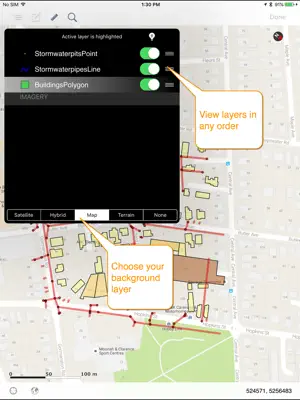
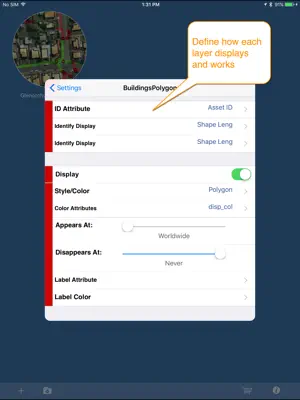

About iGIS for iPad
iGIS - The world's first and leading iOS GIS. True GIS functionality is now available on the iPad! Your iPad. Your data. Your maps. iGIS represents a new era in mobile GIS solutions by enabling users to load, view, investigate, create and export their own data over a background of map service imagery. Importing data is easy with our unique data import facility supporting Mac, PC and Linux or via the USB cable. ESRI Shapefiles (.shp) are supported at the moment. Great for field work as your spatial data is stored on the iPad, so there is no need for an Internet connection to see your data. We also support over 3000 projections, so there is no need for data re-projection. We include support for multiple layers of points, lines, and polygons and imagery – all styled as you like. Add comments to your maps - A point layer is added with a name and description field. You can add or edit any of your layers - and even define your own data entry forms with dropdown lists for codes, etc. Export your layers to ESRI shapefiles for use back in your enterprise. Other features include: - Great speed, using our multi-threaded map renderer. - Support for large datasets. - Add your own imagery - Import and export of ESRI Shapefiles. - Display current GPS location in your chosen projection ( + compass) - Zoom to current location - Zoom to data extent - Map Pan, zoom in, zoom out - Changeable drawing styles for a layer: size, color, transparency - Set the draw order and visibility of map layers - Set the zoom scale for layers via a simple slider - Select and interrogate feature attributes via point and click This application is designed for GIS professionals and an understanding of some basic GIS concepts such as layers, shapefiles, projections etc, would make using iGIS simpler. Please let us know if concepts in iGIS are unclear. We know there’s a lot more functionality that we haven’t included. Let us know what features you’d like to see added or improved. iGIS can use the GPS in the background. Continued use of GPS running in the background can dramatically decrease battery life. Thanks for your interest, The Geometry Team
What’s new
Version 8.4.16 · Updated June 3, 2026
Bug fixes
App privacy
The developer, Geometry, reported these privacy practices to Apple.
Data Not Linked to You
The following data, which may be collected but is not linked to your identity, may be used for the following purposes:
- Diagnostics: Performance Data, Other Diagnostic Data
Used for: Analytics, App Functionality
Alternatives to iGIS for iPad
Looking for apps like iGIS for iPad? Here are 6 similar apps on the App Store. The highest rated is Survey360 (5.0/5), and all 6 are free to download.
-
 MyGIS
1.0
MyGIS
1.0
-
 Survey360
5.0
Survey360
5.0
-
 Global Mapper Mobile
3.7
Global Mapper Mobile
3.7
-
 3D Mappa - GIS & Topo Models
4.6
3D Mappa - GIS & Topo Models
4.6
-
 Map Plus
4.6
Map Plus
4.6
-
 ArcGIS Navigator
2.7
ArcGIS Navigator
2.7
| App | Rating | Price | Last updated | Compare |
|---|---|---|---|---|
| iGIS for iPad | 3.0 / 5 (2 ratings) | Free | June 3, 2026 | |
| MyGIS | 1.0 / 5 (1) | Free | Jan 25, 2024 | Compare |
| Survey360 | 5.0 / 5 (1) | Free | Feb 22, 2024 | Compare |
| Global Mapper Mobile | 3.7 / 5 (15) | Free | Feb 11, 2026 | Compare |
| 3D Mappa - GIS & Topo Models | 4.6 / 5 (18) | Free | Sep 25, 2026 | Compare |
| Map Plus | 4.6 / 5 (637) | Free | Oct 9, 2026 | Compare |
| ArcGIS Navigator | 2.7 / 5 (19) | Free | Nov 12, 2024 | Compare |
Compare iGIS for iPad with the top alternatives: ratings, updates, ASO score and keyword gaps →