

WiFi Camera - Remote iPhones
Daniel Amitay Photo & Video iPhoneiPadiPod touch
WiFi Camera - Remote iPhones is a paid Photo & Video app for iPhone and iPad by Daniel Amitay. Rated 2.7/5 from 9 ratings. Requires iOS 18.0.
- Rating
- 2.7
- 9 ratings
- Price
- 1.99 USD
- on the App Store
- Size
- 1 MB
- Age 4+
- Updated
- Oct 18
- 2026 · v3.0
Screenshots


About WiFi Camera - Remote iPhones
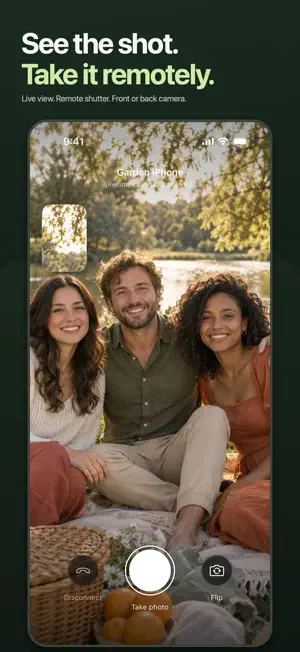
Use one iPhone or iPad to see through another's camera and take the photo remotely. Set up your camera, check the framing on your other device, and tap the shutter when everyone is ready. WiFi Camera sends the full-size photo back to you, ready to save or share. CONNECT TWO DEVICES Install and open WiFi Camera on both devices. Find your other iPhone or iPad in the nearby list, tap to connect, and accept the invitation. You can also enable auto-accept for nearby invitations. SEE AND CONTROL THE CAMERA Watch the live camera view, switch between the other device's front and back cameras, and take photos remotely. When both devices have a camera, they can share their views with each other. KEEP THE ORIGINAL PHOTO Browse your photos in the app, zoom in to check the details, save to your photo library, or share the original image with the iOS share sheet. MADE FOR IPHONE AND IPAD Use an iPhone as the camera and an iPad as the viewfinder, or connect two iPhones. The dark interface keeps the live view in focus, with clear controls and a small preview of your own camera. REQUIREMENTS • Two nearby iPhones or iPads with WiFi Camera installed and open. • This version requires iOS 18 or iPadOS 18 or later. • At least one device must have an available camera. • Enable Wi-Fi or Bluetooth and allow Local Network access when prompted. A shared Wi-Fi network is recommended for live video. WiFi Camera connects Apple mobile devices to each other. It does not connect to standalone cameras, DSLRs, webcams, or IP security cameras, and it is not an internet-based remote monitoring service.
Ratings & reviews
2.7
9 ratings
What’s new
Version 3.0 · Updated October 18, 2026
WiFi Camera 3.0 brings a refreshed interface and a modern camera connection. • Redesigned camera controls, nearby device list, settings, and photo library. • More efficient H.264 live video between compatible devices, with support for connecting to older WiFi Camera clients. • Updated photo capture, full-size photo sharing, and saving to Photos. • Clearer connection status, photo transfer progress, and recovery when a connection fails. • Fixes for discovery resuming and remote camera orientation. Requires iOS 18 or iPadOS 18 or later.
App privacy
The developer, Daniel Amitay, reported these privacy practices to Apple.
Data Not Collected
The developer does not collect any data from this app.
Alternatives to WiFi Camera - Remote iPhones
Looking for apps like WiFi Camera - Remote iPhones? Here are 6 similar apps on the App Store. The highest rated is Luxa RAW Camera (5.0/5), and 5 of the 6 are free to download.
-
 Film Camera Remote
-
 Luxa RAW Camera
5.0
-
 myGPS Map Camera
-
 Home Movies: Vintage Camcorder
-
 RetroLine: Draw To Find Photo
5.0
-
 Traxxtar Videoview
| App | Rating | Price | Last updated | Compare |
|---|---|---|---|---|
| WiFi Camera - Remote iPhones | 2.7 / 5 (9 ratings) | 1.99 USD | October 18, 2026 | |
| Film Camera Remote | – | Free | Oct 26, 2026 | Compare |
| Luxa RAW Camera | 5.0 / 5 (2) | Free | Nov 1, 2026 | Compare |
| myGPS Map Camera | – | Free | Nov 4, 2026 | Compare |
| Home Movies: Vintage Camcorder | – | Free | Sep 17, 2026 | Compare |
| RetroLine: Draw To Find Photo | 5.0 / 5 (1) | 0.99 USD | Oct 13, 2026 | Compare |
| Traxxtar Videoview | – | Free | Oct 2, 2026 | Compare |