

MATLAB Mobile
MathWorks Business iPhoneiPadiPod touch
MATLAB Mobile is a free Business app for iPhone and iPad by MathWorks. Rated 3.2/5 from 179 ratings. Requires iOS 17.0. Updated October 13, 2026.
- Rating
- 3.2
- 179 ratings
- Price
- Free
- on the App Store
- Size
- 27 MB
- Age 4+
- Updated
- Oct 13
- 2026 · v9.13
Screenshots

About MATLAB Mobile
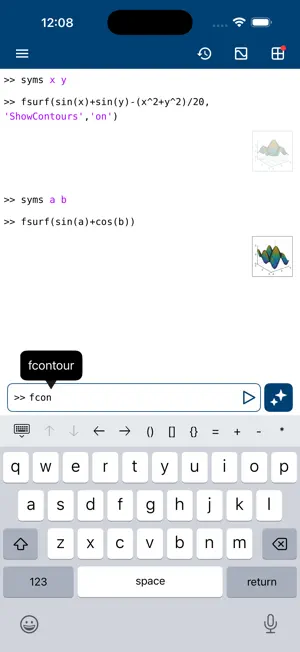
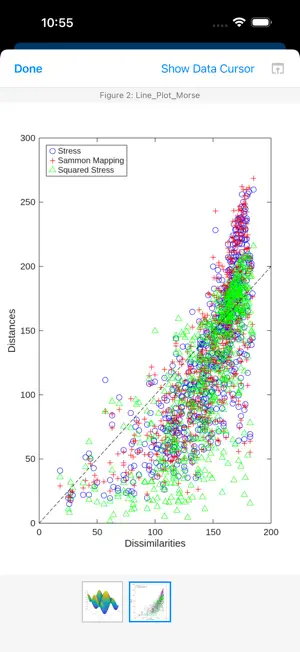
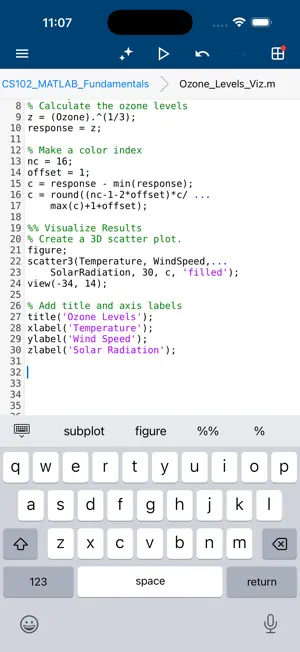
Connect to MATLAB® from your iPhone or iPad. Evaluate MATLAB commands, create and edit files, view results, acquire data from sensors, and visualize data – from the convenience of your mobile device. CONNECT TO THE CLOUD Use your MathWorks Account to connect to MathWorks Cloud from MATLAB Mobile™. Linking a license that is current on MathWorks Software Maintenance Service to your MathWorks Account increases your storage quota and unlocks access to other add-on products on the license. With your MathWorks Account, you can: • Access MATLAB from the command-line • View, run, edit and create files from the Editor • Acquire data from device sensors • Store your files and data on MATLAB Drive (you receive 5 GB of cloud storage) Link a license that is current on MathWorks Software Maintenance Service to your MathWorks Account to unlock the following features: • Access to other add-on products on your license • 20 GB of cloud storage on MATLAB Drive FEATURES • Command-line access to MATLAB and add-on products • MATLAB Copilot for AI-assisted coding with a valid license • 2D and 3D plots to visualize data • Editor to view, run, edit and create MATLAB files • Data acquisition from device sensors • Image and video acquisition from the camera • Cloud storage and synchronization with MATLAB Drive • Custom keyboard to enter typical MATLAB syntax LIMITATIONS The following features are not supported: • Using MATLAB Apps, such as Curve Fitting • Creating apps with App Designer • Interacting with 3D figures • Opening or creating models using the Simulink graphical environment Note: Continued use of GPS running in the background can dramatically decrease battery life. ABOUT MATLAB MATLAB is the leading technical computing software for algorithm development, data visualization, data analysis, and numeric computation. MATLAB is used in a wide range of applications, including signal and image processing, communications, control design, test and measurement, financial modeling and analysis, and computational biology.
Ratings & reviews
3.2
179 ratings
What’s new
Version 9.13 · Updated October 13, 2026
- Support for plain text Live Code format (.m) - Bug fixes
App privacy
The developer, MathWorks, reported these privacy practices to Apple.
Data Linked to You
The following data, which may be collected and linked to your identity, may be used for the following purposes:
- Contact Info: Email Address, Name
Used for: Developer’s Advertising or Marketing, App Functionality
Data Not Linked to You
The following data, which may be collected but is not linked to your identity, may be used for the following purposes:
- Identifiers: Device ID
- Usage Data: Product Interaction
- Location: Precise Location
- User Content: Photos or Videos
Used for: Analytics, App Functionality
Alternatives to MATLAB Mobile
Looking for apps like MATLAB Mobile? Here are 6 similar apps on the App Store. The highest rated is LaTeX Editor Tex Pro (4.8/5), and all 6 are free to download.
-
 LaTeX Editor Tex Pro
4.8
-
 Onshape 3D CAD
3.5
-
 C/C++-programming language
4.5
-
 Autodesk Fusion
4.5
-
 Shapr 3D CAD modeling
4.7
-
 AutoCAD
4.4
| App | Rating | Price | Last updated | Compare |
|---|---|---|---|---|
| MATLAB Mobile | 3.2 / 5 (179 ratings) | Free | October 13, 2026 | |
| LaTeX Editor Tex Pro | 4.8 / 5 (1,670) | Free | Jun 1, 2026 | Compare |
| Onshape 3D CAD | 3.5 / 5 (414) | Free | Oct 10, 2026 | Compare |
| C/C++-programming language | 4.5 / 5 (347) | Free | Sep 16, 2025 | Compare |
| Autodesk Fusion | 4.5 / 5 (4,096) | Free | Oct 21, 2026 | Compare |
| Shapr 3D CAD modeling | 4.7 / 5 (34,196) | Free | Oct 22, 2026 | Compare |
| AutoCAD | 4.4 / 5 (6,266) | Free | Aug 4, 2026 | Compare |
Compare MATLAB Mobile with the top alternatives: ratings, updates, ASO score and keyword gaps →