

Learn To Write
Justin Hackett Productions Education iPhoneiPadiPod touch
Learn To Write is a paid Education app for iPhone and iPad by Justin Hackett Productions. Rated 2.9/5 from 7 ratings. Requires iOS 12.0.
- Rating
- 2.9
- 7 ratings
- Price
- 1.99 USD
- on the App Store
- Size
- 52 MB
- Age 4+
- Updated
- Jan 11
- 2024 · v4.3
Screenshots

About Learn To Write
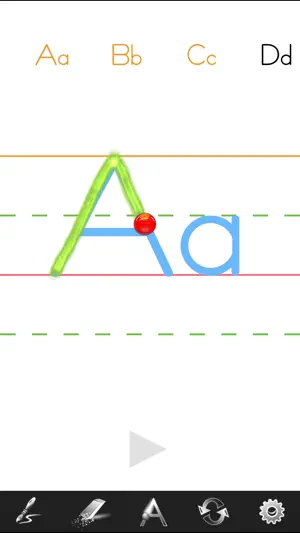
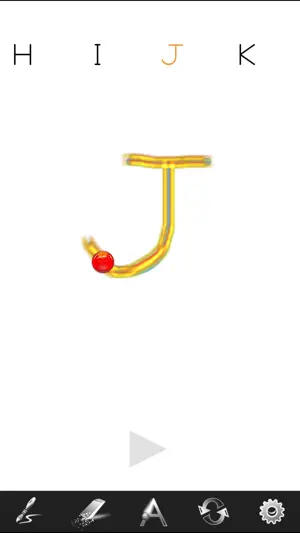
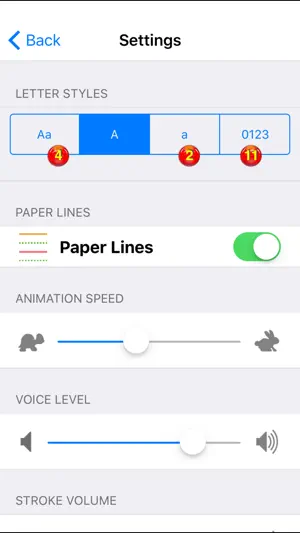
The app educators choose for classroom use, and the only app that records a child's letter strokes for parents and educators to review. Learn to Write is a fun way for children to learn how to write their letters and numbers, and with the improved playback feature in version 4.1, it's easy for the teacher to make sure they do it correctly. This unique playback function, found in Learn to Write, saves the child's writing so you can play it back in real time to see how the child is forming letters and numbers. Children learn the proper strokes with the help of an adjustable-speed-animated ball that they can follow and write along with. With each selection of a letter or number, an audio file says the letter to aid in memorizing the alphabet. Over a dozen unique pen styles are available for tracing. Parents enjoy the educational value and entertainment this mess-free learning tool provides (after all, who needs crayon, marker, or pencil stains on the carpet, table, or wall?). Also great for long car trips, doctor's offices, and other waiting times. Write letters and numbers, or draw on the screen, and push the play-back button to see it all in real-time. Not only is this a great app for teaching children at home, educators are also choosing this app for classroom instruction. You won't find silly cartoon characters and frustrating feedback that tells children they formed letters incorrectly when they failed to trace exactly as outlined. You help children Learn to Write, and then you can review the strokes of every letter formed for further one-on-one instruction. Recommended for children 2 years and up. --------- No in-app purchases. No advertisements, popups, or storing of personal data. --------- The strokes used in Learn To Write resemble the Zaner-Bloser style, which is also used in Romalda Spalding's The Writing Road to Reading, with the exception that O’s and Q’s are started at the top 12 o’clock position instead of the suggested 2 o’clock position. Not all teachers agree on the proper strokes for some letters. For example, some teachers prefer that the pen or stylus never leave the paper except to cross a t, or dot an i. A person's handwriting often adapts with time to be as efficient as possible, while still maintaining proper form. This application is meant as a guide to children and parents, but your individual curriculum may differ slightly. Instructions for use: -Select numbers, or letters in lowercase, uppercase, or mixed case using the segmented control on the settings screen. -When a letter is selected and the child writes upon the screen, the writing is saved in memory. Pushing the triangle-shaped play button at the bottom of the writing screen plays back the last recorded strokes for each letter. A toolbar button allows the user to erase all of the saved strokes in memory. -Red number icons on the settings screen give the total number of letter or number recordings. -The brush button displays a pulldown menu full of usable brush styles. Just touch the brush-style to select it. -Letter buttons display the letter on the screen and turn orange when there are saved strokes for the letter. At any time the user can draw using one's finger, just like a real pen and erase the drawing with the erase button on the toolbar. -The toolbar button with a letter and ball activates the animated red ball, which demonstrates proper letter or number formation. - Adjust the speed of the ball and volume using the sliders on the settings screen. -Press the home and power button at the same time to take a snapshot of the screen and save it in the photo archive of the device .
Ratings & reviews
2.9
7 ratings
What’s new
Version 4.3 · Updated January 11, 2024
- Fixed an issue where the ball animation-speed was too fast. - Fixed an issue on the iPad version that made the brush-size too large when writing.
App privacy
The developer, Justin Hackett Productions, reported these privacy practices to Apple.
Data Not Collected
The developer does not collect any data from this app.
Alternatives to Learn To Write
Looking for apps like Learn To Write? Here are 6 similar apps on the App Store. The highest rated is Feature Function Class (5.0/5), and 5 of the 6 are free to download.
-
 Gold River Calvary Chapel
-
 Phonics Connections
-
 Feature Function Class
5.0
Feature Function Class
5.0
-
 Alge-Bingo
-
 Learn Norwegian Lang
-
 MC Card Codex - LCG Companion
5.0
MC Card Codex - LCG Companion
5.0
| App | Rating | Price | Last updated | Compare |
|---|---|---|---|---|
| Learn To Write | 2.9 / 5 (7 ratings) | 1.99 USD | January 11, 2024 | |
| Gold River Calvary Chapel | – | Free | Dec 14, 2025 | Compare |
| Phonics Connections | – | 1.99 USD | Oct 27, 2024 | Compare |
| Feature Function Class | 5.0 / 5 (1) | Free | Sep 10, 2026 | Compare |
| Alge-Bingo | – | Free | Jan 5, 2026 | Compare |
| Learn Norwegian Lang | – | Free | Dec 10, 2025 | Compare |
| MC Card Codex - LCG Companion | 5.0 / 5 (4) | Free | Aug 2, 2026 | Compare |
Compare Learn To Write with the top alternatives: ratings, updates, ASO score and keyword gaps →