

Dashometer
Ian Ray Navigation iPhoneiPadiPod touch
Dashometer is a paid Navigation app for iPhone and iPad by Ian Ray. Rated 4.8/5 from 18 ratings. Requires iOS 14.0. Updated October 6, 2025.
- Rating
- 4.8
- 18 ratings
- Price
- 1.99 USD
- on the App Store
- Size
- 1 MB
- Age 4+
- Updated
- Oct 6
- 2025 · v15.5
Screenshots


About Dashometer
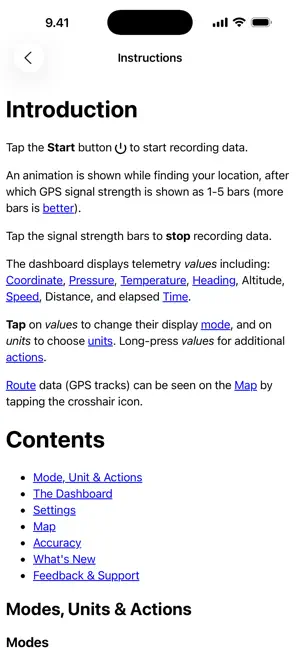
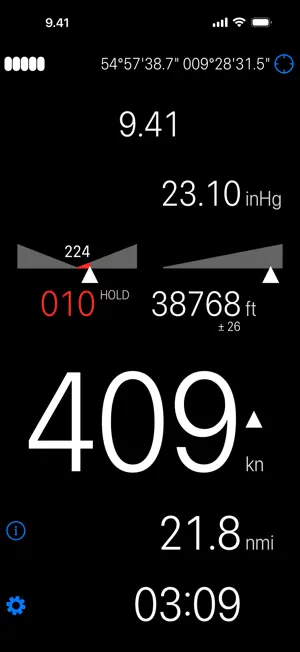
The most accurate, reliable, and flexible GPS tool for iPhone and iPad! Watch the data you care about in real-time. Track your trip. Share your route. Escape from Zombies. Ideal for walking, running, cycling, motorbiking, driving, geocaching, and more! • Highly customizable • Large, easy to read display • Comprehensive built-in instructions The dashboard displays telemetry values including: location, heading, pressure, temperature, altitude, speed, distance, and elapsed time. Tap on values to change their display mode; many have units which can also be changed with a tap - and many respond to a long-tap to allow further configuration. FEATURES • Imperial or metric units • Customizable gestures • Customizable colors and fonts • Landscape / portrait orientation • Full VoiceOver (accessibility) support • HUD (mirrored) mode for viewing on your windshield • Record route (GPS Tracks) • View route on map • Find the address of a location (reverse-geocode) • Create bookmarks from addresses (geocode) • Location (latitude, longitude) • Pressure (using internal barometer on devices that support it) • Temperature • Heading (degrees magnetic, or true; using GPS or internal magnetometer) • Heading hold alarm • Altitude (current, minimum, maximum) • Speed (current, average, trip average, maximum, pace) • Distance (current, odometer, travel alarm, proximity alarm) • Travel alarm • Proximity alarm • Time (moving, stopped, travel alarm, proximity alarm, countdown timer) • Countdown timer • Share location, bookmarks, and trips • Share or export (KML, GPX) to compatible Apps FIFTEEN YEARS OF 5-STAR REVIEWS! ***** mike - v11.1 - Dec 27, 2018 I bought this app because i needed one that showed magnetic heading, as well as groundspeed for my experimental airplane. Wow, it does so much more, and displays in landscape or portrait. Can change display colors, review flight later with speed, times and altitudes, and the instructions are fantastic, great product, worth a lot more than I paid for it!! ***** Malix90x – Jun 7, 2016 It is the best in its genre as it is the most complete! So many thanks to the developer :) ***** TxHornyToad – Jan 3, 2016 In a large field of "Speed" apps this has to be the best. Very clean and clear display. Very customizable. Responsive support. ***** R8Jimmy - v4.5 - Jul 6, 2013 Works as advertised. Very informative when using it on my motorcycle. Display is easy to read. Excellent support from developer. Highly recommended! ***** tmuecke - v4.3 - 30-Jan-2013 Unbelieveable that I am the first one to rate this App. ...offers great features. ...and is a must have for everybody who wants to have precise information... Perfect and thank you!!! ***** Brimstin85 - v4.1 - 22-Nov-2012 The information is large, easy to read, accurate, and intuitively laid out. The app is easy to use and very capable. It has plenty of advanced features too. Worth every penny. ***** v2.7 - 19-Aug-2011 The display is very clear and easy to read in a car and on a bike. The dev is very quick to respond to feedback as well. GETTING STARTED The dashboard displays telemetry values for the current trip. Tap Start to start a new trip or continue the current one. Starting a new trip automatically saves all of the trip data, and saved trips can be viewed via the Settings menu. An animation is shown while finding your location, after which GPS signal strength is shown as 1-5 bars (more bars is better). Tap the signal indicator to stop recording data. For more information please consult the built-in instructions. Please note that continued use of GPS running in the background can dramatically decrease battery life. iPod Touch and Wi-Fi only iPad users NOTE! you need an external GPS receiver. UPDATES Dashometer is updated with new functionality based on *your* feedback. We really want to hear your comments and ideas for new features, so please get in touch at dashometer(at)gmail.com to get support or give feedback!
Ratings & reviews
4.8
18 ratings
What’s new
Version 15.5 · Updated October 6, 2025
* Use standard iOS colour picker * All themes may be edited * Unit colour may be customized * Needle colour may be customized * Improve layout * Requires iOS 14 or later
App privacy
The developer, Ian Ray, reported these privacy practices to Apple.
Data Not Collected
The developer does not collect any data from this app.
Alternatives to Dashometer
Looking for apps like Dashometer? Here are 6 similar apps on the App Store. The highest rated is Speedometer - Race Companion (5.0/5), and 5 of the 6 are free to download.
-
 aSmart HUD +SpeedCams
1.3
aSmart HUD +SpeedCams
1.3
-
 ADVGuide
-
 Speedometer - Race Companion
5.0
Speedometer - Race Companion
5.0
-
 TailLog: Plane Spotting
5.0
TailLog: Plane Spotting
5.0
-
 Speedometer Pro: GPS Tracker
5.0
Speedometer Pro: GPS Tracker
5.0
-
 Boat Maps: Amsterdam Canals
| App | Rating | Price | Last updated | Compare |
|---|---|---|---|---|
| Dashometer | 4.8 / 5 (18 ratings) | 1.99 USD | October 6, 2025 | |
| aSmart HUD +SpeedCams | 1.3 / 5 (3) | 0.99 USD | Jan 13, 2025 | Compare |
| ADVGuide | – | Free | Sep 16, 2026 | Compare |
| Speedometer - Race Companion | 5.0 / 5 (1) | Free | Dec 16, 2025 | Compare |
| TailLog: Plane Spotting | 5.0 / 5 (5) | Free | May 18, 2026 | Compare |
| Speedometer Pro: GPS Tracker | 5.0 / 5 (1) | Free | Feb 4, 2026 | Compare |
| Boat Maps: Amsterdam Canals | – | Free | Sep 7, 2026 | Compare |
Compare Dashometer with the top alternatives: ratings, updates, ASO score and keyword gaps →