

Shift Worker
Production Shed Pty Ltd Productivity iPhoneiPadiPod touch
Shift Worker is a paid Productivity app for iPhone and iPad by Production Shed Pty Ltd. Rated 3.7/5 from 102 ratings. Requires iOS 15.6.
- Rating
- 3.7
- 102 ratings
- Price
- 1.99 USD
- on the App Store
- Size
- 8 MB
- Age 4+
- Updated
- Sep 24
- 2026 · v1.7.0
Screenshots



About Shift Worker
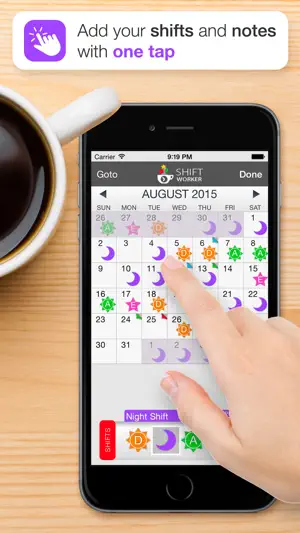
Shift Worker is designed for people who need a quick and easy way to enter and view their shifts. A traditional calendar is not always ideal for shift workers. Sometimes it's not easy to see your upcoming shift schedule very clearly, especially if your shifts don't fall into the traditional working week. Shift Worker solves this problem and turns the frustrating task of entry into a quick and easy experience. Shift Worker allows you to create your own types of shifts by combining visually-attractive icons with letters/numbers so that they can be easily identified at a glance. By including a range of icons (such as suns and stars for day and night shifts) in a variety of colors, any combination is possible for all types of shifts. Entering shifts can be done quickly by simply selecting a type of shift and tapping on each date it occurs. An entire month of shifts could be entered in seconds, an entire year in a few minutes! In addition, Shift Worker allows you create multiple calendars to see friends and family shifts! You can send your shifts to others so they can also see your shifts at a glance as an image or in their copy of Shift Worker. To make things even simpler, you can even save your shifts to your iPhone/iPod's background so that referring to your upcoming shift schedule is as simple as picking up your iPhone/iPod. Shift Worker also includes the ability to create colored personalized notes for each date. Notes can be used anytime additional information needs to be added to a date. FEATURES: - Create a virtually unlimited amount of shift types - Enter shifts on the calendar months in advance in seconds - Add your rotation and automatically fill the calendar in a few simple steps - Show friends and family shifts using multiple calendars - View the calendar in timeline format to see your shift flow at a glance - Create colored personalized notes for any date on the calendar - Include week of year or week 1/2 alternating pattern on calendar - Jump to any month by using the "Goto" button - Save a month's worth of shifts to your background - Share your shifts to others via email, messages and social media. - Import other Shift Worker shifts and view them all within the one app - No ads! Terms of Use (EULA): https://www.apple.com/legal/internet-services/itunes/dev/stdeula/
Ratings & reviews
3.7
102 ratings
What’s new
Version 1.7.0 · Updated September 24, 2026
Added • Sync your shifts straight to your calendar. Turn on Calendar Sync (from Settings, or the new shortcut icon on the main screen) and every shift automatically appears in your device's Calendar app, staying up to date on its own whenever a shift changes. No manual re-syncing needed! • Choose exactly which calendar your shifts go to, including a shared or family calendar if you'd rather everyone see your schedule there. • Pick when you want to be reminded - no alert, right at the time of the shift, or anywhere from 5 minutes up to a full week beforehand. • Calendar Sync is a subscription (monthly or yearly) option. Improved • If you sync to a calendar shared with others, a note now explains they'll see your shift updates too. • Re-syncing no longer rewrites events that haven't actually changed, so anyone else on a shared calendar isn't pinged with "this event changed" notifications for nothing. • Only your current and future shifts get synced. Past history isn't back-filled, but a shift that was already synced stays on your calendar even once its date has passed, instead of quietly disappearing. • Turning sync off now also cleanly removes the shifts it had added to your calendar. Fixed • Reminders sometimes not showing up at all on newly-added synced shifts. • Reminders occasionally only "sticking" on the last shift when several were synced at once. • Swipe-to-delete not working in Shift Manager. • Bulk Actions rows not responding to taps. • Importing a .swc/.swb backup file skipping the calendar picker. • Sync occasionally reading from the wrong calendar rather than the one you had actively selected. • Bottom toolbar buttons (the calendar and settings icons especially) occasionally not responding to the very first tap.
App privacy
The developer, Production Shed Pty Ltd, reported these privacy practices to Apple.
Data Not Collected
The developer does not collect any data from this app.
Alternatives to Shift Worker
Looking for apps like Shift Worker? Here are 6 similar apps on the App Store. The highest rated is My Shift Planner - Calendar (4.8/5), and all 6 are free to download.
-
 Shift Work Calendar Planner
4.7
Shift Work Calendar Planner
4.7
-
 ShiftLife Organizer
4.7
ShiftLife Organizer
4.7
-
 myShiftWork - Roster Calendar
4.5
myShiftWork - Roster Calendar
4.5
-
 My Shift Planner - Calendar
4.8
My Shift Planner - Calendar
4.8
-
 BCNU Connect
-
 Shift Day Work Calendar: Spoke
4.7
Shift Day Work Calendar: Spoke
4.7
| App | Rating | Price | Last updated | Compare |
|---|---|---|---|---|
| Shift Worker | 3.7 / 5 (102 ratings) | 1.99 USD | September 24, 2026 | |
| Shift Work Calendar Planner | 4.7 / 5 (9,585) | Free | Jul 26, 2026 | Compare |
| ShiftLife Organizer | 4.7 / 5 (1,801) | Free | Sep 18, 2026 | Compare |
| myShiftWork - Roster Calendar | 4.5 / 5 (141) | Free | Jun 19, 2026 | Compare |
| My Shift Planner - Calendar | 4.8 / 5 (3,500) | Free | Sep 2, 2026 | Compare |
| BCNU Connect | – | Free | Aug 6, 2026 | Compare |
| Shift Day Work Calendar: Spoke | 4.7 / 5 (14,348) | Free | Sep 10, 2026 | Compare |
Compare Shift Worker with the top alternatives: ratings, updates, ASO score and keyword gaps →