

SOOP - Live Streaming
SOOP Co., Ltd. Entertainment iPhoneiPadiPod touch
SOOP - Live Streaming is a free Entertainment app for iPhone and iPad by SOOP Co., Ltd. Rated 4.2/5 from 761 ratings. Requires iOS 15.0.
- Rating
- 4.2
- 761 ratings
- Price
- Free
- on the App Store
- Size
- 343 MB
- Age 12+
- Updated
- Sep 29
- 2026 · v8.32.0
Screenshots


About SOOP - Live Streaming
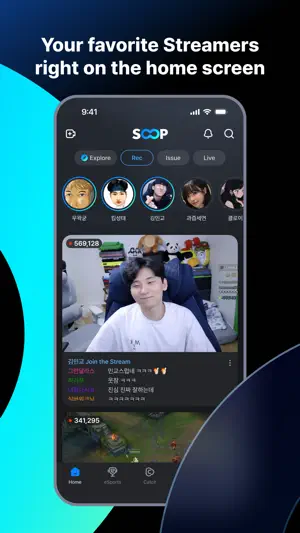
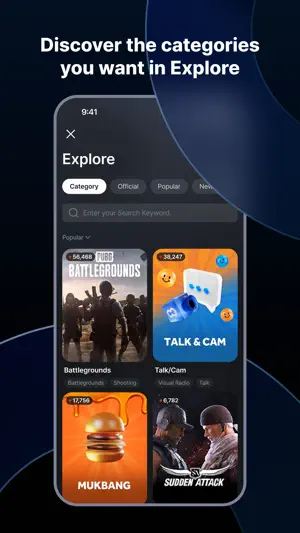
● Media where I become the owner, SOOP SOOP, a streaming platform created through participation and communication! Discover a variety of content at SOOP. ● Your favorite streamers on the front screen! You can quickly watch your favorite broadcasts. ● Find the category you want in the navigation! Easily discover various contents on SOOP through navigation. ● A catchy, immersive catch Enjoy short and fun content quickly. ● Participation and communication Check out the latest VODs and news from your favorite streamers on our channel. Become a streamer who communicates with various users through broadcasting. ● Best fun Discover SOOP original content from ASL, Cinety, etc. ● ‘Quick View’, ‘Quick View Plus’ that skips VOD advertisements - You can rewatch missed scenes with the official broadcast time machine function. - When entering the LIVE broadcast, you can participate without video advertisements. - Supports LIVE broadcast preview function. - You can use two broadcasts simultaneously in multi-view. (Quick View Plus) - You can participate in VOD advertisements without video advertisements. (Quick View Plus) ● [App Permissions] Required Permissions: None Optional Permissions: - Camera: Used to access the camera when streaming. - Microphone: Used to access the microphone for audio when streaming. - Photos and Videos: Used to attach images to your channel. - Notifications: Used to receive notifications for favorite channels and announcements. - Bluetooth: Used to play streams on connected devices. - Location: Used to measure the remaining distance while streaming. - Local Network: Used to discover and connect to supported devices. - Tracking: Used for certain campaigns in Collect Ad Balloons and to provide personalized ads. - You can use the service without granting optional permissions, except for features that require those permissions. ●iOS Quick View Plus Auto-Payment (App Store Subscription Payment) Notes - All pass prices in SOOP include VAT. - iOS Quick View Plus auto-payment (App Store subscription) is billed through the payment method registered to your Apple App Store iTunes Account. - The total amount includes Apple's commission and may vary depending on Apple’s pricing policy for each country. Please check the final amount on the Apple payment screen. - Subscription cancellation and payment details can only be checked through Apple. - Auto-payment for iOS subscription products follows Apple’s subscription policy. If you do not cancel at least 24 hours before the end of your subscription period, it may be renewed automatically. - App Store subscriptions are billed monthly and automatically renewed on the same date as the original purchase date. - The auto-payment time on the App Store and the purchase/expiration dates shown in SOOP may differ slightly depending on Apple’s confirmation timing. - iOS subscription products can be canceled in iTunes [Account Settings > Manage Subscriptions] or on iOS via [Settings > Apple ID > Subscriptions]. - Even if you cancel your subscription through iTunes or iOS Apple ID settings, the subscription will remain active until the end of the current billing period and then automatically expire. - One iTunes or Apple account can only be used to subscribe to SOOP products for one SOOP account. If you wish to subscribe with a different SOOP account, you must cancel your current subscription first. - For inquiries related to iOS payments (duplicate purchases, refunds, missing items, etc.), please contact Apple Support. Refunds for unused subscription periods are generally not available. ※ Terms of Use : https://www.sooplive.com/policy/lang/policy1_en.html ※ Privacy policy : https://www.sooplive.com/policy/lang/policy2_en.html ※ Customer Center Email: [email protected]
Ratings & reviews
4.2
761 ratings
What’s new
Version 8.32.0 · Updated September 29, 2026
[8.32.0 Update] - Other bug fixes and stabilizations
App privacy
The developer, SOOP Co., Ltd., reported these privacy practices to Apple.
Data Used to Track You
The following data may be used to track you across apps and websites owned by other companies:
- Identifiers: Device ID
Data Not Linked to You
The following data, which may be collected but is not linked to your identity, may be used for the following purposes:
- Identifiers: User ID, Device ID
- Usage Data: Advertising Data, Product Interaction, Other Usage Data
- Diagnostics: Crash Data, Performance Data, Other Diagnostic Data
- Purchases: Purchase History
- Contact Info: Email Address, Phone Number
- User Content: Photos or Videos, Customer Support, Other User Content
- Search History: Search History
- Browsing History: Browsing History
Used for: Third-Party Advertising, Developer’s Advertising or Marketing, Analytics, Product Personalization, App Functionality, Other Purposes
Alternatives to SOOP - Live Streaming
Looking for apps like SOOP - Live Streaming? Here are 6 similar apps on the App Store. The highest rated is WEBTOON KR - 네이버 웹툰 (4.7/5), and all 6 are free to download.



| App | Rating | Price | Last updated | Compare |
|---|---|---|---|---|
| SOOP - Live Streaming | 4.2 / 5 (761 ratings) | Free | September 29, 2026 | |
| 치지직 | 1.8 / 5 (228) | Free | Oct 8, 2026 | Compare |
| FLEXTV | 4.0 / 5 (3) | Free | Oct 1, 2026 | Compare |
| WEBTOON KR - 네이버 웹툰 | 4.7 / 5 (5,079) | Free | Sep 17, 2026 | Compare |
| 팝콘티비 - POPKONTV | – | Free | May 20, 2026 | Compare |
| 虎牙直播-游戏互动直播平台 | 3.0 / 5 (668) | Free | Sep 28, 2026 | Compare |
| 斗鱼直播-直播热门电子竞技平台 | 3.7 / 5 (49) | Free | Sep 28, 2026 | Compare |