

MultiTrack DAW
Harmonicdog Music iPhoneiPadiPod touch
MultiTrack DAW is a free Music app for iPhone and iPad by Harmonicdog. Rated 4.5/5 from 279 ratings. Requires iOS 16.6. Updated October 28, 2026.
- Rating
- 4.5
- 279 ratings
- Price
- Free
- on the App Store
- Size
- 54 MB
- Age 4+
- Updated
- Oct 28
- 2026 · v7.0.1
Screenshots


About MultiTrack DAW
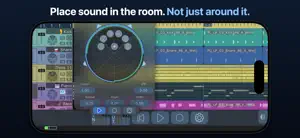
The power of a digital audio workstation in the palm of your hand. MultiTrack has been recording on iPhone since 2009, and version 7 rebuilds it from the engine up — with all 32 tracks for everyone. RECORD Record from the built-in mic, any USB or multichannel interface, or an AUv3 or Inter-App Audio instrument — up to 32 inputs at once. Monitoring, Auto Input, punch and loop recording, and latency compensation tuned to your own setup: tap Detect and a short chirp measures it, or set it by hand to the sample. Recorded audio lines up with what you heard. EDIT WITHOUT LOSING TAKES Nothing you record is overwritten, and a take survives a call, a lost interface, or a closed song. Regions point at the audio, so slicing and trimming never touch the file. Regions can overlap, and the overlap is the crossfade. Drag one over its neighbor to blend two takes — eight curve shapes, equal-power or equal-gain. Every fade has a curve of its own: drag a fade handle up or down to bend it. Smart Snap throughout, and 100 levels of undo. TEMPO AND TIME Change time signatures on the ruler, wherever your song requires. Automate the tempo itself (Unlock All Features): draw ramps and curves, and audio, MIDI, and Ableton Link follow in real time. MIX Up to six AUv3 or Inter-App Audio plugins on every track, bus, and the master. Four send busses, pre- or post-fader. EQ and compressor throughout, plus bundled delay and reverb. Sidechains from any track or bus. Freeze a track to reclaim CPU. SURROUND, DONE PROPERLY Stereo, Quad, LCRS, 5.1, 6.1, both 7.1s, and 9.1, plus discrete pass-through from 4 to 16 channels. The panner places sound instead of smearing it: at least 24 dB between neighboring speakers in every layout, and constant level across the field. Switch a speaker off and its share is redistributed, not dropped. MIDI Play AUv3 instruments from hardware controllers, Network MIDI, or other apps, and record every note, loops included. Route it all through the MIDI Matrix with savable filter and transform chains, and import Standard MIDI Files with their tempo maps. Unlock All Features adds piano-roll editing, where Draw mode puts a note under your finger. AUTOMATION — Unlock All Features Draw or record automation for volume, mute, pan, EQ, compressor, sends, pitch, any Audio Unit parameter, and MIDI CC, pitch bend, and channel pressure. MIDI 2.0 goes further: every note carries its own pitch bend and pressure, shaped note by note with a bendable curve on every segment. WARP AND PITCH Pitch shift up to two octaves either way, with formant preservation, no unlock needed. Time stretching and warp editing (Unlock All Features) put source and target timing in one editor: place markers, correct a source BPM, and loop while you audition. EXPORT THAT SOUNDS LIKE YOUR MIX WAV, MP3, FLAC, Apple Lossless, AAC, and Ogg Vorbis. Normalize only if you choose, to a ceiling from -6 to 0 dBFS. Real dither, triangular or noise-shaped, applied after sample rate conversion, where the depth actually drops. Export the song, the loop, stems, or one surround mixdown. FILES AND iCLOUD Projects live in iCloud Drive or on device. Drag audio, MIDI, presets, and projects in and out of Files and other apps, or over Wi-Fi. No account, no tracking, no analytics. SPECIFICATIONS 32 tracks, 32 inputs, 16 outputs, 16 channels per track. 16-bit, 24-bit, and 32-bit float at 44.1 to 192 kHz. AUv3 hosting, Inter-App Audio, Ableton Link, external MIDI Clock, hardware and Network MIDI. UNLOCK ALL FEATURES Adds three things: MIDI editing, time stretching and warp editing, and automation. Everything else is part of the app, all 32 tracks and pitch shifting included. Subscribe with a free trial, or buy once and keep them forever. Bought extra tracks in an earlier version? What you spent comes back as free months of Unlock All Features and a lower one-time price. Terms of Use: https://www.apple.com/legal/internet-services/itunes/dev/stdeula/ harmonicdog.com
Ratings & reviews
4.5
279 ratings
What’s new
Version 7.0.1 · Updated October 28, 2026
Version 7.0.1 - Bluetooth headphones keep full quality when you arm a track. To record from the headset's mic, turn on Bluetooth Microphone in Song Settings > Audio Device. - The playhead handle is put away while a take records, so brushing it no longer stops the recording. - iCloud: Keep This Version keeps the version from this device, and a resolved conflict no longer leaves a song stuck on "Syncing changes". - Fixed rare crashes when quitting while a song opens, converting several older projects at once, and recording with a punch-in. - Under Ableton Link, loop markers snap to measures, so a loop can be moved without redrawing it. - Snapping Dynamic Tempo back to 1x no longer leaves a track out of time with the metronome. ALSO NEW - With Bluetooth Microphone on, some AirPods record in full quality on iOS 26. - The recording latency slider reaches 600 ms, and its -1/+1 buttons repeat while held. - Song Settings keeps what belongs to your device, not the song, under a new Audio Device heading. - MIDI mapping has an Unmap button. ALSO FIXED - Redeeming an offer code while MultiTrack is open now opens Upgrades on what it unlocked. - Turning Measurement Mode off with a track armed returns playback to your Bluetooth speaker. - A song you closed no longer keeps showing as open on your other devices. - The iCloud project list no longer re-sorts after it loads when sorted by date or size, and the Loading iCloud Projects bubble no longer flashes over a folder already on screen. - Adjusting several regions shows their fade curves, and the fade panel's controls apply as you turn them. - The time signature panel is no longer cut off on narrow screens. - The Start button in Detect Recording Latency is readable when disabled. Found something? harmonicdog.com
App privacy
The developer, Harmonicdog, reported these privacy practices to Apple.
Data Not Collected
The developer does not collect any data from this app.
Alternatives to MultiTrack DAW
Looking for apps like MultiTrack DAW? Here are 6 similar apps on the App Store. The highest rated is Tako Kick (5.0/5), and 2 of the 6 are free to download.
-
 Cubasis 3 - DAW & Music Studio
4.6
Cubasis 3 - DAW & Music Studio
4.6
-
 Tako Kick
5.0
Tako Kick
5.0
-
 Auria - Music Production
4.0
Auria - Music Production
4.0
-
 AUM - Audio Mixer
4.7
AUM - Audio Mixer
4.7
-
 Roboto AUv3 Singing Synth
1.0
Roboto AUv3 Singing Synth
1.0
-
 Super 606 Drums - Drum Machine
4.9
Super 606 Drums - Drum Machine
4.9
| App | Rating | Price | Last updated | Compare |
|---|---|---|---|---|
| MultiTrack DAW | 4.5 / 5 (279 ratings) | Free | October 28, 2026 | |
| Cubasis 3 - DAW & Music Studio | 4.6 / 5 (3,525) | 49.99 USD | Sep 4, 2026 | Compare |
| Tako Kick | 5.0 / 5 (5) | Free | Oct 23, 2026 | Compare |
| Auria - Music Production | 4.0 / 5 (34) | 24.99 USD | Oct 13, 2026 | Compare |
| AUM - Audio Mixer | 4.7 / 5 (534) | 24.99 USD | Nov 23, 2025 | Compare |
| Roboto AUv3 Singing Synth | 1.0 / 5 (2) | Free | Oct 21, 2026 | Compare |
| Super 606 Drums - Drum Machine | 4.9 / 5 (204) | 4.99 USD | Oct 18, 2026 | Compare |
Compare MultiTrack DAW with the top alternatives: ratings, updates, ASO score and keyword gaps →