

IT Tools - Network Analyzer
KEVIN KOLTZAU Utilities iPhoneiPadiPod touch
IT Tools - Network Analyzer is a paid Utilities app for iPhone and iPad by KEVIN KOLTZAU. Rated 4.3/5 from 18 ratings. Requires iOS 15.0.
- Rating
- 4.3
- 18 ratings
- Price
- 5.99 USD
- on the App Store
- Size
- 17 MB
- Age 4+
- Updated
- Mar 17
- 2024 · v2.24.3
Screenshots

About IT Tools - Network Analyzer
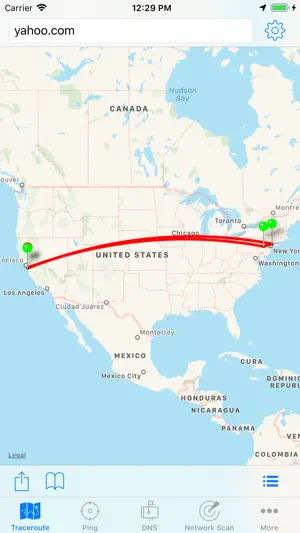
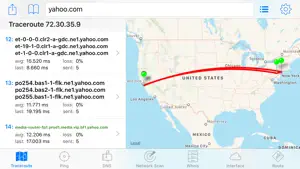
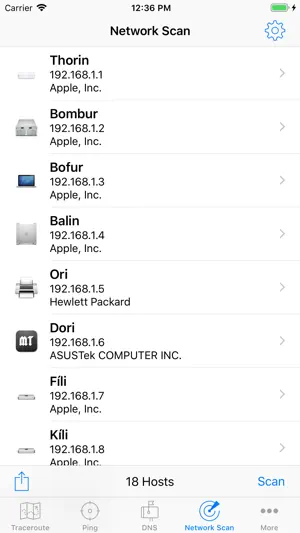
Network scanner and diagnostic utilities for users of all skill levels. Discover devices on your network, detect various types of problems and more! Includes high speed WiFi network device discovery, able to find devices on your local network other tools miss. Standard network diagnostic tools such as ping, traceroute, DNS lookup, and whois are also provided. WiFi Network Scanner Discover all the machines running on your network. • Supports IPv6 scanning via broadcast addresses • All Bonjour/mDNS services, including all extra data stored in the TXT record. • All UPnP devices, including sub-devices and services. • Discover devices using NetBIOS. This helps a lot on networks with many Windows machines. Continuous Traceroute Provides details of the network hops to the destination host. Optimized to determine the network path extremely quickly, often in less then 5 seconds. Once the path is determined, it proceeds to continuously ping each hop to provide additional statistics and alternate paths, similar to tools like PathPing and MTR. • Visualize traceroute geolocation data on the map • Configurable start and max TTL, interval and payload size • Choose which interface to use • Lists all hostnames that respond to each hop • View the AS Numbers associated with each hop DNS • Detects when an IP address is entered, and looks up the reverse PTR record • Use the current system DNS server, or supply your own • Choose from 50 supported DNS record types, including A, AAAA, CNAME, LOC, MX, NS, SRV, TXT • Request DNSSEC records • Optionally query using EDNS, including the NSID option. • View LOC and GPOS records on a map • Force DNS lookup over TCP to diagnose DNS server issues • View the full DNS response, with headers and the question, answer, authority and additional sections • Lookup internationalized domain names (IDN) Ping • Configurable TTL, Payload size, and interval • Choose which interface to use • Optionally keep the screen from going to sleep for very long ping sessions • Optional audible sound on errors or when responses arrive • Ping results can be graphed in real time to easily see response time spikes Whois • Lookup details about hosts, IP addresses, and more • Auto detects the whois server based on the query, or use a custom server Routing table • Route statistics updated in real time • Very useful for diagnosing WiFi and VPN configuration issues Interface • All network interfaces on your device • Network statistics updated in real time • Current WiFi and WWAN IP Address • WiFi SSID and BSSID
Ratings & reviews
4.3
18 ratings
What’s new
Version 2.24.3 · Updated March 17, 2024
Bug fixes
App privacy
The developer, KEVIN KOLTZAU, reported these privacy practices to Apple.
Data Not Collected
The developer does not collect any data from this app.
Alternatives to IT Tools - Network Analyzer
Looking for apps like IT Tools - Network Analyzer? Here are 6 similar apps on the App Store. The highest rated is iNet Pro - Network Scanner (4.7/5).
-
 NetTools Pro
-
 NetAdmin - Network Scanner
1.0
NetAdmin - Network Scanner
1.0
-
 Service Browser
-
 Network Radar
4.5
Network Radar
4.5
-
 iNet Pro - Network Scanner
4.7
iNet Pro - Network Scanner
4.7
-
 IP Scanner Ultra
4.5
IP Scanner Ultra
4.5
| App | Rating | Price | Last updated | Compare |
|---|---|---|---|---|
| IT Tools - Network Analyzer | 4.3 / 5 (18 ratings) | 5.99 USD | March 17, 2024 | |
| NetTools Pro | – | 7.99 USD | Aug 11, 2026 | Compare |
| NetAdmin - Network Scanner | 1.0 / 5 (1) | 29.99 USD | Oct 7, 2026 | Compare |
| Service Browser | – | 3.99 USD | Feb 14, 2025 | Compare |
| Network Radar | 4.5 / 5 (296) | 9.99 USD | Oct 12, 2026 | Compare |
| iNet Pro - Network Scanner | 4.7 / 5 (742) | 9.99 USD | Aug 12, 2026 | Compare |
| IP Scanner Ultra | 4.5 / 5 (73) | 39.99 USD | Oct 4, 2026 | Compare |