

iLogger
Rick Maddy Productivity iPhoneiPadiPod touch
iLogger is a free Productivity app for iPhone and iPad by Rick Maddy. Rated 5.0/5 from 10 ratings. Requires iOS 15.0. Updated December 11, 2024.
- Rating
- 5.0
- 10 ratings
- Price
- Free
- on the App Store
- Size
- 4 MB
- Age 4+
- Updated
- Dec 11
- 2024 · v3.0.2
Screenshots

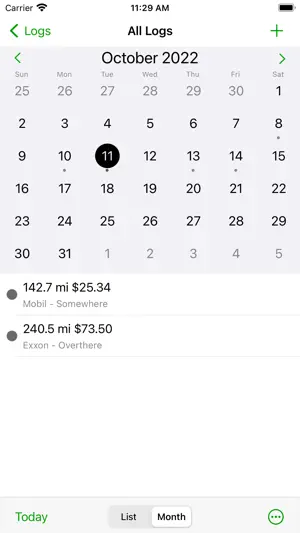


About iLogger
iLogger is the only app you will need to log and record all of your activities. If it happened, you can log it. User definable logs allow you to keep track of the events you want and how you want them. iLogger comes with sample logs to get you started quickly but you can set it up any way you desire to fit your needs. NOTE: The free version is fully functional but it limits you to 15 entries. A single one-time in-app purchase will remove the restriction on the number of entries you can enter. Here is a small list of things you can keep track of: • Food / Diet / Calories • Exercise / Fitness • Running / Jogging / Biking / Hiking • Car Maintenance • Gas Mileage • Consulting time / Work • Project construction • Trip Diary • Flight Log • Dive Log • Swim Log • Medical / Medication • Sleep / Dreams • Money • Ham Radio • Anything you want to keep track of Quickly import your existing logs directly from your computer. You can also export your logs from iLogger directly to your own computer or via email. Built-in backup and restore to/from your own computer ensures you always have a copy of your data. Quickly find your events using iLogger's powerful filtering, searching, and sorting capabilities. Data entry is made easy with autofill and quick copy. iLogger allows you to enter the following types of data: • Text • Note/Comment • Date • Time • Duration • Currency • Count • Numbers (Integer, Decimal) • Yes/No • Web Address • Email Address • Phone Number • Location (GPS, address, city, etc.) • Voice Memo • Calculated (use basic math on other attributes and values) • Lookup List (user defined list of values) Store up to 20 photos for each of your entries. Use existing photos or take a photo with the built-in camera. Share your data with others. Email logs to co-workers or friends and family. Other users of iLogger can import your shared logs directly simply by tapping a link in the email. Customize entry lists to display exactly the data you want to see. Apply colors to logs or individual entries to make them stand out. See a summary of the entry list you are viewing. Shows entry count and totals and averages of your data. Generate a report of your logs viewable on your computer. Includes a print friendly version of your entries. Protect access to your data with a passcode. Keep others out of your data. The passcode feature functions just like the version built into your iOS device. The Tools menu gives you access to: • Data Transfer (Backup, Restore, Import, Export, Reports) • Lookup List maintenance • Settings (Display Options, Sorting Options) • Passcode Lock • Contact Information • Help Information Please visit https://www.maddysoft.com/ilogger for additional information and contact information for iLogger.
Ratings & reviews
5.0
10 ratings
What’s new
Version 3.0.2 · Updated December 11, 2024
Bug Fixes • When adding a new entry while in List mode, the date now matches the date currently at the top of the list. • Fixed crash trying to delete an entry from the entry list. • Fixed crash trying to move a group to a new parent.
App privacy
The developer, Rick Maddy, reported these privacy practices to Apple.
Data Not Collected
The developer does not collect any data from this app.
Alternatives to iLogger
Looking for apps like iLogger? Here are 6 similar apps on the App Store. The highest rated is Relog: Task Logger (4.9/5), and all 6 are free to download.
-
 Event Logger 3.0
4.3
Event Logger 3.0
4.3
-
 Logsit
4.7
Logsit
4.7
-
 Sink: Habit & Event Tracker
4.8
Sink: Habit & Event Tracker
4.8
-
 Timestamper: Activity Tracker
4.1
Timestamper: Activity Tracker
4.1
-
 Headspace Lite
3.0
Headspace Lite
3.0
-
 Relog: Task Logger
4.9
Relog: Task Logger
4.9
| App | Rating | Price | Last updated | Compare |
|---|---|---|---|---|
| iLogger | 5.0 / 5 (10 ratings) | Free | December 11, 2024 | |
| Event Logger 3.0 | 4.3 / 5 (14) | Free | Aug 14, 2025 | Compare |
| Logsit | 4.7 / 5 (63) | Free | Oct 9, 2026 | Compare |
| Sink: Habit & Event Tracker | 4.8 / 5 (8) | Free | Apr 9, 2024 | Compare |
| Timestamper: Activity Tracker | 4.1 / 5 (171) | Free | Mar 16, 2026 | Compare |
| Headspace Lite | 3.0 / 5 (3) | Free | Apr 28, 2026 | Compare |
| Relog: Task Logger | 4.9 / 5 (47) | Free | Jul 18, 2024 | Compare |
Compare iLogger with the top alternatives: ratings, updates, ASO score and keyword gaps →