

DriveSavers Data Recovery
DriveSavers, Inc. Utilities iPhoneiPadiPod touch
DriveSavers Data Recovery is a free Utilities app for iPhone and iPad by DriveSavers, Inc. Rated 3.6/5 from 426 ratings. Requires iOS 17.0.
- Rating
- 3.6
- 426 ratings
- Price
- Free
- on the App Store
- Size
- 50 MB
- Age 4+
- Updated
- Nov 11
- 2026 · v62
Screenshots
Save to Pinterest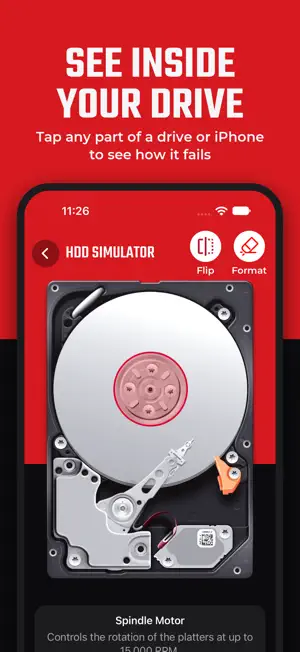


About DriveSavers Data Recovery
DriveSaver is the free app from DriveSavers Data Recovery, the data recovery lab in Novato, California, recovering data since 1985. It helps you do the right thing in the first few minutes after data goes missing, and shows you what happens inside a drive when it fails. LOST DATA? START HERE What Happened? asks one question and gives you the steps for the next 10 minutes: deleted by mistake, got wet, won't turn on, dropped, clicking drive or ransomware. The wrong move in the first hour (a reboot, a rice bag, a recovery tool run on a failing drive) is what turns a recoverable case into a lost one. HELP YOURSELF FIRST - Find Deleted Items: every Recently Deleted folder on iPhone (Photos, Messages, Notes, Files) in order, with a reminder before the 30 day window closes. - Backup Health Check: five quick checks to find out if this iPhone is actually backed up, plus an optional monthly reminder. - Media Check: connect a memory card, USB drive, external drive or NAS share and the app reads every file to find damaged, blank, encrypted and partly encrypted files, ransom notes and virtual machine disks (VMDK, VHD, VHDX, QCOW2, VDI). It reads only. Nothing is changed or deleted. TOOLS FOR TECHS AND IT TEAMS - Inspect a Device: point the camera at a drive or device label to read the maker, model, serial number and capacity, with next steps. Text is read on the device. - Before You Erase: what not to do with a Mac, iPhone, drive or RAID before the data is safe. - Ransomware Response: a first hour checklist and a shareable incident summary. - RAID Calculator: add drives and compare usable capacity and protection for two RAID levels side by side. - Siri and Shortcuts: call DriveSavers, check a memory card or start a recovery by voice, plus Control Center buttons. SEE HOW DRIVES FAIL Interactive simulators for a hard drive, SSD, USB flash drive, SD card and iPhone. Crash them on purpose: head crash, seized motor, contamination, SSD failure and more. Then play Keep the Head Flying and try to beat the shop high score. FOR PARTNER SHOPS - Shop Mode: a counter QR code tied to your DS code, so every case a customer starts is credited to your shop. - Wallet referral card: your DS code and shop name in Apple Wallet. - Shop QR widget for the home and lock screen. - App Clip: customers who scan your QR open DriveSavers instantly, no install needed. LEARN Data recovery services for 11 device types, from phones to RAID, protection strategies, a tour of the ISO 5 certified cleanroom, and DriveSavers certifications including the annual SOC 2 Type II audit and HIPAA security compliance. Main screens are available in English and Spanish. Works on iPhone and iPad. DriveSaver gives guidance and diagnostics. It cannot undelete or decrypt files; iOS does not give apps that level of access. When the data matters, call DriveSavers 24/7 at 800.440.1904 or start a case from the app.
Ratings & reviews
3.6
426 ratings
What’s new
Version 62 · Updated November 11, 2026
DriveSaver is rebuilt from scratch for iOS 17 and later, on iPhone and iPad. New: - What Happened? Pick what went wrong and get the steps for the next 10 minutes. - Find Deleted Items and Backup Health Check. - Ship It In: free FedEx label, packing steps for each device, and the nearest FedEx locations. - Call DriveSavers widget for the Home Screen and Lock Screen. - Media Check: find damaged, blank, encrypted and partly encrypted files on cards, drives, NAS shares and VM disks. - Inspect a Device: read a drive label with the camera. - Before You Erase, Ransomware Response and a new RAID Calculator. - Keep the Head Flying game. - Kiosk Mode: a full-screen demo loop for in-store iPads. - For partner shops: Shop Mode QR, Apple Wallet referral card, Shop QR widget and an App Clip. - Siri and Shortcuts: call DriveSavers, check a memory card or start a recovery by voice, plus Control Center buttons. - Larger text, Increase Contrast and VoiceOver support throughout. - Spanish for the main screens. - New design with a sidebar layout on iPad. The hard drive, SSD, USB, SD card and iPhone simulators and crash demos are rebuilt and now fill the screen on iPad.
App privacy
The developer, DriveSavers, Inc., reported these privacy practices to Apple.
Data Linked to You
The following data, which may be collected and linked to your identity, may be used for the following purposes:
- Contact Info: Email Address, Name, Phone Number
- User Content: Customer Support
- Identifiers: User ID
- Other Data: Other Data Types
Used for: App Functionality
Data Not Linked to You
The following data, which may be collected but is not linked to your identity, may be used for the following purposes:
- Usage Data: Product Interaction
Used for: Analytics
Alternatives to DriveSavers Data Recovery
Looking for apps like DriveSavers Data Recovery? Here are 6 similar apps on the App Store. The highest rated is Device System Services - Tools (4.5/5), and all 6 are free to download.
-
 ReFile: Recovery All
1.0
-
 Clone My Phone - Data Backup
4.1
-
 Tiger Data Recovery:Rescue
4.4
-
 Device System Services - Tools
4.5
-
 Cyber Protect
3.5
-
 Photo Recovery: Gbyte
4.2
| App | Rating | Price | Last updated | Compare |
|---|---|---|---|---|
| DriveSavers Data Recovery | 3.6 / 5 (426 ratings) | Free | November 11, 2026 | |
| ReFile: Recovery All | 1.0 / 5 (1) | Free | Feb 4, 2026 | Compare |
| Clone My Phone - Data Backup | 4.1 / 5 (90) | Free | Nov 14, 2026 | Compare |
| Tiger Data Recovery:Rescue | 4.4 / 5 (641) | Free | Nov 6, 2026 | Compare |
| Device System Services - Tools | 4.5 / 5 (391) | Free | Sep 13, 2026 | Compare |
| Cyber Protect | 3.5 / 5 (11) | Free | Mar 15, 2024 | Compare |
| Photo Recovery: Gbyte | 4.2 / 5 (101) | Free | Nov 27, 2026 | Compare |