

iComic -comic reader-
Y.Yamamoto Utilities iPhoneiPadiPod touch
iComic -comic reader- is a paid Utilities app for iPhone and iPad by Y.Yamamoto. Rated 3.1/5 from 7 ratings. Requires iOS 16.6. Updated March 17, 2025.
- Rating
- 3.1
- 7 ratings
- Price
- 0.99 USD
- on the App Store
- Size
- 3 MB
- Age 17+
- Updated
- Mar 17
- 2025 · v6.1.5
Screenshots
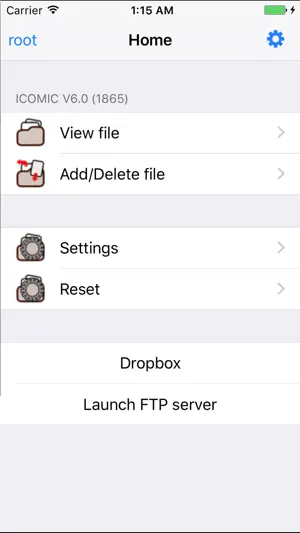
About iComic -comic reader-
Welcome to iComic, the premier application for reading comics on your iPhone or iPod Touch. iComic makes great use of the multi-touch function for simple and effective page navigation and zooming to provide the best portable comic book read you will find. iComic displays high resolution comic pages (jpg, tif, or png image files) contained inside compressed zip or cbz format archives. Using the built-in download function, comics can be downloaded from the internet or from a personal server and stored locally on your iPhone or iPod Touch. Your downloaded comics are stored on your device and so are always available for reading, even when you have no internet connection. As iTunes resizes images to a compressed format, iComic is also useful for displaying images for other uses e.g. maps, high detailed photos and ebooks (convert your pdf books to jpeg and you have a perfect reader for those large pdf files, normally unreadable due to the high memory requirement). iComic currently provides three methods for turning pages: swiping your finger on the screen; by taps in the screen corners using the Corner-Tap method; or by Multi-Touch (tap once to page forward, twice to page back). Zooming is by the familiar pinch method used in Safari and other applications or by double tapping the screen when in Corner-Tap mode. The application is very stable and can easily handle zip files up to 60MB with infrequent problems observed with files of much larger size. Individual image files inside the zip files are constrained to a maximum 3 million pixels (e.g. 3,000 pixels high x 1,000 pixels wide or equivalent) though for the sake of battery conservation much smaller sizes (~1000 pixels high) are generally used. A manual for setting up and using iComic can be downloaded from http://red.halfmoon.jp/AppStore_iComic_V1.3_FAQ.pdf The author of this application is Japanese so for excellent community support and discussion in English please visit the helpful and friendly ~*~ Ultimate icomic Thread ~*~ at www.ipodtouchfans.com/forums/showthread.php?t=23759
Ratings & reviews
3.1
7 ratings
What’s new
Version 6.1.5 · Updated March 17, 2025
Bug fixes and latest OS compatibility.
App privacy
The developer, Y.Yamamoto, reported these privacy practices to Apple.
Data Not Collected
The developer does not collect any data from this app.
Alternatives to iComic -comic reader-
Looking for apps like iComic -comic reader-? Here are 6 similar apps on the App Store. The highest rated is ComicFlow - CBR & CBZ to PDF (4.5/5), and 3 of the 6 are free to download.
-
 Zinema
-
 Special Symbols: Keyboards
3.5
Special Symbols: Keyboards
3.5
-
 BookViewer
-
 Who was that again? DaréDakke
-
 Kantu - Image viewer
1.5
Kantu - Image viewer
1.5
-
 ComicFlow - CBR & CBZ to PDF
4.5
ComicFlow - CBR & CBZ to PDF
4.5
| App | Rating | Price | Last updated | Compare |
|---|---|---|---|---|
| iComic -comic reader- | 3.1 / 5 (7 ratings) | 0.99 USD | March 17, 2025 | |
| Zinema | – | Free | May 9, 2026 | Compare |
| Special Symbols: Keyboards | 3.5 / 5 (8) | 0.99 USD | Nov 1, 2023 | Compare |
| BookViewer | – | Free | Mar 18, 2026 | Compare |
| Who was that again? DaréDakke | – | Free | Mar 8, 2026 | Compare |
| Kantu - Image viewer | 1.5 / 5 (2) | 1.99 USD | May 5, 2026 | Compare |
| ComicFlow - CBR & CBZ to PDF | 4.5 / 5 (11) | 2.99 USD | Oct 19, 2026 | Compare |