

Units - Pro Unit Converter
Homegrown Software Ltd Utilities iPhoneiPadiPod touch
Units - Pro Unit Converter is a free Utilities app for iPhone and iPad by Homegrown Software Ltd. Rated 4.1/5 from 49 ratings. Requires iOS 17.0.
- Rating
- 4.1
- 49 ratings
- Price
- Free
- on the App Store
- Size
- 86 MB
- Age 4+
- Updated
- Oct 23
- 2026 · v3.1
Screenshots


About Units - Pro Unit Converter
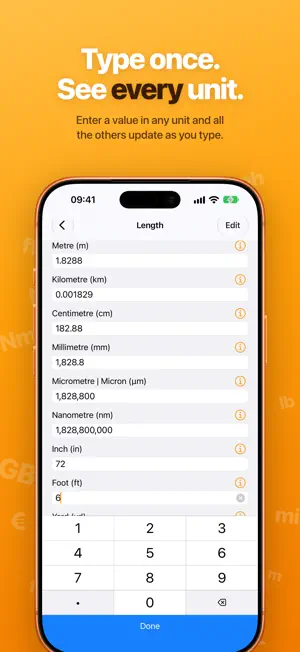
Units is the fast, friendly unit converter. Type a number into any unit and instantly see it in every other one, all on a single screen. There's no picking what to convert from and to, no digging through menus, and no ads. With more than 800 units across 43 categories, Units covers everyday conversions like length, weight, volume and temperature, and the ones you need less often, from torque and fuel consumption to data rates, shoe sizes and musical notes. SEE EVERYTHING AT ONCE • Enter a value in any unit and every other unit in the category updates as you type • A keypad made for numbers, so the decimal point is always right where you need it CURRENCY • Convert between more than 160 currencies • Exchange rates updated every day MAKE IT YOURS • Hide the units you never use, so the ones you need are always in view • Reorder units and categories so your favorites come first • Switch on a two-column layout to see even more at a glance • Leave a tip to unlock a collection of alternative app icons MADE FOR YOUR DEVICES • Designed for iPhone and iPad, with your categories and conversion side by side on larger screens • Makes full use of iPhone Duo, whether it's open or closed • Handoff picks up a conversion where you left off on another device • Supports Dark Mode and Dynamic Type Units has been converting since 2008, and is lovingly made in Scotland.
Ratings & reviews
4.1
49 ratings
What’s new
Version 3.1 · Updated October 23, 2026
NEW: • Units now makes full use of iPhone Duo: the inner display shows your categories and conversion side by side, and no field sits in the hinge when it's folded. • App icons have been redrawn for iOS 26, with Liquid Glass, dark, and tinted versions. And added some new custom icons. • The keypad now taps back with haptics as you type, and holding backspace keeps deleting. • Long-press a converted value to copy it, with or without its unit. • Unit information now opens in a small popover instead of an alert. • Improved feel of unit editing and settings screens with some haptics and animations. • Clearing a value now fades the other results out smoothly. • The currency Last Updated label now shows it can be tapped to update, with a spinner while it updates and a tap of haptic feedback when it's done. FIXED: • Currencies you turn on soon after installing Units no longer switch themselves off again when new exchange rates arrive. • If you've used Units since its early days, Luminance now keeps its place in the category list instead of dropping to the bottom. • Continuing a conversion on another device with Handoff now keeps the value when you customise the units, and clearing a conversion no longer hands off the old value. • The currency screen’s “Last Updated” time reads more naturally, says “just now” for the first minute, and no longer shows a raw date if your clock has changed. • Fixed a rare crash after entering a thousand or so different values, and a crash when editing results that have spaces between the digits, as in French. • Men's shoe sizes now match standard size charts: European sizes were a size small, and Japanese sizes from UK 10 up were half a size large. Women's sizes also convert back and forth consistently. • Numbers are now read the way your region writes them, including a comma as the decimal point and other minus signs. The keypad's decimal key now types your region's decimal point, so a "." in Germany, for example, is read as a thousands separator. • Opening Units without an internet connection no longer throws away the latest downloaded currency rates. • Wavelength units in Electromagnetic Radiation, and siemens-based units in Electrical Resistance & Conductance, now convert correctly instead of showing 0 or ∞. • Typing a value to convert is snappier, especially in categories with lots of units like Length. • Fixed a possible crash when currency rates finish updating while the category list or Currency screen is in use. • If currency rates have never downloaded, opening Currency now tries again. • Pasting or typing an incomplete value, like "2+" or "1.2.3", now converts the number at the start instead of 0.
App privacy
The developer, Homegrown Software Ltd, reported these privacy practices to Apple.
Data Not Linked to You
The following data, which may be collected but is not linked to your identity, may be used for the following purposes:
- Identifiers: Device ID
- Usage Data: Advertising Data
Used for: Third-Party Advertising, Developer’s Advertising or Marketing
Alternatives to Units - Pro Unit Converter
Looking for apps like Units - Pro Unit Converter? Here are 6 similar apps on the App Store. The highest rated is Unit Converter - Scientific (4.9/5), and all 6 are free to download.
-
 Conversion Calculator Units
4.7
-
 Unit Converter HD.
4.7
-
 Unit Converter Calculator Pro
4.7
-
 Fancy Units Converter
4.7
-
 Unit Converter - Scientific
4.9
-
 Converter-Universal Conversion
4.9
| App | Rating | Price | Last updated | Compare |
|---|---|---|---|---|
| Units - Pro Unit Converter | 4.1 / 5 (49 ratings) | Free | October 23, 2026 | |
| Conversion Calculator Units | 4.7 / 5 (4,994) | Free | Sep 22, 2026 | Compare |
| Unit Converter HD. | 4.7 / 5 (644) | Free | Sep 23, 2026 | Compare |
| Unit Converter Calculator Pro | 4.7 / 5 (992) | Free | Oct 31, 2023 | Compare |
| Fancy Units Converter | 4.7 / 5 (1,603) | Free | May 23, 2024 | Compare |
| Unit Converter - Scientific | 4.9 / 5 (18) | Free | Jul 14, 2026 | Compare |
| Converter-Universal Conversion | 4.9 / 5 (980) | Free | Apr 3, 2025 | Compare |