

Timize: App Blocker & Focus
斯琴 代 Utilities iPhoneiPadiPod touch
Timize: App Blocker & Focus is a free Utilities app for iPhone and iPad by 斯琴 代. Rated 5.0/5 from 10 ratings. Requires iOS 17.0. Updated October 19, 2026.
- Rating
- 5.0
- 10 ratings
- Price
- Free
- on the App Store
- Size
- 6 MB
- Age 4+
- Updated
- Oct 19
- 2026 · v1.5.5
Screenshots

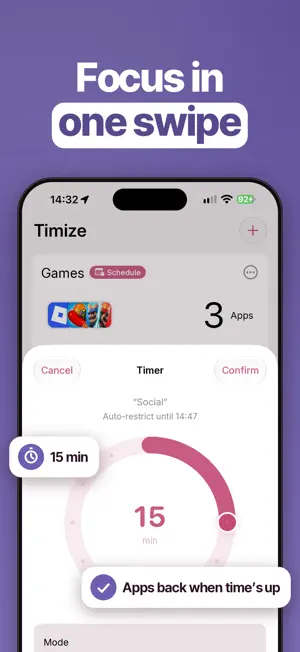

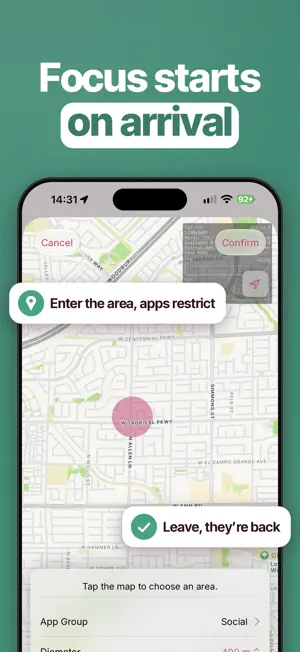
About Timize: App Blocker & Focus
Timize is a tool designed to help you manage your app screen usage time effectively. It is aimed at improving your focus, as well as enhancing your work and study efficiency. With Timize, you can group your applications for easy management, set time limits for individual app usage, and automatically lift the screen usage time limit after reaching it. Additionally, you can manually lift the restrictions at any time. Timize also supports screen widgets and shortcuts, providing you with a personalized screen time management experience. Using the screen widgets and shortcuts, you can efficiently manage your app screen time with just one click. Furthermore, Timize supports the "Action Button" feature on iPhone 15, which allows you to manage app screen usage time without unlocking your phone. Timize provides detailed statistics on your application usage time, making it easy for you to monitor your screen usage and stay focused while improving your learning efficiency. If you have any questions or issues, please contact the developer at [email protected]
Ratings & reviews
5.0
10 ratings
What’s new
Version 1.5.5 · Updated October 19, 2026
Fully optimized for iOS 27! Meet Timing mode: spin the dial to pick a duration, and Timize restricts or restores your apps when time is up. Short focus sessions just got easier. New • Timing mode with a dial picker that snaps to 5-minute steps, with haptic feedback. Cancel anytime. • 5 color themes: Rose, Lavender, Ocean, Mint and Sunset. Your screens and Home Screen widget change together. • Shortcuts now show how many apps and categories each group contains. • Send feedback with a diagnostic log attached in one tap, so issues get fixed faster. Improved • A redesigned Pro page that shows every benefit and a clear Free vs Pro comparison. • Terms of Use and Privacy Policy are now built in and open offline. • Your passcodes are now stored in the iOS Keychain for better security. • Smoother animations when you add or delete a group. Fixed • Places sometimes not triggering when you arrive or leave. • A crash when swiping to delete a schedule. • A group not returning to its previous state after you cancel a timer. • What's New not appearing after an update. • Text that showed in the wrong language on some screens.
App privacy
The developer, 斯琴 代, reported these privacy practices to Apple.
Data Not Collected
The developer does not collect any data from this app.
Alternatives to Timize: App Blocker & Focus
Looking for apps like Timize: App Blocker & Focus? Here are 6 similar apps on the App Store. The highest rated is Magic Locker - Screen Master (5.0/5), and all 6 are free to download.
-
 Magic Locker - Screen Master
5.0
Magic Locker - Screen Master
5.0
-
 AppLocker • Password lock apps
5.0
AppLocker • Password lock apps
5.0
-
 PAUSED: Limit Screen Time
4.5
PAUSED: Limit Screen Time
4.5
-
 App Lock - Invis AppBlock
4.7
App Lock - Invis AppBlock
4.7
-
 Unscreen • Control daily usage
4.2
Unscreen • Control daily usage
4.2
-
 Cloakd: Privacy App Vault
4.3
Cloakd: Privacy App Vault
4.3
| App | Rating | Price | Last updated | Compare |
|---|---|---|---|---|
| Timize: App Blocker & Focus | 5.0 / 5 (10 ratings) | Free | October 19, 2026 | |
| Magic Locker - Screen Master | 5.0 / 5 (9) | Free | Jul 31, 2024 | Compare |
| AppLocker • Password lock apps | 5.0 / 5 (11) | Free | Nov 25, 2023 | Compare |
| PAUSED: Limit Screen Time | 4.5 / 5 (68) | Free | Oct 21, 2026 | Compare |
| App Lock - Invis AppBlock | 4.7 / 5 (265) | Free | Oct 28, 2025 | Compare |
| Unscreen • Control daily usage | 4.2 / 5 (84) | Free | Aug 19, 2026 | Compare |
| Cloakd: Privacy App Vault | 4.3 / 5 (208) | Free | Nov 4, 2023 | Compare |