

Braille Translator & Scanner
Mukhammadkodir Abduvoitov Education iPhoneiPadiPod touch
Braille Translator & Scanner is a free Education app for iPhone and iPad by Mukhammadkodir Abduvoitov. Requires iOS 15.6. Updated October 21, 2026.
- Price
- Free
- on the App Store
- Size
- 48 MB
- Age 4+
- Updated
- Oct 21
- 2026 · v4.2.0
Screenshots


About Braille Translator & Scanner
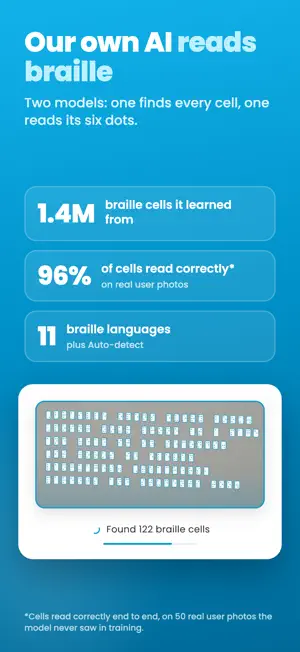
Braille Translator & Scanner turns a photo of braille into text. Point your camera at an embossed page and the app marks every braille cell with the letter it stands for, then gives you the whole text to read, copy or share. A braille reader, braille translator and braille scanner in one app. Made for teachers, parents and students who work with braille, and for anyone learning to read it. HOW IT WORKS • Take a photo of a braille page, or import one from your gallery • The AI finds every cell and reads its six dots • Read the text under your photo, with each letter right on its cell • Switch the photo between letters and braille with one tap to check any cell OUR OWN BRAILLE AI We trained our own models for braille: one finds the cells, the other reads the dots. They learned from 1.4 million braille cells and read 96% of cells correctly, end to end, on real user photos they never saw in training. 11 BRAILLE LANGUAGES English (Grade 1 and Grade 2), Spanish, Portuguese, French, German, Polish, Russian, Uzbek, Greek, Latvian and Arabic. Auto-detect picks the right one for you. More languages are coming soon. BRAILLE KEYBOARD AND CHART Type braille on a six-dot keyboard and get text, or type text and see it in braille. When you're not sure about a letter, the braille chart is one tap away. The keyboard is free. FOR TEACHERS AND PARENTS Check braille homework without knowing braille yourself. Follow the page cell by cell and spot the cell that doesn't match. HISTORY AND FAVOURITES Your translations are saved in History, so you can come back to them. Star the ones you need often. CLEAR PHOTOS, BETTER RESULTS The app is made for braille embossed on paper, photographed from straight above in soft light. Built-in tips show you how. FREE TO TRY Your first 5 photo translations are free. Premium unlocks unlimited translation and your full history. Cancel any time. Premium is an auto-renewing subscription. Payment is charged to your Apple ID. It renews automatically unless cancelled at least 24 hours before the end of the current period. Manage or cancel it in your App Store account settings. Terms of Use (EULA): https://braillerecognition.alfocus.uz/terms-of-use Privacy Policy: https://braillerecognition.alfocus.uz/privacy-policy
What’s new
Version 4.2.0 · Updated October 21, 2026
• New camera: hold your phone over the page and it takes the photo by itself once the braille is clear. It tells you to move closer or back, hold still, or change the light. • Pages held sideways or upside down are read the right way round. • Pages embossed on both sides: read the other side from the same photo. • Shows which part of a page read badly, so you can retake it. • Better word spacing, Arabic and language detection. • Faster reading on Android.
App privacy
The developer, Mukhammadkodir Abduvoitov, reported these privacy practices to Apple.
Data Not Linked to You
The following data, which may be collected but is not linked to your identity, may be used for the following purposes:
- Identifiers: User ID, Device ID
Used for: Analytics, App Functionality
Alternatives to Braille Translator & Scanner
Looking for apps like Braille Translator & Scanner? Here are 6 similar apps on the App Store. The highest rated is Braille Academy: Play & Learn (4.9/5), and all 6 are free to download.
-
 Braille Decoded
4.6
Braille Decoded
4.6
-
 Braille Typing
4.7
Braille Typing
4.7
-
 BrailleBuzz
3.9
BrailleBuzz
3.9
-
 Braille Academy: Play & Learn
4.9
Braille Academy: Play & Learn
4.9
-
 Braille Study Lite
1.0
Braille Study Lite
1.0
-
 Braille Keyboard Writer
4.5
Braille Keyboard Writer
4.5
| App | Rating | Price | Last updated | Compare |
|---|---|---|---|---|
| Braille Translator & Scanner | – | Free | October 21, 2026 | |
| Braille Decoded | 4.6 / 5 (10) | Free | Jul 6, 2026 | Compare |
| Braille Typing | 4.7 / 5 (10) | Free | Sep 2, 2026 | Compare |
| BrailleBuzz | 3.9 / 5 (7) | Free | Aug 26, 2026 | Compare |
| Braille Academy: Play & Learn | 4.9 / 5 (1,680) | Free | Jan 13, 2025 | Compare |
| Braille Study Lite | 1.0 / 5 (1) | Free | Dec 22, 2023 | Compare |
| Braille Keyboard Writer | 4.5 / 5 (17) | Free | May 23, 2025 | Compare |