

PHP Editor: Code & Run
Merbin Joe Developer Tools iPhoneiPadiPod touch
PHP Editor: Code & Run is a free Developer Tools app for iPhone and iPad by Merbin Joe. Requires iOS 15.0. Updated October 19, 2026.
- Price
- Free
- on the App Store
- Size
- 44 MB
- Age 4+
- Updated
- Oct 19
- 2026 · v2.5
Screenshots


About PHP Editor: Code & Run
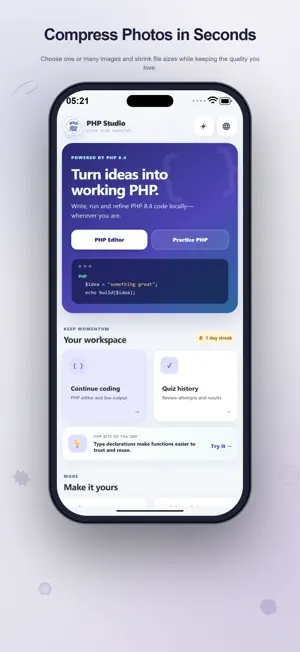
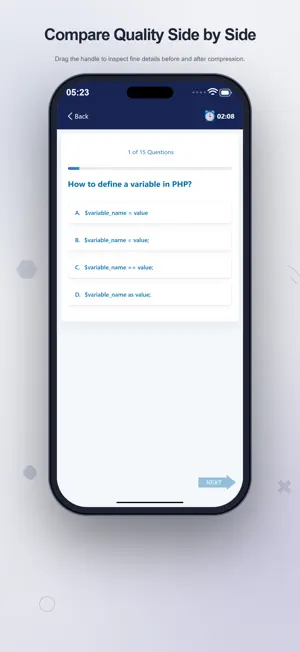
Give a PHP idea a place to take shape. PHP Editor brings writing, local execution and language practice into one workspace, so you can move from a short snippet to its output and back to the code you want to improve. A practical place to experiment The integrated PHP 8.4 runtime runs code on your device. Open the editor, make a change and tap Run to see PHP Output. Use Edit code to return and continue your experiment. Reported errors are shown with the result, giving you feedback when a statement does not behave as expected. You do not need a separate remote execution service for this local coding workflow. Tools that support the next edit Read your source with PHP syntax highlighting, line numbers and word wrapping. Bracket matching and automatic closing of brackets help when entering expressions and functions. Quick Undo and Redo controls let you revisit a change without retyping it. Find helps locate a name or phrase, while Go to line takes you to a specific position in the file. Start new, or return to an idea Begin a fresh file when you want a clean starting point. Open PHP files from the app's available document storage workflow, save a named script, or choose Save As to preserve a separate copy. When a draft has been stored locally, Continue coding brings it back from Home. A saved file gives an experiment a name and makes it easier to return to deliberate work later. Examples you can change The daily PHP bite opens an editable example related to the Home screen's tip. Try changing the values in a strict comparison, replacing a missing value with null coalescing, or following the choices in a match expression. Other examples cover array transformations, function type declarations, escaping text and reusable functions. Run your variation and inspect the result to connect the syntax with its effect. A second way to practise Use Practice PHP for multiple-choice quizzes across levels. Timed sessions encourage focused review, and the results show how an attempt went. Quiz history gives you access to recorded attempts and their results. You can alternate between answering questions and testing a small program, choosing the kind of practice that suits the time you have. Make the workspace familiar Choose an app theme, including a light or dark appearance, and select from the available interface languages. The editor follows the active appearance. Home keeps Continue coding, the daily example and quiz history within reach, along with a daily visit streak for your practice routine. Designed for small, useful sessions Students can explore language exercises; learners can test an unfamiliar expression; developers can check a compact function or revisit a script. Keep local runs focused: execution time and output limits apply. Code execution is local, while network-dependent services such as advertising and purchases use their own connections. Write an example you understand, change one part and see what happens. Keep useful scripts as files and use quizzes to revisit the concepts you are learning. Terms of Use https://www.apple.com/legal/internet-services/itunes/dev/stdeula/
What’s new
Version 2.5 · Updated October 19, 2026
Enjoy a completely refreshed design. Run PHP offline with a real PHP compiler and a fully redesigned compiler interface. Explore new features and improved editing tools. Experience faster performance and smoother navigation. Includes bug fixes and stability improvements.
App privacy
The developer, Merbin Joe, reported these privacy practices to Apple.
Data Used to Track You
The following data may be used to track you across apps and websites owned by other companies:
- Usage Data: Advertising Data
Data Not Linked to You
The following data, which may be collected but is not linked to your identity, may be used for the following purposes:
- Usage Data: Advertising Data
Used for: Third-Party Advertising
Alternatives to PHP Editor: Code & Run
Looking for apps like PHP Editor: Code & Run? Here are 6 similar apps on the App Store. The highest rated is JDoodle: Code Compiler (4.5/5), and all 6 are free to download.
-
 Code Editor: HTML, Python, JS
-
 KeyAuth LLC
3.8
KeyAuth LLC
3.8
-
 Portainer & Docker: Pourtainer
4.1
Portainer & Docker: Pourtainer
4.1
-
 SMS Verification Number GetSMS
4.4
SMS Verification Number GetSMS
4.4
-
 JDoodle: Code Compiler
4.5
JDoodle: Code Compiler
4.5
-
 PostgreSQL Client
4.5
PostgreSQL Client
4.5
| App | Rating | Price | Last updated | Compare |
|---|---|---|---|---|
| PHP Editor: Code & Run | – | Free | October 19, 2026 | |
| Code Editor: HTML, Python, JS | – | Free | Oct 27, 2026 | Compare |
| KeyAuth LLC | 3.8 / 5 (6) | Free | Jun 2, 2024 | Compare |
| Portainer & Docker: Pourtainer | 4.1 / 5 (7) | Free | Sep 8, 2026 | Compare |
| SMS Verification Number GetSMS | 4.4 / 5 (162) | Free | Sep 17, 2026 | Compare |
| JDoodle: Code Compiler | 4.5 / 5 (98) | Free | Apr 21, 2026 | Compare |
| PostgreSQL Client | 4.5 / 5 (157) | Free | Oct 25, 2026 | Compare |