

Scanner PDF : Enjoy your Scans
Elena Gertseva Productivity iPhoneiPadiPod touch
Scanner PDF : Enjoy your Scans is a free Productivity app for iPhone and iPad by Elena Gertseva. Rated 4.7/5 from 13 ratings. Requires iOS 17.6.
- Rating
- 4.7
- 13 ratings
- Price
- Free
- on the App Store
- Size
- 79 MB
- Age 4+
- Updated
- Sep 18
- 2026 · v2.2.0
Screenshots


About Scanner PDF : Enjoy your Scans
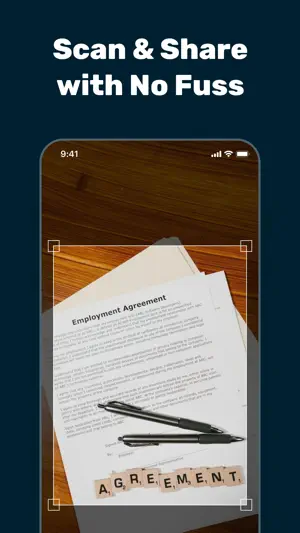
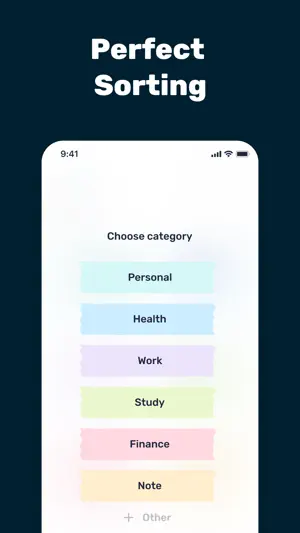
SCAN, SIGN & ORGANIZE Your Documents Anywhere, Anytime JUST IMAGINE: You can do all the document scanning work right on your iPhone or iPad With Scanner PDF : Enjoy your Scans you can quickly: ▶ Scan your documents ▶ Import files incl. DOC/DOCX and convert them into PDFs ▶ Sign documents right on your iPhone/iPad ▶ Keep everything organized into well-labeled categories and folders No more scrambling for a scanner. No more shuffling through papers - everything you need is here. ▶ Password-protect each file All this... on your iPhone! WHO’S THIS FOR? (Everyone who needs to scan documents into PDFs and keep them digitally) • Students • Working professionals • Small business owners • Freelancers • Travelers • And also to any iPhone/iPad users PERFECT FOR SCANNING: (Almost any document) ID cards, invoices, contracts, order forms, bills, business cards, lecture notes, educational material, and the list goes on. THE STANDOUT FEATURES: (What makes us unique) ▶ High-quality scans, even for multi-page documents - in seconds ▶ Converting and Signing DOC/DOCX documents ▶ Perfect Organizing ORGANIZE & STORE Your Files Store your scanned documents in categories logically labelled, like Personal, Health, Study, Work and Note, or create custom categories and folders. So, you DON’T NEED TO RESCAN THE DOCUMENTS AGAIN, and you can access them in seconds. ONE-TAP SHARING (EXPORT): Send your scans via Messengers, Mail, AirDrop, Messages, Notes, Cloud Storage and more…directly from the app. READY TO GO PAPERLESS? Download Scanner PDF : Enjoy your Scans now and save time organizing your documents digitally. Terms: https://lifescan.site/terms Privacy: https://lifescan.site/privacy
Ratings & reviews
4.7
13 ratings
What’s new
Version 2.2.0 · Updated September 18, 2026
Optimized for iOS 27.
App privacy
The developer, Elena Gertseva, reported these privacy practices to Apple.
Data Used to Track You
The following data may be used to track you across apps and websites owned by other companies:
- Identifiers: Device ID
Data Not Linked to You
The following data, which may be collected but is not linked to your identity, may be used for the following purposes:
- Identifiers: Device ID
- Usage Data: Advertising Data, Product Interaction, Other Usage Data
- Diagnostics: Other Diagnostic Data, Crash Data, Performance Data
- User Content: Photos or Videos, Customer Support
Used for: Developer’s Advertising or Marketing, Analytics, App Functionality, Other Purposes
Alternatives to Scanner PDF : Enjoy your Scans
Looking for apps like Scanner PDF : Enjoy your Scans? Here are 6 similar apps on the App Store. The highest rated is Callegra Community (4.9/5), and all 6 are free to download.
-
 Callegra Community
4.9
Callegra Community
4.9
-
 AI Chatbot & Keyboard - SageAI
2.8
AI Chatbot & Keyboard - SageAI
2.8
-
 PhotoAsk - AI Photo Chatbot
3.0
PhotoAsk - AI Photo Chatbot
3.0
-
 Memo: AI Note Taker
4.2
Memo: AI Note Taker
4.2
-
 Notro: AI Note Taker
3.8
Notro: AI Note Taker
3.8
-
 Fofo – AI Save & Organize
4.7
Fofo – AI Save & Organize
4.7
| App | Rating | Price | Last updated | Compare |
|---|---|---|---|---|
| Scanner PDF : Enjoy your Scans | 4.7 / 5 (13 ratings) | Free | September 18, 2026 | |
| Callegra Community | 4.9 / 5 (20) | Free | Sep 23, 2026 | Compare |
| AI Chatbot & Keyboard - SageAI | 2.8 / 5 (6) | Free | May 29, 2026 | Compare |
| PhotoAsk - AI Photo Chatbot | 3.0 / 5 (3) | Free | Feb 29, 2024 | Compare |
| Memo: AI Note Taker | 4.2 / 5 (77) | Free | Dec 19, 2025 | Compare |
| Notro: AI Note Taker | 3.8 / 5 (5) | Free | Oct 12, 2026 | Compare |
| Fofo – AI Save & Organize | 4.7 / 5 (101) | Free | Apr 2, 2026 | Compare |