

Files - Media File Manager
ZipoApps Photo & Video iPhoneiPadiPod touch
Files - Media File Manager is a free Photo & Video app for iPhone and iPad by ZipoApps. Rated 4.6/5 from 329 ratings. Requires iOS 15.0.
- Rating
- 4.6
- 329 ratings
- Price
- Free
- on the App Store
- Size
- 138 MB
- Age 4+
- Updated
- Apr 13
- 2026 · v2.1.1
Screenshots


About Files - Media File Manager
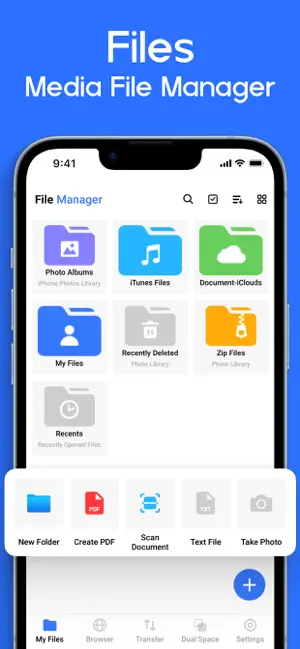
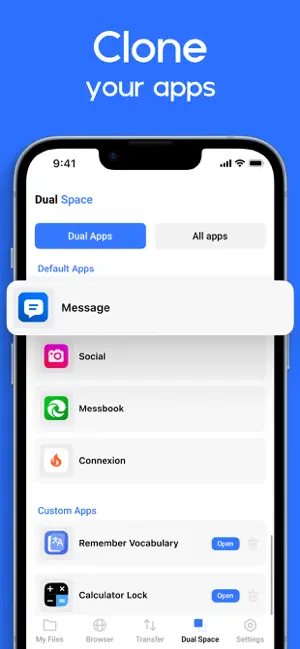
File Manager+ is an easy and powerful file explorer for iPhone. It’s free, fast, and full-featured. Because of its simple UI, it’s extremely easy to use. You can easily manage storage on your device, NAS(Network-attached storage), and cloud storage. What’s more, you can find out how many files & apps you have on your device at a glance immediately after opening the app. It supports every file management action (open, search, navigate directory, copy and paste, cut, delete, rename, compress, decompress, transfer, download, bookmark, and organize) for various file formats, including media and apk. Major locations and functions of File Manager Plus are as follows: ◆ Main Storage: You can manage all files and folders on both your internal storage and external storage. ◆ Downloads / New files / Images / Audio / Videos / Documents: Your files and folders are automatically sorted by their types and characteristics so that you can easily find what you are looking for. ◆ Apps: You can see and manage all applications installed on your local device. ◆ Cloud / Remote: You can access your cloud storage and also remote/shared storage like NAS and FTP server. (Cloud storage: Google Drive™, OneDrive, Dropbox, Box, and Yandex) ◆ Add Data from PC: You can add any files to the device storage from a PC using FTP(File Transfer Protocol). ◆ Storage analysis: You can analyse local storage to clean up useless files. You can find out which files and apps take up the most space. ◆ Internal image viewer / Internal music player/ Internal text editor: You can choose to use built-in utilities for faster and better performance. Get unlimited access to all premium files and media storage Subscribe to the Monthly File Manager Pro at $1.99 and the Yearly File Manager Pro at $9.99 to use ad-free versions of the premium app, which you can cancel anytime. Privacy Policy: https://zipoapps.com/mediamanagerios/privacy/ Terms: https://zipoapps.com/mediamanagerios/terms/
Ratings & reviews
4.6
329 ratings
What’s new
Version 2.1.1 · Updated April 13, 2026
User experience improvement. Clean storage & manage files fast!
App privacy
The developer, ZipoApps, reported these privacy practices to Apple.
Data Used to Track You
The following data may be used to track you across apps and websites owned by other companies:
- Purchases: Purchase History
- Identifiers: User ID, Device ID
- Usage Data: Product Interaction, Advertising Data, Other Usage Data
- Diagnostics: Crash Data, Performance Data, Other Diagnostic Data
Data Not Linked to You
The following data, which may be collected but is not linked to your identity, may be used for the following purposes:
- Identifiers: User ID, Device ID
- Purchases: Purchase History
- Usage Data: Product Interaction, Advertising Data, Other Usage Data
- Diagnostics: Crash Data, Performance Data, Other Diagnostic Data
Used for: Third-Party Advertising, Developer’s Advertising or Marketing, Analytics, Product Personalization, App Functionality, Other Purposes
Alternatives to Files - Media File Manager
Looking for apps like Files - Media File Manager? Here are 6 similar apps on the App Store. The highest rated is Recover Deleted Photos - DiskQ (4.6/5), and all 6 are free to download.
-
 Gallery : Media File Manager
4.3
Gallery : Media File Manager
4.3
-
 Gallery: Photo Vault & Cleaner
4.3
Gallery: Photo Vault & Cleaner
4.3
-
 HD Video Downloader - Download
4.0
HD Video Downloader - Download
4.0
-
 All Video Saver
4.3
All Video Saver
4.3
-
 Recover Deleted Photos - DiskQ
4.6
Recover Deleted Photos - DiskQ
4.6
-
 Sneptunè : HD Videos
3.7
Sneptunè : HD Videos
3.7
| App | Rating | Price | Last updated | Compare |
|---|---|---|---|---|
| Files - Media File Manager | 4.6 / 5 (329 ratings) | Free | April 13, 2026 | |
| Gallery : Media File Manager | 4.3 / 5 (106) | Free | Jan 21, 2026 | Compare |
| Gallery: Photo Vault & Cleaner | 4.3 / 5 (4,608) | Free | Jul 31, 2026 | Compare |
| HD Video Downloader - Download | 4.0 / 5 (636) | Free | Dec 23, 2025 | Compare |
| All Video Saver | 4.3 / 5 (9,836) | Free | Sep 1, 2026 | Compare |
| Recover Deleted Photos - DiskQ | 4.6 / 5 (1,254) | Free | Aug 15, 2026 | Compare |
| Sneptunè : HD Videos | 3.7 / 5 (32) | Free | Jul 23, 2026 | Compare |