

Digital Habits: Focus
CENTRE FOR DIGITAL HABITS CIC Productivity iPhoneiPadiPod touchMac
Digital Habits: Focus is a free Productivity app for iPhone and iPad by CENTRE FOR DIGITAL HABITS CIC. Rated 4.9/5 from 16 ratings. Requires iOS 15.0.
- Rating
- 4.9
- 16 ratings
- Price
- Free
- on the App Store
- Size
- 4 MB
- Age 4+
- Updated
- Sep 28
- 2026 · v6.9.3
Screenshots


About Digital Habits: Focus
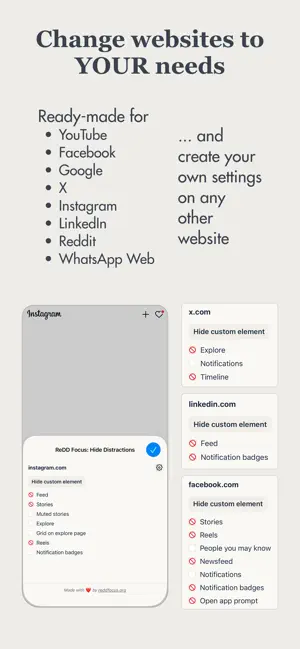
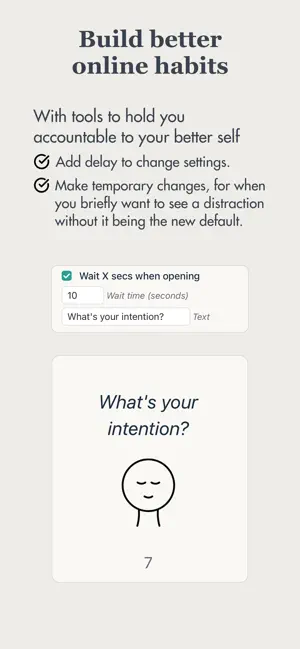
*NOTE: WORKS WITHIN SAFARI, NOT THE APPS*: This app lets you control how YouTube, LinkedIn, etc. appears in the Safari browser. It does NOT change the apps, as this is not possible. To make using e.g. Instagram in the browser as convenient as the app, create an icon on your home screen to take you directly to the site in the browser. You can find instructions for how to do so when you open the app. ---- Digital Habits: Focus (formerly known as 'ReDD Focus', 'Viking Focus' and 'MindShield') is a browser extension for Safari we built to help ourselves be less distracted online. It primarily lets you hide distracting elements on any website, with ready-made options for YouTube, Facebook, Twitter, Instagram, LinkedIn, Reddit, Google Search, and WhatsApp Web. For example, on YouTube you might want to hide recommended videos, on Facebook you might hide the newsfeed, and on Google Search you might want to hide AI summaries. You have full control over what is hidden. Simply click the extension icon in the browser toolbar to select elements to hide, and save your preferred settings. To help hold yourself accountable, you can also add a delay time to change the settings. You can also delay opening of distracting websites, make any website greyscale to reduce its allure, and set up redirects from one website to somewhere else to keep your online use intentional. Everywhere you go on the internet, something tries to grab your attention. This extension gives you back control. Enjoy! - Ulrik, Konrad, Tiago, and the Centre for Digital Habits Team (see what we're up to at digitalhabits.org) NOTE: the extension is open source and collects no personal data. In Chrome, Edge and Safari, it sends one anonymous count a day, with an ID that changes every month, so we know how many people use it. You can turn this off in Settings. See the source code, flag bugs, or submit suggestions for improvement at https://github.com/digitalhabits/dh-focus
Ratings & reviews
4.9
16 ratings
What’s new
Version 6.9.3 · Updated September 28, 2026
Hi folks, This update comes with some design improvements and under-the-hood improvements. Hide Distracting Elements - Greyscale now greys the whole page, including things a site keeps on top such as chat bubbles and cookie banners, while Focus's own picker bar and delay screen stay in colour. - Pick… now only affects the tab you are in, not every open tab on that site or your other computers. - Picking no longer dims the page on some sites, and the highlight stays on the element as you scroll. - Undo on the picker bar only appears when there is something on the page to undo. - The picker bar now fits its text, and its count of hidden elements updates when you change your picks in the popup. Delay Opening Websites - Turning Delay off during a countdown now ends the countdown straight away. Redirects - Editing a redirect is more reliable: moving between fields keeps your place, and an emptied field no longer looks saved when it isn't. Accountability - Lock in is only offered when there is something to lock; otherwise Focus tells you so. - After you lock in, a short message explains how to unlock. Privacy - Digital Habits: Focus now sends one anonymous count a day, only on days it has a rule on a site you visit, so we know how many people use it. It contains nothing about the sites you visit or your settings, and you can turn it off in Settings under "Send anonymous usage count". The welcome screen explains this under "Private by design". Fixes & Polish - The popup has been redesigned, with Greyscale, Delay and Redirect as compact cards at the top that show their current setting. - The welcome screen has been simplified around a short "Private by design" note. - The design of the Settings screen has been improved. Remember that the app is open source — keep your feedback and suggestions coming at https://github.com/digitalhabits/dh-focus Cheers, Ulrik & all of us at Centre for Digital Habits
App privacy
The developer, CENTRE FOR DIGITAL HABITS CIC, reported these privacy practices to Apple.
Data Not Linked to You
The following data, which may be collected but is not linked to your identity, may be used for the following purposes:
- Usage Data: Product Interaction
Used for: Analytics
Alternatives to Digital Habits: Focus
Looking for apps like Digital Habits: Focus? Here are 6 similar apps on the App Store. The highest rated is NeatNotes : Notes and lists (5.0/5), and 4 of the 6 are free to download.
-
 NeatNotes : Notes and lists
5.0
-
 "No Distractions" for YouTube
4.4
-
 Habit Time Tracker - Flowtic
4.8
-
 Focus: Lofi Study Music
4.7
-
 Character Counter
-
 Fuel MPG & Vehicle Expense Log
4.6
| App | Rating | Price | Last updated | Compare |
|---|---|---|---|---|
| Digital Habits: Focus | 4.9 / 5 (16 ratings) | Free | September 28, 2026 | |
| NeatNotes : Notes and lists | 5.0 / 5 (40) | Free | Oct 3, 2026 | Compare |
| "No Distractions" for YouTube | 4.4 / 5 (29) | 1.29 USD | Jun 2, 2026 | Compare |
| Habit Time Tracker - Flowtic | 4.8 / 5 (12) | Free | Sep 20, 2025 | Compare |
| Focus: Lofi Study Music | 4.7 / 5 (50) | Free | Feb 13, 2026 | Compare |
| Character Counter | – | 2.99 USD | Jun 24, 2026 | Compare |
| Fuel MPG & Vehicle Expense Log | 4.6 / 5 (354) | Free | Oct 14, 2026 | Compare |