

Impres - Student & Staff login
Nithra Education iPhoneiPadiPod touch
Impres - Student & Staff login is a free Education app for iPhone and iPad by Nithra. Requires iOS 13.0. Updated August 7, 2026.
- Price
- Free
- on the App Store
- Size
- 68 MB
- Age 4+
- Updated
- Aug 7
- 2026 · v1.1.0
Screenshots

About Impres - Student & Staff login
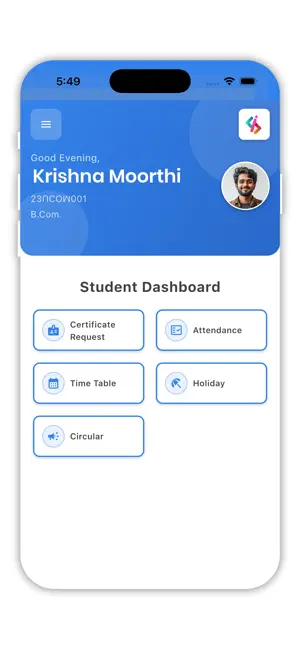
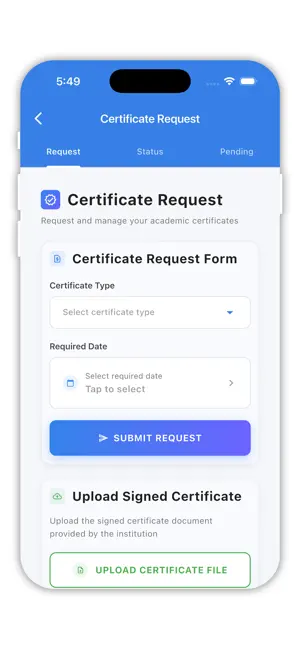
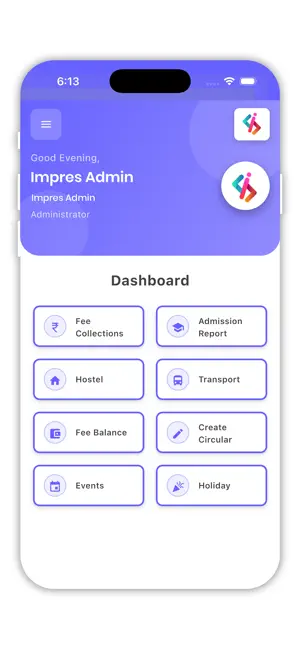
Impres ERP is a software that contains data on admin reports, student reports, and attendance entries and it can be used by students and staff who have access to that software. Features of ImpresERP are: Student facilities are listed below Internal Mark: Student can view their internal marks in the app which was shown semester-wise. Attendance: Attendance is updated semester-wise for students in this section. If you click on View more the app lists your period-wise attendance list. View Absent list shows you the number of days you are absent. Through date view can get full attendance details of the student. Time Table: Student Time Table is also given in our ImpresERP. With this students can prepare for their exams by scheduling the subjects based on preference within a short time. University Marks: A full view of university marks based on semester is available here. Students are able to download their mark sheets at any time in PDF format. Circulars & Holidays: Circulars given by principal and HOD’s are posted at this corner. Through the holiday button, you can see the number of holidays in that semester available. Fee Details: Student Semester fee details are shown here. How much should they pay for each semester and year are enlisted. And fee history is updated here. Library(OPAC) Library details are enrolled here. Students can view the transaction history and overdue details on this page. Staff Side facilities are listed below: 1. Staff Attendance This part contains staff attendance data. In this staff can view present and absent details. 2. Student Attendance In this staff can view the marks of students that they have posted. Students present and absent details, and daily attendance of students can be seen by staff. 3. Notes of Lesson Staff taking notes of his/her lesson plan is displayed in this section. 4. Circulars and Library Institutions circulars to staff members are posted. In the library section, staff can search for the book they are in need of. Can get their transactions history and know about their overdue if any. 5. Leave Balance and TimeTable Staff leave balance and eligible leave data information are listed here. Staff Time Table data is listed in this corner such as which department they are handling at which time and day courses are scheduled for them. 6. Holidays It has the institution's holiday Data list. 7. My Proforma This includes Staff’s performance at the institutions and their activities. ImpresERP is free to use and easy to communicate for staff members and students. Start tracking your reports with ImpresERP today to improve your study habits!
What’s new
Version 1.1.0 · Updated August 7, 2026
Bugs fixed
App privacy
The developer, Nithra, reported these privacy practices to Apple.
Data Not Collected
The developer does not collect any data from this app.
Alternatives to Impres - Student & Staff login
Looking for apps like Impres - Student & Staff login? Here are 6 similar apps on the App Store. The highest rated is Payil (5.0/5), and all 6 are free to download.


| App | Rating | Price | Last updated | Compare |
|---|---|---|---|---|
| Impres - Student & Staff login | – | Free | August 7, 2026 | |
| KVIM | – | Free | Sep 5, 2026 | Compare |
| Payil | 5.0 / 5 (4) | Free | Feb 2, 2026 | Compare |
| Fair Marks - Marks made easy | – | Free | Sep 23, 2025 | Compare |
| AVP INSTITUTIONS | – | Free | Apr 21, 2026 | Compare |
| PCDP App | – | Free | Oct 23, 2026 | Compare |
| OSH STATE UNIVERSITY | – | Free | Oct 16, 2025 | Compare |