

xZoom Cam - PRO Camera
Slava Plisko Photo & Video iPhoneiPadiPod touchApple Watch
xZoom Cam - PRO Camera is a free Photo & Video app for iPhone and iPad by Slava Plisko. Rated 4.4/5 from 574 ratings. Requires iOS 15.0.
- Rating
- 4.4
- 574 ratings
- Price
- Free
- on the App Store
- Size
- 35 MB
- Age 4+
- Updated
- Oct 17
- 2026 · v1.1.426
Screenshots
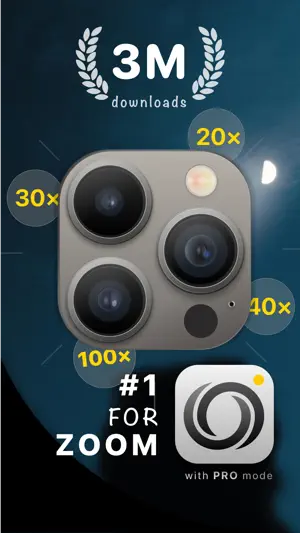
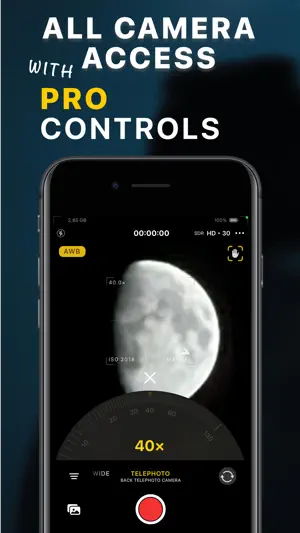
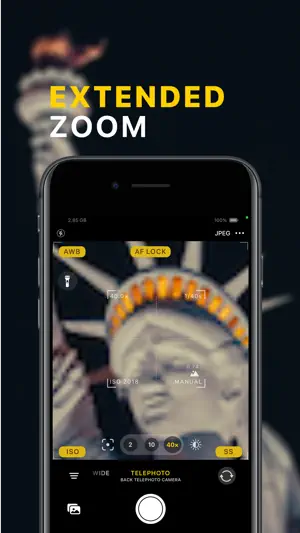

About xZoom Cam - PRO Camera
Unlock the full potential of your iPhone camera with xZoom Cam - a powerful camera app for extended zoom, professional photo and video controls, and advanced multi-camera capture. Capture stunning photos and videos with camera zoom up to 100×, manual focus, ISO, shutter speed, white balance, RAW and ProRAW, 4K video, ProRes, Dolby Vision, Picture-in-Picture, and more. ## FREE CAMERA FEATURES • Extended camera zoom for Photos and Videos - up to 100× • Photo, 4K, Full HD and HD video • JPEG, HEIC, TIFF, RAW and ProRAW photo formats • Extended video formats • Advanced Video Stabilization modes • Pro Active Color Space management • Video Frame Rate control • Dolby Vision support • Fast Photo Capture ## ADVANCED CAMERA CONTROLS Get direct access to the physical cameras available on your iPhone, including Wide, Ultra-Wide and Telephoto cameras. Depending on your iPhone model, xZoom Cam supports: • Wide Camera • Ultra-Wide Camera • Telephoto Camera • Dual Camera • Dual Wide Camera • Triple Camera Use professional camera controls in PRO mode: • F - Manual Focus - precisely control lens position • SS - Shutter Speed - control camera exposure time • ISO - control sensor sensitivity to light • AWB - White Balance - control color temperature and tint ## EXTENDED CAMERA ZOOM Go beyond the standard zoom range of your iPhone camera. xZoom Cam combines the available cameras with advanced zoom processing to provide an extended camera zoom experience of up to 100×. Smooth zoom transitions help you move naturally between available cameras and extended zoom ranges. ## DUAL CAMERA & PICTURE-IN-PICTURE VIDEO Capture more than one perspective and create dynamic videos with xZoom Cam. • Dual Camera with PiP - record video from two cameras simultaneously with Picture-in-Picture • Front & Back Camera Switching - switch between the front and rear cameras while recording • Dual Capture support for older compatible iPhone devices Multi-camera features require a compatible iPhone and iOS version. ## PROFESSIONAL VIDEO CAMERA Take control of your video recording with advanced video features: • 4K, Full HD and HD recording • Extended video formats • ProRes and HEVC support • Dolby Vision • Video Frame Rate control • Advanced Video Stabilization modes • Active Color Space management ## ADVANCED PHOTO CAMERA Capture photos using the full capabilities of your iPhone camera system. • Zero Shutter Lag • Fast Photo Capture • JPEG, HEIC, TIFF, RAW and ProRAW • Instant Light • Constant Color support on compatible devices • Manual Focus, Shutter Speed, ISO and White Balance in PRO mode ## COMPOSITION & CAMERA TOOLS Compose and frame your photos and videos with advanced camera guides: • Default Grid • Phi Grid • Fibonacci Spiral Grid • Camera Level • Landscape interface orientation ## APPLE WATCH CAMERA REMOTE Use xZoom Remote on Apple Watch to control xZoom Cam remotely. • Take photos remotely • Start and stop video recording • Control zoom ## PRO MODE Unlock professional camera controls with PRO mode. ### Subscription • Weekly plan • Monthly plan • Annual plan ### Purchase • Lifetime PRO The Annual plan includes a 7-day free trial period. ## SUPPORTED CODECS • ProRes • HEVC • MPEG • HEIC • JPEG ## SUPPORTED DEVICES • iPhone 7 and newer Some features require a compatible iPhone model. ## SUPPORTED iOS VERSION • iOS 15 and newer Terms of Service: https://www.xzoom.app/terms/ Privacy Policy: https://www.xzoom.app/privacy/ Support: [email protected]
Ratings & reviews
4.4
574 ratings
What’s new
Version 1.1.426 · Updated October 17, 2026
In this version, we've added general UI/UX enhancements and stability improvements. We hope you'll enjoy the updates! Photo / Video Toggle • We moved the Photo / Video switch to the bottom for easier access. Composition Grid • We've designed a new composition grid selection controller. Now you can easily change the composition grid and adjust the rotation and mirroring modes for the Fibonacci Spiral grid. To open the controller, tap the button with three horizontal dots next to the main capture button. Gallery Icon • The Gallery icon now updates every time you launch the app, showing your latest gallery asset in a larger, rounded design. Stability Improvements • Fixed a zoom calculation issue with the Triple camera. • Increased the maximum zoom limit to 200x for the Telephoto camera. • Fixed an app crash when stopping video recording. • Improved stability of the Dual Capture recording mode.
App privacy
The developer, Slava Plisko, reported these privacy practices to Apple.
Data Not Collected
The developer does not collect any data from this app.
Alternatives to xZoom Cam - PRO Camera
Looking for apps like xZoom Cam - PRO Camera? Here are 6 similar apps on the App Store. The highest rated is Varlens - DSLR in Phone (4.7/5), and all 6 are free to download.
-
 Pro Camera-Omnipotent Camera
4.4
Pro Camera-Omnipotent Camera
4.4
-
 Ultra Camera Zoom 100x
4.2
Ultra Camera Zoom 100x
4.2
-
 Pro Camera with RAW & Focus
4.4
Pro Camera with RAW & Focus
4.4
-
 Super Zoom 200x - Tele Camera
4.4
Super Zoom 200x - Tele Camera
4.4
-
 Varlens - DSLR in Phone
4.7
Varlens - DSLR in Phone
4.7
-
 Camera+ I Pro Camera & Editor
4.5
Camera+ I Pro Camera & Editor
4.5
| App | Rating | Price | Last updated | Compare |
|---|---|---|---|---|
| xZoom Cam - PRO Camera | 4.4 / 5 (574 ratings) | Free | October 17, 2026 | |
| Pro Camera-Omnipotent Camera | 4.4 / 5 (4,303) | Free | Jul 8, 2026 | Compare |
| Ultra Camera Zoom 100x | 4.2 / 5 (297) | Free | Oct 18, 2024 | Compare |
| Pro Camera with RAW & Focus | 4.4 / 5 (4,264) | Free | Aug 13, 2026 | Compare |
| Super Zoom 200x - Tele Camera | 4.4 / 5 (559) | Free | Oct 6, 2026 | Compare |
| Varlens - DSLR in Phone | 4.7 / 5 (3,985) | Free | Oct 24, 2026 | Compare |
| Camera+ I Pro Camera & Editor | 4.5 / 5 (11,842) | Free | Aug 21, 2026 | Compare |