

DVD Collection: Movie Miner
giant cookie IT Consulting UG (haftungsbeschränkt) Productivity iPhoneiPadiPod touch
DVD Collection: Movie Miner is a free Productivity app for iPhone and iPad by giant cookie IT Consulting UG (haftungsbeschränkt).
- Rating
- 4.8
- 297 ratings
- Price
- Free
- on the App Store
- Size
- 73 MB
- Age 12+
- Updated
- Aug 22
- 2026 · v1.19.7
Screenshots
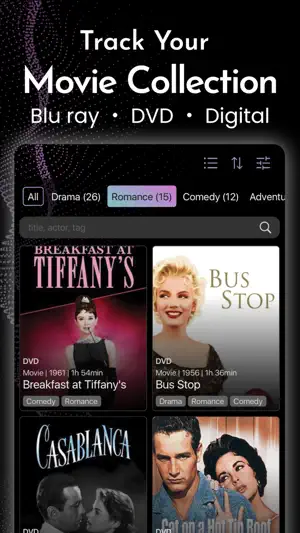


About DVD Collection: Movie Miner
The app for your movie collection! From now on you have your movie collection under control! With Movie Miner you can easily manage all your movies in one place: DVDs, Blu-rays or digital purchases. Best thing: Enter as many movies as you like for free! Honestly: Do you actually know how many films you own? Is your DVD cabinet full and have you bought a few more movies from different streaming providers over the years? Can you still keep track? With Movie Miner you get the overview back! You can easily add all your movies by searching for them or by scanning the bar code of your DVD or Blu-ray. Once that's done, you can search your collection and filter according to various criteria. +++ Your own tags +++ Assign your own keywords for your films and organize everything according to your wishes: The children's favorite films, Christmas classics, costume films: you've definitely already got a few categories in mind. +++ Your own providers +++ You can specify one (or more) providers for each film so that you always know where to find it. This can be DVD or Blu-ray, but also video-on-demand providers. If you need it even more precisely, you can also create your own providers: "Shelf top left", "Aunt Anna's lumber room"? - whatever you need to keep track. +++ Suggestions and recommendations +++ Find out what to watch: Movie Miner presents you with new suggestions from your collection every day. This is how movies come to light that you may have long forgotten. Try it! +++ Watch list +++ Plannning a movie night? Queue up your favourite movies on the watch list +++ Wish list +++ A movie came to mind, that is still missing in your collection? Put it on your wish list! Go ahead and start your personal movie database! Even more fun for Movie Nerds: Unlock Movie Miner Nerd Mode and enjoy your collection even more. * Sync your collection via iCloud between your devices. Share and co-edit with family and friends via iCloud Sharing. * Print out movie information or save them as PDF * Use the app ad-free Nerd Mode is available as a subscription with either a monthly or a yearly period or as a one-time payment. If you choose the the monthly or yearly plan and you are a new subscriber you can try it for free for one week. If you choose the monthly or yearly plan, the subscription will automatically renew for one month or one year, respectively, unless you cancel the subscription at least 24 hours before the end of the term. If you renew, your account will be charged the applicable subscription price within the last 24 hours before the subscription expires. If you choose the one-time payment, you will unlock Nerd Mode for an unlimited period of time. You can cancel your subscription at any time. To do so, go to Settings on your iPhone or iPad and tap your Apple ID. In the "Subscriptions" section you can easily cancel. Cancellations will always take effect at the end of the subscription period. Your subscription or one-time purchase can be used on all devices where you are signed in with the Apple ID you used to make the purchase. If your purchase isn't automatically recognized, simply use the "Restore Purchase" button on the subscription page within the app. Apple family sharing is enabled for all purchases, so all members of an Apple family group can use Nerd Mode with one purchase. We look forward to receiving suggestions and ideas at [email protected] Please note: Movie Miner is not a streaming app and not a content provider. It's an app for managing your private movie collection. Apple's standard end user license agreement applies: https://www.apple.com/legal/internet-services/itunes/dev/stdeula/ Disclosure: This app contains affiliate links to Amazon and eBay. As partners, we may earn commissions from qualifying purchases. There are no additional costs for you.
Ratings & reviews
4.8
297 ratings
What’s new
Version 1.19.7 · Updated August 22, 2026
We fixed some minor issues.
App privacy
The developer, giant cookie IT Consulting UG (haftungsbeschränkt), reported these privacy practices to Apple.
Data Used to Track You
The following data may be used to track you across apps and websites owned by other companies:
- Location: Coarse Location
Data Not Linked to You
The following data, which may be collected but is not linked to your identity, may be used for the following purposes:
- Location: Coarse Location
- Identifiers: User ID
- Usage Data: Product Interaction, Other Usage Data
- User Content: Other User Content
- Diagnostics: Crash Data, Performance Data, Other Diagnostic Data
Used for: Third-Party Advertising, Analytics, App Functionality
Alternatives to DVD Collection: Movie Miner
Looking for apps like DVD Collection: Movie Miner? Here are 6 similar apps on the App Store. The highest rated is SceneThat (5.0/5), and all 6 are free to download.
-
 Movielogue
4.0
Movielogue
4.0
-
 SceneThat
5.0
SceneThat
5.0
-
 MyStuff2 Pro
4.4
MyStuff2 Pro
4.4
-
 Listy · Watchlist & Tracker
4.6
Listy · Watchlist & Tracker
4.6
-
 Filmotech
4.5
Filmotech
4.5
-
 My Collections: Collect & Show
4.7
My Collections: Collect & Show
4.7
| App | Rating | Price | Last updated | Compare |
|---|---|---|---|---|
| DVD Collection: Movie Miner | 4.8 / 5 (297 ratings) | Free | August 22, 2026 | |
| Movielogue | 4.0 / 5 (20) | Free | Aug 19, 2026 | Compare |
| SceneThat | 5.0 / 5 (9) | Free | Jul 10, 2026 | Compare |
| MyStuff2 Pro | 4.4 / 5 (533) | Free | May 14, 2026 | Compare |
| Listy · Watchlist & Tracker | 4.6 / 5 (480) | Free | Jul 10, 2026 | Compare |
| Filmotech | 4.5 / 5 (4) | Free | Sep 26, 2024 | Compare |
| My Collections: Collect & Show | 4.7 / 5 (56) | Free | Mar 25, 2026 | Compare |