

Reverse Sound: Audios & Videos
Marcos Morais Music iPhoneiPadiPod touch
Reverse Sound: Audios & Videos is a free Music app for iPhone and iPad by Marcos Morais. Rated 4.4/5 from 7 ratings. Requires iOS 26.0.
- Rating
- 4.4
- 7 ratings
- Price
- Free
- on the App Store
- Size
- 4 MB
- Age 4+
- Updated
- Oct 19
- 2026 · v2.0.1
Screenshots

About Reverse Sound: Audios & Videos
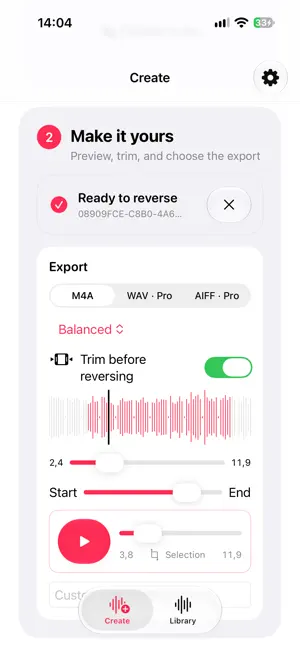
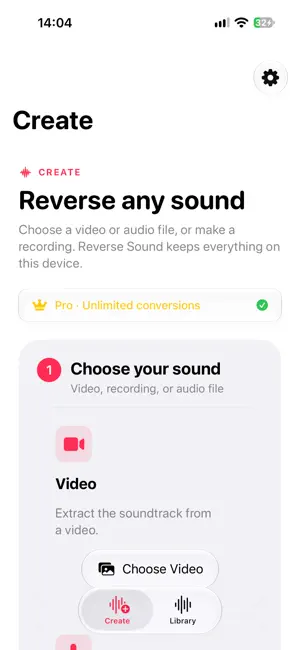
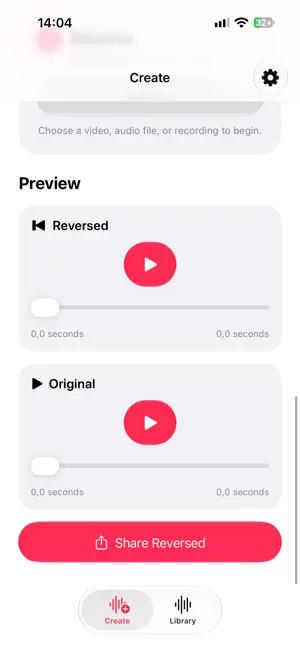
Reverse Sound makes reversing audio fast, private, and delightfully simple. Choose a video from your photo library, import an audio file, or record something directly in the app. Preview your source, reverse it, and your new audio is immediately ready to play, save, or share. EVERYTHING STAYS ON YOUR DEVICE Your recordings and audio files are processed locally. Reverse Sound has no account system, advertising, analytics SDK, or cloud upload. Your audio remains yours. THREE EASY WAYS TO START • Choose a video and extract its audio • Record audio using your microphone • Import an existing audio file PREVIEW BEFORE AND AFTER Listen to the original audio before converting, then compare it with the reversed version using the built-in player and waveform. YOUR AUDIO LIBRARY Every completed conversion is saved in your Library, where you can: • Play your reversed audio • Search and filter your collection • Rename recordings • Mark favorites • Share or export files • Delete anything you no longer need SHARE ANYWHERE Send reversed audio to friends, messaging apps, email, creative tools, or any compatible app using the familiar system share sheet. You can also save files directly to the Files app. DESIGNED FOR IPHONE, IPAD, AND MAC Reverse Sound adapts naturally to every screen, with a focused mobile experience and spacious sidebar-based layouts on iPad and Mac. It supports keyboard navigation, resizable windows, light and dark appearances, Dynamic Type, VoiceOver, increased contrast, Reduce Motion, and Reduce Transparency. TEN FREE CONVERSIONS EVERY MONTH Reverse Sound includes ten completed conversions per local calendar month. Failed or cancelled operations never use your allowance, and everything already in your Library remains available to play, manage, and share. REVERSE SOUND PRO Upgrade to Pro for: • Unlimited conversions • Trim-before-reverse with live preview • WAV and AIFF export • M4A quality controls • Custom export names Monthly and annual subscription options are available. Optional Tip Jar purchases support continued development but do not unlock features. Whether you’re creating sound effects, exploring music, preparing a funny message, or simply curious about how something sounds backward, Reverse Sound gives you the tools without getting in your way. Choose. Reverse. Listen. Terms of Use: https://www.apple.com/legal/internet-services/itunes/dev/stdeula/ Privacy Policy: https://www.marcostmorais.com/reversesound_privacy_policy.html
Ratings & reviews
4.4
7 ratings
What’s new
Version 2.0.1 · Updated October 19, 2026
Reverse Sound 2.0 is a complete rebuild. • A beautiful new Liquid Glass design for iPhone, iPad, and Mac • A faster three-step Create experience with clear import and conversion progress • Choose videos directly from your photo library • Import audio files or record with the microphone • Preview original and reversed audio with waveforms and accurate playback tracking • Trim audio before reversing with live preview • Export as M4A, WAV, or AIFF • Choose M4A quality and custom export names • A redesigned Library with search, filters, favorites, rename, share, and deletion • One coordinated audio player across Create and Library • Ten free completed conversions every month • Reverse Sound Pro with monthly and annual options • Optional Tip Jar purchases • Improved support for VoiceOver, Dynamic Type, increased contrast, reduced motion, and reduced transparency • English and Brazilian Portuguese localization • All audio processing remains private and on your device This release also improves reliability for video importing, repeated microphone recordings, subscription restoration, playback tracking, and large audio conversions.
App privacy
The developer, Marcos Morais, reported these privacy practices to Apple.
Data Not Collected
The developer does not collect any data from this app.
Alternatives to Reverse Sound: Audios & Videos
Looking for apps like Reverse Sound: Audios & Videos? Here are 6 similar apps on the App Store. The highest rated is Mp3 Converter & Audio Editor (4.7/5), and all 6 are free to download.
-
 Reverse Audio Recorder
4.4
Reverse Audio Recorder
4.4
-
 Reverse Audio / Reverse Voice
4.6
Reverse Audio / Reverse Voice
4.6
-
 Mp3 Converter & Audio Editor
4.7
Mp3 Converter & Audio Editor
4.7
-
 Reverse Sing: Audio Challenge
4.0
Reverse Sing: Audio Challenge
4.0
-
 BackPlay: Reverse Audio
4.7
BackPlay: Reverse Audio
4.7
-
 Reverse Audio ®
4.5
Reverse Audio ®
4.5
| App | Rating | Price | Last updated | Compare |
|---|---|---|---|---|
| Reverse Sound: Audios & Videos | 4.4 / 5 (7 ratings) | Free | October 19, 2026 | |
| Reverse Audio Recorder | 4.4 / 5 (202) | Free | Sep 28, 2026 | Compare |
| Reverse Audio / Reverse Voice | 4.6 / 5 (117) | Free | Oct 8, 2026 | Compare |
| Mp3 Converter & Audio Editor | 4.7 / 5 (1,633) | Free | Sep 15, 2026 | Compare |
| Reverse Sing: Audio Challenge | 4.1 / 5 (20) | Free | Sep 5, 2026 | Compare |
| BackPlay: Reverse Audio | 4.7 / 5 (15) | Free | Dec 12, 2025 | Compare |
| Reverse Audio ® | 4.5 / 5 (404) | Free | May 28, 2026 | Compare |