

PrintMyDays
Thomas ROBB Utilities iPhoneiPadiPod touch
PrintMyDays is a free Utilities app for iPhone and iPad by Thomas ROBB. Rated 5.0/5 from 3 ratings. Requires iOS 17.6. Updated October 2, 2026.
- Rating
- 5.0
- 3 ratings
- Price
- Free
- on the App Store
- Size
- 2 MB
- Age 4+
- Updated
- Oct 2
- 2026 · v2.40
Screenshots



About PrintMyDays
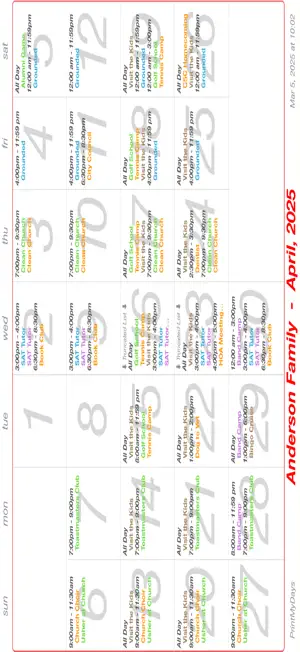
This little Gregorian-based calendar app promises to bring all your far-flung "Calendars" (Cloud, local, subscribed) together in the form of a color-coded, hard-copy, monthly calendar. Before we start, a word about those first five ScreenShots in the Preview section shown above. Well, they're not ScreenShots, but rather "PrinterShots" – thumbnail images of a calendar "scrunched-down" to the size requirement of a ScreenShot so as to be depicted here on the App Store. Yes, they look somewhat out-of-sorts here, but on your printer or sent as a PDF, they will look "fabulous". The remaining five ScreenShots are directly from the app. So, let's get started. Meet the Anderson family (and their Calendar colors) - Mom (orange), Dad (green), son Blu (blue) and daughter Vi (violet). Mom, the family “calendar-master”, previews her Calendar together with the Calendars for Dad, Blu and Violet (#1, above). Nice. Wait, what? Grandma (brown), who lives in Fresno, is coming for a visit? Probably to keep an eye on grandson Blu while Mom and Dad are busy recreating (golf and tennis camps). The calendar gets crowded on a couple of Wednesdays (#2, above). Mom needs more "real-estate" in the calendar. So, what can be done? Mom knows what to do. Mom will bifurcate the calendar. Wait, what? bi·fur·cate - "to cause to divide into two branches or parts" - Merriam-Webster Dictionary. Mom uses the Date Range feature of the app to render days 1-15 (#3, above with "shrink" option shown), then renders days 16-30 (#4, above with "hide" option shown) on the flip-side. Mission accomplished. Also available is a columnar calendar style (#5, above). Three font sizes are available for calendar event titles. A customized calendar title and a calendar note field are also available. Also available, the ability to "shrink" or "hide" parts of the calendar. What paper sizes are supported, you might ask? USLetter? Of course. A4? Yes. Legal? That too. PDF is supported. You select the size with the full dimensions becoming the imageable area. If a PDF "meets-up" with a printer somewhere down the line, just use "fit-to-page" or "scale" to avoid clipping on the margins. So, what this app did for the Andersons it can do for you. It's free to try - your Calendars, your events, your printer. And the app produces a PDF that you can AirDrop, Email, etc. If it looks good, a nominal IAP (Tier One) will get you on your way. AND, this little iOS app will run just fine on your big silicon macOS device!
What’s new
Version 2.40 · Updated October 2, 2026
Infrastructure updates
App privacy
The developer, Thomas ROBB, reported these privacy practices to Apple.
Data Not Collected
The developer does not collect any data from this app.
Alternatives to PrintMyDays
Looking for apps like PrintMyDays? Here are 6 similar apps on the App Store. The highest rated is Quickesign TV Control (5.0/5), and 5 of the 6 are free to download.
-
 Quickesign TV Control
5.0
Quickesign TV Control
5.0
-
 Zeliox ZAI4
-
 CalPrint for iPhone
4.9
CalPrint for iPhone
4.9
-
 PrintingCalendar:Easy,simple
4.1
PrintingCalendar:Easy,simple
4.1
-
 Teleprompter: Voice Follow
-
 Convertify PDF: Converter Edit
3.0
Convertify PDF: Converter Edit
3.0
| App | Rating | Price | Last updated | Compare |
|---|---|---|---|---|
| PrintMyDays | 5.0 / 5 (3 ratings) | Free | October 2, 2026 | |
| Quickesign TV Control | 5.0 / 5 (1) | Free | Aug 17, 2026 | Compare |
| Zeliox ZAI4 | – | Free | Jun 5, 2025 | Compare |
| CalPrint for iPhone | 4.9 / 5 (610) | 1.99 USD | Oct 6, 2026 | Compare |
| PrintingCalendar:Easy,simple | 4.1 / 5 (7) | Free | Oct 30, 2026 | Compare |
| Teleprompter: Voice Follow | – | Free | Oct 19, 2026 | Compare |
| Convertify PDF: Converter Edit | 3.0 / 5 (1) | Free | Sep 26, 2025 | Compare |
Compare PrintMyDays with the top alternatives: ratings, updates, ASO score and keyword gaps →