

Speech To Text: Voice Notes
Parsottambhai Dhameliya Productivity iPhoneiPadiPod touch
Speech To Text: Voice Notes is a free Productivity app for iPhone and iPad by Parsottambhai Dhameliya. Rated 4.1/5 from 25 ratings. Requires iOS 13.0.
- Rating
- 4.1
- 25 ratings
- Price
- Free
- on the App Store
- Size
- 32 MB
- Age 4+
- Updated
- May 28
- 2026 · v3.2
Screenshots

About Speech To Text: Voice Notes
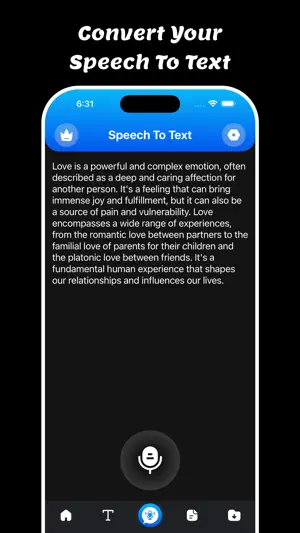
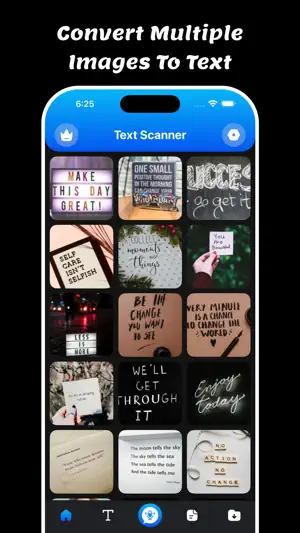
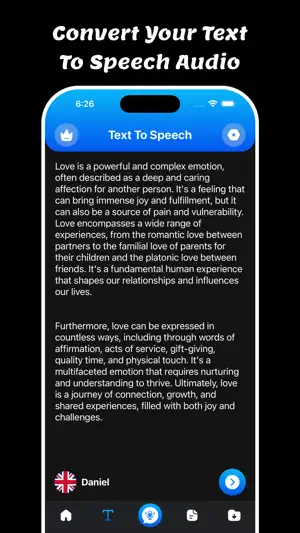
Welcome to Speech To Text: Voice Notes app. Convert speech, images, PDFs, and text seamlessly – all in one smart app! Unlock the power of your voice, images, and documents with Speech To Text: Voice Notes – the all-in-one tool that transforms the way you interact with content. Trusted by millions, continuous non-stop, and unlimited dictation. Battle-tested for years. For thinkers, bloggers, writers, drivers, joggers, busy people, and anyone who prefers fast & easy typing. Speech To Text: Voice Notes is easy to use. Users can easy to convert Speech to text and Text to Speech using a single click. Users can copy, share, print, and save files using a single click. Makes life easy - no more struggling to write down short or long texts. Unlike other voice-typing apps, Speech To Text: Voice Notes does not stop listening when you take a break to breathe or think. Incorporates a built-in keyboard so you can enjoy the ease of dictation for words and ease of tapping for punctuation & symbols. Designed to make writing fast and easy. Featured: The following features make Speech To Text: Voice Notes a powerful speech-enabled notepad, designed to empower your ideas and creativity: - Write short or long texts easily. Dictate hands-free for hours!, Speech To Text: Voice Notes will not stop even when you take longer breaks between sentences. - Fast, simple & light. - Supports offline - Speech to Text - Text to Speech - Share, export & print in one tap - Auto capitalization & spacing - Edit text, while still in dictation mode - no need to stop and restart Key Features: Speech to Text : Speak naturally and let the app transcribe your words instantly. Perfect for notes, ideas, or hands-free productivity. Text to Speech : Type or paste any text and hear it spoken aloud in a natural voice. Ideal for learning, multitasking, or accessibility. Image to Text (OCR) : Snap a photo or upload an image to extract text with high accuracy. Great for digitizing documents, signs, or printed material. PDF to Text : Easily import PDFs and convert them to editable, shareable text. Extract data from contracts, reports, or study materials in seconds. Download and enjoy the Speech To Text: Voice Notes. Privacy Policy: https://glistensolution.com/Apps/App_Privacy.html Terms of use: https://glistensolution.com/Apps/App_TOS.html
Ratings & reviews
4.1
25 ratings
What’s new
Version 3.2 · Updated May 28, 2026
- Crashes Fixed - Performance Improved
App privacy
The developer, Parsottambhai Dhameliya, reported these privacy practices to Apple.
Data Used to Track You
The following data may be used to track you across apps and websites owned by other companies:
- User Content: Audio Data
- Usage Data: Advertising Data
Data Not Linked to You
The following data, which may be collected but is not linked to your identity, may be used for the following purposes:
- User Content: Audio Data
- Usage Data: Advertising Data
Used for: Third-Party Advertising
Alternatives to Speech To Text: Voice Notes
Looking for apps like Speech To Text: Voice Notes? Here are 6 similar apps on the App Store. The highest rated is MyVoiceToText (5.0/5), and all 6 are free to download.
-
 Speech To Text - Voice Notes
2.0
Speech To Text - Voice Notes
2.0
-
 MyVoiceToText
5.0
MyVoiceToText
5.0
-
 Transcribe 2026
4.6
Transcribe 2026
4.6
-
 Speech to Text: Voice memos
4.4
Speech to Text: Voice memos
4.4
-
 Voice notebook speech to text
4.2
Voice notebook speech to text
4.2
-
 Speech To Text: Voice Typing
4.3
Speech To Text: Voice Typing
4.3
| App | Rating | Price | Last updated | Compare |
|---|---|---|---|---|
| Speech To Text: Voice Notes | 4.1 / 5 (25 ratings) | Free | May 28, 2026 | |
| Speech To Text - Voice Notes | 2.0 / 5 (1) | Free | May 6, 2024 | Compare |
| MyVoiceToText | 5.0 / 5 (1) | Free | Mar 11, 2024 | Compare |
| Transcribe 2026 | 4.6 / 5 (10) | Free | Dec 16, 2025 | Compare |
| Speech to Text: Voice memos | 4.4 / 5 (128) | Free | Aug 20, 2026 | Compare |
| Voice notebook speech to text | 4.2 / 5 (5) | Free | Jul 15, 2026 | Compare |
| Speech To Text: Voice Typing | 4.3 / 5 (3) | Free | Dec 17, 2024 | Compare |