

StitchHub: Cross Stitch
Diana Białogrzywa Graphics & Design iPhoneiPadiPod touch
StitchHub: Cross Stitch is a free Graphics & Design app for iPhone and iPad by Diana Białogrzywa. Rated 3.5/5 from 2 ratings. Requires iOS 18.6.
- Rating
- 3.5
- 2 ratings
- Price
- Free
- on the App Store
- Size
- 84 MB
- Age 4+
- Updated
- Oct 26
- 2026 · v3.7.1
Screenshots



About StitchHub: Cross Stitch
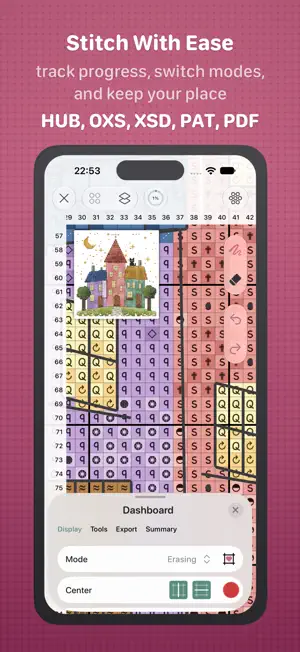
Create, import, edit and work with cross stitch patterns in one powerful workspace. The app brings everything together for stitchers and pattern designers: importing existing patterns, tracking stitching progress, creating new designs, converting images into patterns, managing materials, and preparing clear exports. Work with detailed patterns that include a wide range of stitch types and decorative elements, from full cross stitches, half stitches and fractional stitches to backstitch, knots, beads and buttons. You can also preview your design in a realistic embroidery-style view, helping you better imagine how the finished piece may look. Some features, limits and export options vary by subscription. STITCHING Ideal for keeping your embroidery process clear, structured and comfortable from the first stitch to the last. • Import supported pattern files, including HUB, OXS, XSD, PAT and PDF • Open large patterns up to 1000 × 1000 stitches • Use all essential navigation aids: grid, rulers, guidelines, center marks and stitch counters • Switch between several working modes, including marking, coloring, erasing and stitching • Mark and unmark completed stitches • Track your progress as you work • Share current stitching progress with a visual preview and details • Navigate patterns easily with the minimap • Use advanced stitching tools such as boundary areas and parking marks • Calculate materials with adjustable parameters and export results as TXT or PDF • Export legends, organizers and materials DESIGNING Made for turning ideas, artwork, photos and custom designs into real embroidery patterns. • Create new designs from scratch, convert images into patterns, or open editable HUB and OXS designs • Create larger designs up to 1000 × 1000 stitches • Work in the display mode that fits your workflow: colors, symbols, colors with symbols, colored symbols or realistic preview • Work with threads, beads, fabrics and custom palettes • Choose materials, symbols and colors for your design • Use a variety of brushes for comfortable drawing and erasing • Apply quick actions for common operations, such as drawing shapes, filling empty areas and editing larger regions • Manage layers: create, delete, merge, duplicate, and add another pattern as a layer • Use an underlayer as a visual reference when redrawing or recreating a pattern • Export everything you need: editable designs, pattern files, PDF charts, cover pages, organizers, legends and materials SUPPORTED FORMATS The app supports multiple formats for working with patterns, editable designs and stitching progress, as well as transferring data between devices. Core app formats: • HUB — pattern file • HUBD — layered design file with all related data • HUBS — stitching progress file • HUBW — PDF pattern with calibration and progress Import of popular third-party formats is also supported: • XSD — Hobbyware Pattern Maker • OXS — Open Cross Stitch • PAT — PC Stitch You can also import PDF charts. The app helps you calibrate them — stitching multi-page charts into one large sheet, detecting the grid, and setting up the color palette — so you can track your stitching progress right on the chart, use many of the features of digital patterns, and keep all your charts together in one convenient format. Everything you need for cross stitch pattern work — in one place. PC Stitch, Pattern Maker and the thread brands named in the app are trademarks of their respective owners. StitchHub is not affiliated with them. Terms of Use (EULA): https://www.apple.com/legal/internet-services/itunes/dev/stdeula/
What’s new
Version 3.7.1 · Updated October 26, 2026
A PDF chart now brings its beads along: symbols the key lists as beads, under their own heading or among the threads, become beads instead of cross stitches. In PDF Preparation the brush places and erases beads just like French knots. Lots of small fixes and quiet polish have gone in alongside. May every bead find its place, and every evening feel cosy!
App privacy
The developer, Diana Białogrzywa, reported these privacy practices to Apple.
Data Used to Track You
The following data may be used to track you across apps and websites owned by other companies:
- Identifiers: Device ID
- Usage Data: Advertising Data
Data Not Linked to You
The following data, which may be collected but is not linked to your identity, may be used for the following purposes:
- Identifiers: Device ID
- Usage Data: Advertising Data, Product Interaction
- Purchases: Purchase History
- Diagnostics: Crash Data, Performance Data
Used for: Third-Party Advertising, Analytics, App Functionality
Alternatives to StitchHub: Cross Stitch
Looking for apps like StitchHub: Cross Stitch? Here are 6 similar apps on the App Store. The highest rated is Cross Stitch Pattern Creator (5.0/5), and all 6 are free to download.
-
 Cross Stitch Pattern Maker PDF
-
 Cross Stitch Pattern Creator
5.0
Cross Stitch Pattern Creator
5.0
-
 StitchItOn
-
 StitchALot Studio
3.0
StitchALot Studio
3.0
-
 StitchGrid
-
 Patchwork: Pattern Editor
5.0
Patchwork: Pattern Editor
5.0
| App | Rating | Price | Last updated | Compare |
|---|---|---|---|---|
| StitchHub: Cross Stitch | 3.5 / 5 (2 ratings) | Free | October 26, 2026 | |
| Cross Stitch Pattern Maker PDF | – | Free | Sep 16, 2026 | Compare |
| Cross Stitch Pattern Creator | 5.0 / 5 (1) | Free | Jul 9, 2026 | Compare |
| StitchItOn | – | Free | Sep 16, 2026 | Compare |
| StitchALot Studio | 3.0 / 5 (2) | Free | Oct 21, 2026 | Compare |
| StitchGrid | – | Free | May 13, 2026 | Compare |
| Patchwork: Pattern Editor | 5.0 / 5 (2) | Free | Jul 29, 2026 | Compare |