

LogBooklet
Leon Eck Productivity iPhoneiPadiPod touch
LogBooklet is a free Productivity app for iPhone and iPad by Leon Eck. Rated 5.0/5 from 1 ratings. Requires iOS 27.0. Updated September 22, 2026.
- Rating
- 5.0
- 1 ratings
- Price
- Free
- on the App Store
- Size
- 6 MB
- Age 4+
- Updated
- Sep 22
- 2026 · v1.8
Screenshots


About LogBooklet
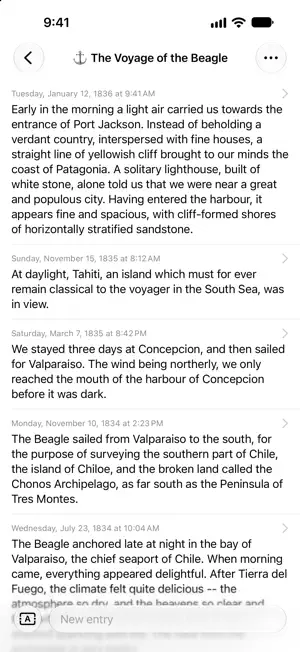
Write one line. LogBooklet remembers when and where. LogBooklet is a journal for iPhone and iPad. Type a thought, tap send, and the entry keeps the date, the time and the place on its own. No fields, no forms. ONE BOOKLET PER THING YOU KEEP TRACK OF A diary. The meals worth remembering. The plants. Quotes you want to keep. Make as many booklets as you like. The list shows how each one's latest entry begins, when you wrote it, and how many entries it holds. THE BEST PART COMES YEARS LATER Switch on time between entries for a booklet, and every entry shows the gap since the one before it. 9 days since you watered the fig. 6 weeks since you called your brother. 4 months since the last headache like this one. WHAT'S INSIDE • Unlimited booklets • Date and time on every entry, plus your coordinates when location access is on • Snippets for the lines you write again and again: log one with a tap, or drop it into what you're typing • Search everything in a booklet • Edit anything: the text, the timestamp, or drag the pin on the map • Text you haven't sent yet stays in its booklet and follows you to your other devices • Export a booklet as a plain-text Markdown file • Sync between iPhone and iPad through iCloud NOTHING TO SIGN UP FOR No account and no LogBooklet server. Sync runs through your own private iCloud database. No ads, no analytics, no in-app purchases.
What’s new
Version 1.8 · Updated September 22, 2026
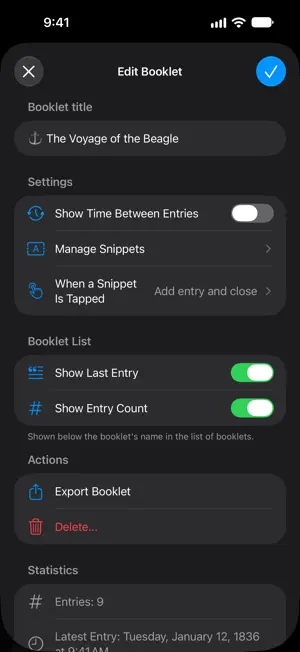
- A new input bar sits at the bottom of every booklet: one text field that grows as you write, a send button, and a snippets button beside it. - Snippets open in a sheet. A new booklet setting decides what tapping one does: add the entry and close the sheet, add it and keep the sheet open, or insert its text where you are writing. - Whatever you type but haven't sent yet stays in each booklet, even after you close the app, and syncs to your other devices so you can finish it there. - Drag the entries or the text field down to put the keyboard away. - The booklet list shows more of each booklet: the start of its latest entry, when that entry was written and how long ago, and how many entries the booklet holds. Each booklet's options can switch off the preview, the count, or both. A booklet whose name starts with an emoji shows it as a large icon beside the name. - Opening an entry shows how long ago it was, below its date and time. - With "Show Time Between Entries" switched on, the time between two entries now sits on the line that separates them, and the top of the booklet shows when the last entry was, as plain text instead of badges. - Closing an editor with unsaved changes, with the X or by swiping it down, now asks before throwing the changes away. Editors close with the X and save with the checkmark. - The "Input Order" setting is gone, since there is only one input now.
App privacy
The developer, Leon Eck, reported these privacy practices to Apple.
Data Not Collected
The developer does not collect any data from this app.
Alternatives to LogBooklet
Looking for apps like LogBooklet? Here are 6 similar apps on the App Store. The highest rated is Auer Tasks (5.0/5), and all 6 are free to download.
-
 HiMemo
-
 Auer Jot
4.3
Auer Jot
4.3
-
 Auer Tasks
5.0
Auer Tasks
5.0
-
 Pathway - Goal Tracker
-
 UltiCount: All-in-One Tracker
5.0
UltiCount: All-in-One Tracker
5.0
-
 WorkTimeSheet!
| App | Rating | Price | Last updated | Compare |
|---|---|---|---|---|
| LogBooklet | 5.0 / 5 (1 rating) | Free | September 22, 2026 | |
| HiMemo | – | Free | Oct 1, 2023 | Compare |
| Auer Jot | 4.3 / 5 (6) | Free | Jul 6, 2026 | Compare |
| Auer Tasks | 5.0 / 5 (2) | Free | Jul 12, 2025 | Compare |
| Pathway - Goal Tracker | – | Free | Jun 25, 2026 | Compare |
| UltiCount: All-in-One Tracker | 5.0 / 5 (1) | Free | Aug 1, 2026 | Compare |
| WorkTimeSheet! | – | Free | Dec 1, 2025 | Compare |
Compare LogBooklet with the top alternatives: ratings, updates, ASO score and keyword gaps →