

Text Reader - Text to Speech
Torapp Productivity iPhoneiPadiPod touch
Text Reader - Text to Speech is a free Productivity app for iPhone and iPad by Torapp. Rated 4.3/5 from 116 ratings. Requires iOS 16.6.
- Rating
- 4.3
- 116 ratings
- Price
- Free
- on the App Store
- Size
- 99 MB
- Age 4+
- Updated
- Oct 30
- 2026 · v1.4.44
Screenshots


About Text Reader - Text to Speech
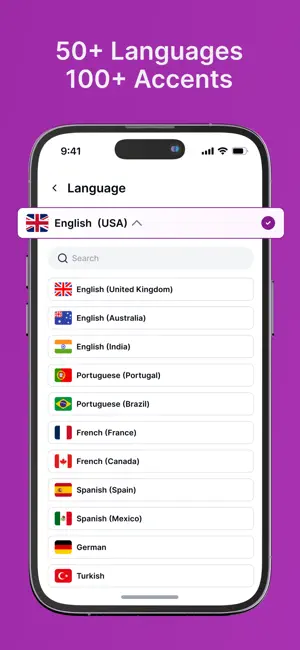
What is SPEAKTOR? SPEAKTOR is a text to speech converter that takes any text file, turns it into a speech, and reads it to you. This AI-powered text to speech app converts any written word into a speech. Speech has become more convenient to consume and share thoughts and ideas. The digital world sees more of this conversion through text to speech converters. The emergence of text to speak converters has made it easier for all kinds from researchers to travelers tirelessly waiting at the airport. There are multiple benefits of the text to speak communication. TTS can be excellent for businesses that operate at a fast pace. Why do People Love SPEAKTOR? See the speech synthesizer read aloud for you Convert English text to speech to be more productive Automatically convert text to voice within minutes with the natural reader Work faster in school and work with the text to speak converter SPEAKTORS text reader can help you read any article Listen to lessons and books with text to voice converter Scan a book and watch SPEAKTOR read out loud Has a built-in screen reader It takes SPEAKTOR only minutes to scan and read text I want an app to read to me! Do you want to listen to a book on the go but don't have time or simply don’t like reading? Have you ever thought, “I wish someone would read to me”? Then SPEAKTOR is for you. With SPEAKTOR you can enjoy stories and articles by listening to them. It reads aloud any text, content, document, or book given to it making it possible for anyone who cannot read or may not be able to read well. With speech synthesizer technology you will never be bored with your audiobook again. How do TTS apps read to me? This text reader picks up not only the rhythm and speed but also the tone in which someone would pronounce words. SPEAKTOR sounds unlike any other text reader on the market right now. With innovative advancements in speech synthesis technology, you can speechify texts to audio that you can listen to anywhere. Just use this new text reader service. You don’t need anything special to access SPEAKTOR. Just upload a text or book that will be read aloud wherever and whenever you want. Speaktor is a natural reader. It’s the best screen reader on the market. Some people prefer to have their phones read out loud; this kind of text reader technology is often called “text to voice.” It allows those who can’t type on a screen to hear the words before them and make any necessary changes. This content consumption mode has been considered for people who don't want to use their eyes to a large extent. SPEAKTOR provides English text to speak and a reading speed control. SPEAKTOR can be your companion, helping you speechify websites much faster when you're in a hurry. A TTS program that has a screen reader feature Make SPEAKTOR speechify your texts - it turns text into speech in English and more than 40 languages. With SPEAKTOR you can hear content in any subject area or format and listen to it as if you read out loud. This tts tool can be used as a screen reader for online text content that is often difficult to scan and read. TTS (Text to speech) overcomes the problems of screen fatigue. Brightness, font size, or color may not suit some users. When you take a book picture, SPEAKTOR’s speech synthesizer scans and reads aloud for you in only a few minutes. SPEAKTOR has also introduced tts for businesses and organizations so that they can make information more accessible for everyone. Convert text to voice Terms of Use: https://www.apple.com/legal/internet-services/itunes/dev/stdeula/
Ratings & reviews
4.3
116 ratings
What’s new
Version 1.4.44 · Updated October 30, 2026
You can now edit your text directly in the reader. Audio exports can be longer and use your chosen playback speed. This update also brings a smoother onboarding and bug fixes. We're always improving the app to give you a better experience.
App privacy
The developer, Torapp, reported these privacy practices to Apple.
Data Used to Track You
The following data may be used to track you across apps and websites owned by other companies:
- Contact Info: Email Address
Data Linked to You
The following data, which may be collected and linked to your identity, may be used for the following purposes:
- Contact Info: Email Address
Used for: Analytics, App Functionality
Data Not Linked to You
The following data, which may be collected but is not linked to your identity, may be used for the following purposes:
- Identifiers: User ID
Used for: Developer’s Advertising or Marketing, Analytics, App Functionality
Alternatives to Text Reader - Text to Speech
Looking for apps like Text Reader - Text to Speech? Here are 6 similar apps on the App Store. The highest rated is Narrly: Read Aloud PDF & Text (4.8/5), and all 6 are free to download.
-
 Aloud!, text to speech reader
4.3
Aloud!, text to speech reader
4.3
-
 TTSpeech: Text to Speech Audio
3.7
TTSpeech: Text to Speech Audio
3.7
-
 Text to Speech App - ListenMe
4.2
Text to Speech App - ListenMe
4.2
-
 Audify read aloud web browser
4.7
Audify read aloud web browser
4.7
-
 Lextra: PDF Text to Speech
4.1
Lextra: PDF Text to Speech
4.1
-
 Narrly: Read Aloud PDF & Text
4.8
Narrly: Read Aloud PDF & Text
4.8
| App | Rating | Price | Last updated | Compare |
|---|---|---|---|---|
| Text Reader - Text to Speech | 4.3 / 5 (116 ratings) | Free | October 30, 2026 | |
| Aloud!, text to speech reader | 4.3 / 5 (243) | Free | Jun 24, 2025 | Compare |
| TTSpeech: Text to Speech Audio | 3.7 / 5 (10) | Free | Aug 10, 2026 | Compare |
| Text to Speech App - ListenMe | 4.2 / 5 (1,148) | Free | Oct 26, 2026 | Compare |
| Audify read aloud web browser | 4.7 / 5 (110) | Free | Aug 15, 2026 | Compare |
| Lextra: PDF Text to Speech | 4.1 / 5 (971) | Free | Oct 22, 2026 | Compare |
| Narrly: Read Aloud PDF & Text | 4.8 / 5 (224) | Free | Dec 6, 2025 | Compare |