

La Terminal: Mosh & SSH Client
Xibbon, Inc Developer Tools iPhoneiPadiPod touch
La Terminal: Mosh & SSH Client is a free Developer Tools app for iPhone and iPad by Xibbon, Inc. Rated 4.7/5 from 104 ratings. Requires iOS 18.6.
- Rating
- 4.7
- 104 ratings
- Price
- Free
- on the App Store
- Size
- 85 MB
- Age 4+
- Updated
- Oct 20
- 2026 · v2.0.10
Screenshots


About La Terminal: Mosh & SSH Client
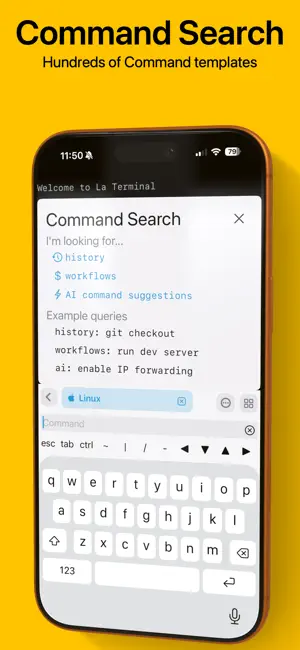
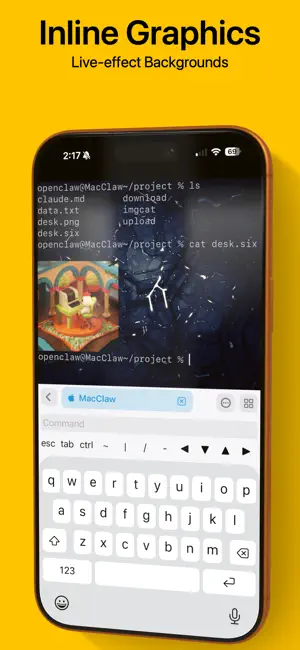
Welcome to La Terminal, your mobile command center for AI coding agents. Connect to OpenAI Codex, Claude Code, GitHub Copilot CLI, or OpenClaw from anywhere, with full SSH and Mosh support for resilient, always-on sessions. More than just a simple command-line shell, La Terminal provides a fully-native, first-class touch experience for command-line hackers on iPhone and iPad. Built on Open Source: From the original developer of Midnight Commander, the open source visual file manager for Linux, La Terminal provides a comprehensive Xterm/DEC VT terminal emulator experience based on the popular open source SwiftTerm library with powerful client amenities for serious command-line aficionados. Command Search: Use Command Search to quickly find the command you are looking for. Search your own command history and our comprehensive workflow gallery to find and execute commands. Create and edit your own workflows for a variety of tasks, including running frequently used commands, automating a series of commands, or just tracking down a complex command that might be difficult to recall. AI-powered assistant: Get help writing Linux, Mac, or Windows terminal commands using plain English, such as “extract the name property inside the article element from a json file” or “list the most CPU consuming Kubernetes pods”. Eye candy: La Terminal sports a fully themeable experience accented with beautifully captivating live-effect backgrounds powered by Metal Performance Shaders. Secure Enclave: Your private keys are stored in the secure enclave so your private key can never be found in plain text. Powerful status visualizations: La Terminal’s resource monitoring tools put powerful CPU and memory use visualizations, as well as a native process explorer, right at your fingertips. Resource monitoring visualizations are accessible from the top of any connected terminal, and process explorer tools provide multiple views into CPU, memory, and disk utilization. Thumbnail snapshots show previews of connected hosts along with system load over time in the active Terminals view. Network monitoring plots data traffic on a world map to help you understand the sources and targets of connections to and from your connected hosts. iCloud for everyone: La Terminal makes it easy to switch between your iPhone, iPad, and Mac by syncing your settings and keys over iCloud - like magic! Host platform aware: Whether you’re managing a dozen Linux VMs on AWS or Azure, logging into zsh on your Mac desktop, or configuring your latest IoT Raspberry Pi project via bash, La Terminal provides the most productive experience possible on a mobile device. La Terminal is even Windows-aware to ensure PowerShell power users can enjoy a delightful ssh experience, too. International support: La Terminal delivers extensive support for international terminals, including rendering internationalized output as well as support for internationalized input methods from native iOS dictation and international keyboards. La Terminal Pro features - Complete SFTP File Manager - Upload, download and navigate remote filesystems with our native SFTP client. - Files can be uploaded or downloaded to the local device via the iOS Files app, or copied between remote hosts. - Files app support - Access files on any configured La Terminal host using Apple’s Files app and other File Provider-enabled apps. - SSH Agent Forwarding - Use locally configured keys to authorize connections when SSHing between remote hosts. - All Live Backgrounds - Choose from our full library of GPU-accelerated Live Backgrounds to customize your terminal experience. Terms of Service: https://la-terminal.net/la-terminal/terms-of-service Privacy Policy: https://la-terminal.net/privacy-policy
Ratings & reviews
4.7
104 ratings
What’s new
Version 2.0.10 · Updated October 20, 2026
Now with support for iPhone Duo! Open, closed, or somewhere in between, La Terminal bends over backwards to deliver a seamless terminal experience. This update also fixes a regression that prevented scrolling back through terminal history.
App privacy
The developer, Xibbon, Inc, reported these privacy practices to Apple.
Data Linked to You
The following data, which may be collected and linked to your identity, may be used for the following purposes:
- Usage Data: Product Interaction
- Diagnostics: Crash Data, Performance Data, Other Diagnostic Data
Used for: Analytics
Alternatives to La Terminal: Mosh & SSH Client
Looking for apps like La Terminal: Mosh & SSH Client? Here are 6 similar apps on the App Store. The highest rated is NeoServer SSH Mosh Terminal (4.8/5), and all 6 are free to download.
-
 Secure Terminal
4.5
Secure Terminal
4.5
-
 Prompt 3
4.3
Prompt 3
4.3
-
 NeoServer SSH Mosh Terminal
4.8
NeoServer SSH Mosh Terminal
4.8
-
 WorldWideWeb – Mobile
4.5
WorldWideWeb – Mobile
4.5
-
 SSH Client - Secure ShellFish
4.8
SSH Client - Secure ShellFish
4.8
-
 Docker Server Admin
4.7
Docker Server Admin
4.7
| App | Rating | Price | Last updated | Compare |
|---|---|---|---|---|
| La Terminal: Mosh & SSH Client | 4.7 / 5 (104 ratings) | Free | October 20, 2026 | |
| Secure Terminal | 4.5 / 5 (63) | Free | Oct 21, 2026 | Compare |
| Prompt 3 | 4.3 / 5 (376) | Free | Oct 7, 2026 | Compare |
| NeoServer SSH Mosh Terminal | 4.8 / 5 (297) | Free | Oct 7, 2026 | Compare |
| WorldWideWeb – Mobile | 4.6 / 5 (40) | Free | Sep 15, 2025 | Compare |
| SSH Client - Secure ShellFish | 4.8 / 5 (1,563) | Free | Oct 10, 2026 | Compare |
| Docker Server Admin | 4.7 / 5 (145) | Free | Apr 20, 2026 | Compare |