

Brain Order: Tasks & Notes
Anatolii Levitskyi Productivity iPhoneiPadiPod touch
Brain Order: Tasks & Notes is a free Productivity app for iPhone and iPad by Anatolii Levitskyi. Requires iOS 16.4. Updated October 24, 2026.
- Price
- Free
- on the App Store
- Size
- 60 MB
- Age 4+
- Updated
- Oct 24
- 2026 · v3.3.2
Screenshots


About Brain Order: Tasks & Notes
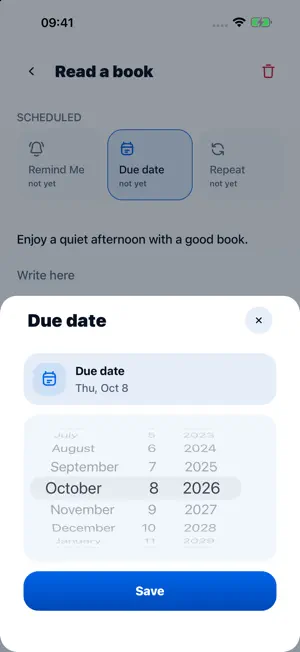
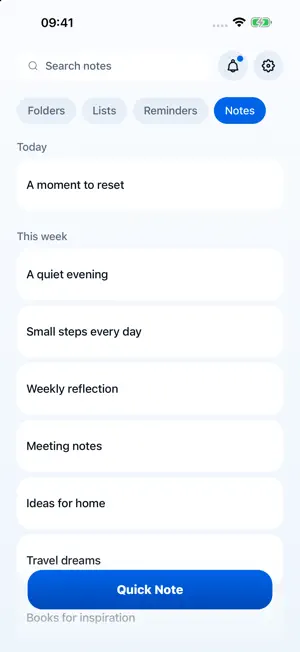
Brain Order helps you turn scattered thoughts into clear notes, tasks, reminders and shared lists. Create folders, lists and notes Use folders for areas of life, lists for action items and notes for details you want to keep. Capture ideas quickly and organize them when you have time. Plan tasks and reminders Add due dates and repeating reminders. Review dated tasks in the Reminders tab without opening every list. Mark tasks as complete and organize them by date or importance. Share lists Invite others to collaborate on shared lists for groceries, trips, home tasks and family routines. Work online or offline Keep working when your connection is unstable. Your changes sync when a connection is available, subject to account access and conflict handling. Make it comfortable Choose light mode, dark mode or your system theme. Contact support from Settings to report a problem or suggest an improvement. Free and BrainOrder Pro Free includes up to 3 active recurring reminders you own and 1 shared list you own. BrainOrder Pro adds unlimited active recurring reminders you own, up to 20 shared lists you own, and creating and linking contacts to personal, non-recurring tasks. Existing organizer data remains available when Pro ends, subject to access and retention rules. Pro is an optional monthly or annual subscription. The store shows your localized price, billing period, renewal terms and any eligible 14-day free trial before confirmation. Subscriptions renew automatically unless cancelled; the annual plan is billed once per year. Manage or cancel your subscription in the store where you subscribed. Deleting your BrainOrder account does not cancel store billing. Purchase or restore may move verified Pro access to your current BrainOrder account and end that purchase’s Pro access on the previous account. Tasks, notes, contacts and list permissions stay with their respective accounts. Restoring a purchase does not restore a deleted account. This release does not include an embedded AI assistant or sell AI tokens. Privacy: https://brainorder.pp.ua/privacy Terms of Use: https://brainorder.pp.ua/terms Support: [email protected]
What’s new
Version 3.3.2 · Updated October 24, 2026
BrainOrder Pro offers monthly and annual plans, purchase restoration and subscription management. This update improves synchronization and opening tasks from reminder notifications, corrects task completion and importance handling, and adds account deletion with clearer information about shared content and retained purchase records.
App privacy
The developer, Anatolii Levitskyi, reported these privacy practices to Apple.
Data Linked to You
The following data, which may be collected and linked to your identity, may be used for the following purposes:
- Purchases: Purchase History
- Location: Coarse Location
- Contact Info: Email Address, Name, Phone Number
- Identifiers: User ID, Device ID
- Usage Data: Product Interaction
- Diagnostics: Crash Data, Performance Data, Other Diagnostic Data
- Contacts: Contacts
- User Content: Photos or Videos, Customer Support, Other User Content
- Other Data: Other Data Types
Used for: Analytics, App Functionality
Alternatives to Brain Order: Tasks & Notes
Looking for apps like Brain Order: Tasks & Notes? Here are 6 similar apps on the App Store. The highest rated is All.Done (5.0/5), and all 6 are free to download.
-
 All.Done
5.0
-
 Tooday
4.0
-
 Pocket Plans - Simple To Dos
5.0
-
 Task Management Board
-
 Bryxe
5.0
-
 Sisyphus Tasks
5.0
| App | Rating | Price | Last updated | Compare |
|---|---|---|---|---|
| Brain Order: Tasks & Notes | – | Free | October 24, 2026 | |
| All.Done | 5.0 / 5 (3) | Free | Dec 21, 2023 | Compare |
| Tooday | 4.0 / 5 (1) | Free | Feb 17, 2025 | Compare |
| Pocket Plans - Simple To Dos | 5.0 / 5 (4) | Free | Mar 21, 2025 | Compare |
| Task Management Board | – | Free | Jun 16, 2024 | Compare |
| Bryxe | 5.0 / 5 (1) | Free | Aug 7, 2025 | Compare |
| Sisyphus Tasks | 5.0 / 5 (6) | Free | Sep 19, 2026 | Compare |