

Scrollly: Auto Scroll Reader
Sobhi Arood Productivity iPhoneiPadiPod touch
Scrollly: Auto Scroll Reader is a free Productivity app for iPhone and iPad by Sobhi Arood. Rated 3.3/5 from 3 ratings. Requires iOS 17.0.
- Rating
- 3.3
- 3 ratings
- Price
- Free
- on the App Store
- Size
- 17 MB
- Age 4+
- Updated
- Oct 19
- 2026 · v2.1.0
Screenshots
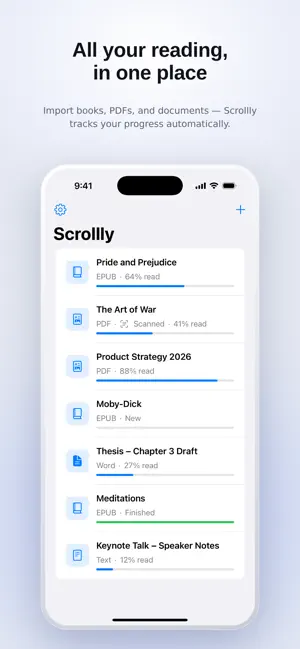


About Scrollly: Auto Scroll Reader
Transform the way you read. Scrollly lets you read without constantly swiping the screen. Import PDF files, extract text from images with AI, or paste any text, then enjoy a smooth, hands-free reading experience with automatic scrolling. Perfect for reading articles, books, study notes, scripts, speeches, documents, and any text you want to read comfortably. Features: • AI-powered text extraction from images (OCR) • Import PDF documents • Paste or type any text • Smooth automatic scrolling • Adjustable scrolling speed • Multiple font sizes • Dark Mode for comfortable night reading • Save your favorite texts to read later • Clean, distraction-free reading interface • Fast and lightweight Upgrade to Scrollly Premium to unlock the complete reading experience with premium features, AI tools, and future updates. Terms of Use (EULA): https://www.apple.com/legal/internet-services/itunes/dev/stdeula/ Privacy Policy: https://sobhi-portfolio.netlify.app/scrollly_pp
What’s new
Version 2.1.0 · Updated October 19, 2026
Save anything to Scrollly Share web articles, PDFs and documents straight from Safari, Files, Mail and other apps — just tap Share and choose Scrollly. You can also paste any link with “Add Web Article”, and Scrollly keeps only the article: no ads, menus or clutter. Find your way around • Contents: jump to any chapter in a tap • Search: find any word or phrase in your document • Bookmarks: save your favourite places and come back to them anytime Build a reading habit • Reading streaks: read a little every day and watch your streak grow • Reading stats: see your time read today, this week, and your last 7 days at a glance Widgets Add Scrollly to your Home Screen or Lock Screen to pick up where you left off and keep an eye on your streak. Also in this update • Smoother reading position when jumping around a document • Performance improvements and bug fixes
App privacy
The developer, Sobhi Arood, reported these privacy practices to Apple.
Data Not Collected
The developer does not collect any data from this app.