

HD-Mix
Empower Tribe Innovations DE GmbH Music iPad
HD-Mix is a free Music app for iPad by Empower Tribe Innovations DE GmbH. Rated 2.2/5 from 6 ratings. Requires iOS 16.0. Updated October 13, 2026.
- Rating
- 2.2
- 6 ratings
- Price
- Free
- on the App Store
- Size
- 36 MB
- Age 4+
- Updated
- Oct 13
- 2026 · v1.2.1
Screenshots
About HD-Mix
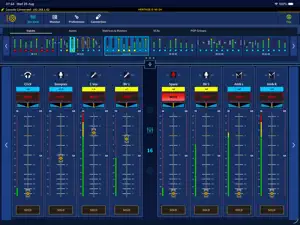
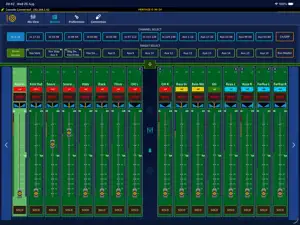
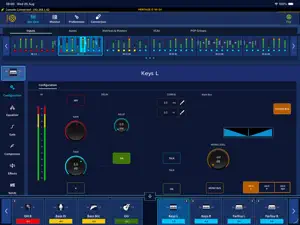
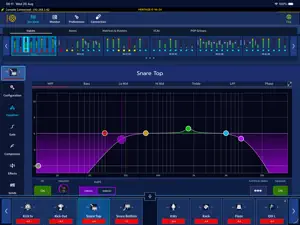
HD-Mix provides the user with remote control of the Heritage Digital series of mixing consoles, offering the same functionality and workflow found on the console from your tablet. Connection Screen Upon boot, HD-Mix will automatically scan for consoles that are on the same network as your tablet, or you can manually enter the console's IP from the connection screen. Mix View Mix View provides the user with a clear and easy to navigate overview of the console meter bridge and faders, with access to all Inputs, Auxes, Matrices, VCA's and POP Groups. HD-Mix utilises the same Common Control Rotary used in the Heritage series consoles, allowing the user to move and lock any parameter on screen for ease of access. Choose between standard and expanded 8/16 channel fader layouts to view more channels at once. Monitor Mode HD-Mix supports Monitor Mode, allowing the user to select a target output channel and send multiple sources to it directly via the channel faders. While active, the channel faders become dedicated send level controls for the selected monitor target, offering fast, tactile control over monitor mixes. The fader tray can be pulled down to reveal the selected channel widgets, with access to and full control of the following: - Configuration Provides the user with an overview and control of: • 48V • Mic Gain control • Trim control • Phase • Delay • Talk • Solo / Bus configuration options (Solo A, Solo B, Solo A&B) - EQ Full parameter control of channel EQ with Band Locks, Flatten One / All band functionality and Full Screen mode. - Gate Full access and control of channel gates / duckers, with expandable Key Filter section. - Compressor Channel compressors with full control of all parameters and modes including key sidechain source control. - Effects The Effects widget shows effects populated in the selected channel, with support for full screen effect editing. - Sends and Matrices The Sends and Matrices widget provides the user with a complete overview of contributions and parameter controls (for the selected channel) to all console Aux and Matrix busses. - Flip Mode HD-Mix can be placed into Flip Mode, allowing the user to select and send contribution levels from an easy to access interface. When Flip is activated the meter bridge can be replaced with a Flip Target Select window, which allows the user to select a Flip target and then set appropriate contribution levels. - Full Screen Effect Support HD-Mix provides full screen parameter control for supported effects, including the Midas XL4 EQ, GEQ and Ocean EQ, with additional effects being added in future updates. - Preferences Page Solo System preferences are available to the user, along with Channel Flip Lock functionality and Reset Channel EQ Lock functionality. ---------------------- Please Note: We recommend using a wired connection from the console to the Access Point in critical applications (use of a wired connection from the Access Point to the tablet will further ensure a consistent connection).
Ratings & reviews
2.2
6 ratings
What’s new
Version 1.2.1 · Updated October 13, 2026
- HD-Neon support added - Console Discovery Improvements - Bugs and Improvements
App privacy
The developer, Empower Tribe Innovations DE GmbH, reported these privacy practices to Apple.
Data Not Linked to You
The following data, which may be collected but is not linked to your identity, may be used for the following purposes:
- Location: Precise Location
- Diagnostics: Crash Data, Performance Data, Other Diagnostic Data
Used for: Analytics
Alternatives to HD-Mix
Looking for apps like HD-Mix? Here are 6 similar apps on the App Store. The highest rated is dLive MixPad (3.4/5), and all 6 are free to download.


| App | Rating | Price | Last updated | Compare |
|---|---|---|---|---|
| HD-Mix | 2.2 / 5 (6 ratings) | Free | October 13, 2026 | |
| DiGiCo Quantum V2 | – | Free | Feb 14, 2024 | Compare |
| dLive MixPad | 3.4 / 5 (11) | Free | Jul 15, 2025 | Compare |
| SSL Live TaCo | 3.0 / 5 (6) | Free | Apr 24, 2026 | Compare |
| Avantis MixPad | 3.4 / 5 (13) | Free | Apr 13, 2026 | Compare |
| SQ+ MixPad | – | Free | Jul 7, 2026 | Compare |
| dLive OneMix | 2.6 / 5 (7) | Free | Jul 15, 2025 | Compare |
Compare HD-Mix with the top alternatives: ratings, updates, ASO score and keyword gaps →