

Cloud Punch Clock-Time Record
永文 胡 Business iPhoneiPadiPod touch
Cloud Punch Clock-Time Record is a free Business app for iPhone and iPad by 永文 胡. Requires iOS 15.6. Updated August 28, 2026.
- Price
- Free
- on the App Store
- Size
- 3 MB
- Age 4+
- Updated
- Aug 28
- 2026 · v4.9
Screenshots


About Cloud Punch Clock-Time Record
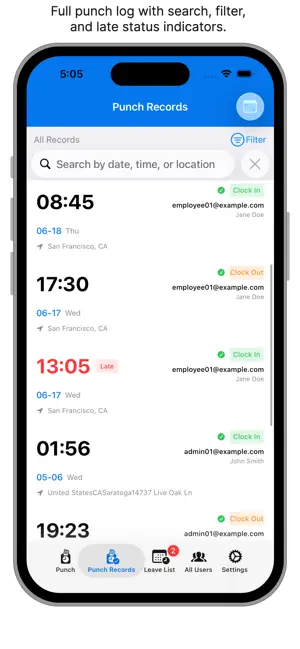
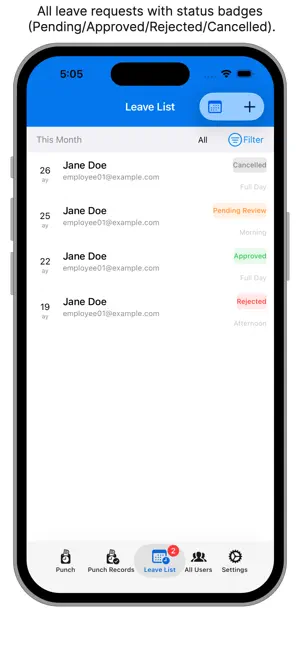
Enterprise Cloud Mobile Punch APP is a cloud-based attendance system designed specifically for business teams. Your phone is your time clock. It supports GPS location-based punch, multi-device data synchronization, and attendance statistics reports, providing a simple and easy-to-use attendance solution for small businesses, companies, and teams. It records all employees' clock-in/clock-out times and attendance status. Simple operation, easy management. Attendance, leave requests, statistics, and attendance status at a glance. Companies save time and effort, employees enjoy convenience — a win-win for everyone! Employees can clock in and out directly from their phones. The system automatically records punch time, geographic location, and punch type. GPS location ensures the authenticity of punch locations — no one can modify or cheat. Administrators can view the punch records of all team members for easy attendance verification. Employees can submit leave requests through the App, selecting leave date, period (Morning/Afternoon/Full Day), and leave type (Annual Leave/Sick Leave/Personal Leave/Other). Administrators or authorized Sub-Admins with approval permissions can review and approve or reject leave requests instantly. Approved leave requests automatically override punch status, eliminating manual handling. Administrators or Sub-Admins with edit permissions can manually correct employee punch status. When an employee has an abnormal punch due to special circumstances (such as traffic delays, device malfunctions, etc.), administrators can correct late arrivals, early departures, or invalid punches to normal status, ensuring attendance record accuracy. Every correction records the corrector, correction time, and correction reason, ensuring traceability. Administrators can authorize employees as Sub-Admins to share management responsibilities. Sub-Admins have three permission types: View Only (VIEW), Editable (EDIT), and Full Access (FULL). The maximum number of Sub-Admins is calculated based on the 1/10 ratio of VIP purchased users, making team management more flexible. All punch data and leave records are synchronized to the cloud server in real time. Managers can view all employees' attendance data at a glance. One account can synchronize instantly across multiple devices, no manual backup required. Data is never lost even when changing phones. One account grants access to cloud data, with support for simultaneous login on multiple devices. The system features built-in statistics that automatically calculate total punch days, valid punch counts, late counts, and punctuality rate, as well as total working hours for each employee. Administrators can view overall team attendance statistics, while employees can view their personal statistics. Administrators can customize "Standard Start Time," "Grace Period," and "Late Threshold Minutes." Export punch records in CSV or JSON format. Administrators can also export a summary of all employees' attendance data with one click (including employee name, total punch days, late count, leave days, etc.). VIP members can generate PDF reports from punch records. Before getting started, you need to register an administrator account, then log in with the administrator account, and add sub-users or employees. Administrators can add multiple sub-users. Sub-users cannot register themselves — they can only be added by the administrator. Administrators can set employee names, passwords, employee IDs, and other information.
What’s new
Version 4.9 · Updated August 28, 2026
New Features Added: - Employee Self-Service Password Change - Employees can now change their own login password, requiring verification of the current password. - Admin Password Reset - Administrators can directly reset an employee's password from the user detail page. - Multi-level Delete Confirmation - Deleting an employee requires two confirmation steps to prevent accidental deletion. - Associated data (attendance records, leave requests, etc.) is displayed before deletion.
App privacy
The developer, 永文 胡, reported these privacy practices to Apple.
Data Linked to You
The following data, which may be collected and linked to your identity, may be used for the following purposes:
- Identifiers: User ID
Used for: App Functionality
Data Not Linked to You
The following data, which may be collected but is not linked to your identity, may be used for the following purposes:
- Location: Coarse Location
- Contact Info: Email Address
Used for: App Functionality
Alternatives to Cloud Punch Clock-Time Record
Looking for apps like Cloud Punch Clock-Time Record? Here are 6 similar apps on the App Store. The highest rated is DakaClock (2.0/5), and all 6 are free to download.


| App | Rating | Price | Last updated | Compare |
|---|---|---|---|---|
| Cloud Punch Clock-Time Record | – | Free | August 28, 2026 | |
| 打卡-yes企業芸出勤系統 | – | Free | Mar 9, 2026 | Compare |
| TimeRecorder S (phone) | – | Free | Oct 5, 2026 | Compare |
| 行動差勤簽到系統 | – | Free | Jun 7, 2024 | Compare |
| Easy Attendance Clock | – | Free | Sep 25, 2026 | Compare |
| DakaClock | 2.0 / 5 (1) | Free | Oct 13, 2026 | Compare |
| Netask Cloud 雲打卡 | – | Free | May 13, 2026 | Compare |